Chapter 6: Acknowledgment, Status Report & Remote Access
87
&KDSWHU$FNQRZOHGJPHQW6WDWXV5HSRUW
5HPRWH$FFHVV
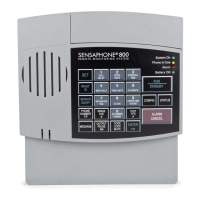
In addition to communication and alarm monitoring capabilities,
the Model 800 will also respond to your instructions and provide
you with access to information on monitored conditions at all times.
By issuing commands to the unit, either at the installation site
or over standard telephone lines, the following features may be
activated:
s!CKNOWLEDGMENTOFEXISTINGALARMS
s 4HE3TATUS2EPORTONALLMONITOREDCONDITIONS
s ,IMITEDPROGRAMMING
$ODUP$FNQRZOHGJPHQW
When the Model 800 dials out with an alarm message, it will
request acknowledgment before hanging up. Acknowledgment
indicates to the unit that the alarm message has been received.
5PONACKNOWLEDGMENTTHE-ODELWILLCANCELTHEDIALOUT
sequence.
4HEREARETHREEWAYSTHATANALARMISACKNOWLEDGEDDIRECTLY
s ,OCAL!CKNOWLEDGMENT
s 4OUCH4ONE!CKNOWLEDGMENT
s #ALLBACK!CKNOWLEDGMENT
!FOURTHMETHODOFALARMACKNOWLEDGMENTISINDIRECT2EFERTO
-AX#ALLS#HAPTER3ECTIONFORANEXAMPLEOFAUTOMATIC
alarm acknowledgment.
/RFDO$FNQRZOHGJPHQW
4OACKNOWLEDGEANALARMLOCALLYDIRECTLYATTHEINSTALLATIONSITE
OFTHE-ODELPRESSTHE!,!2-#!.#%,+EY
7RXFK7RQHj$FNQRZOHGJPHQW
4HISMETHODOFREMOTEALARMACKNOWLEDGMENTWORKSWITHA
4OUCH4ONE
telephone.
%XAMPLE: You receive a call from the Model 800, reporting
THATANALARMEXISTS4HEMESSAGECONCLUDES “Enter
Acknowledgement code.”.OWORATANYTIMEDURINGTHISCALL


 To Next Page