Chapter 5: Alarm Programming
69
&KDSWHU$ODUP3URJUDPPLQJ
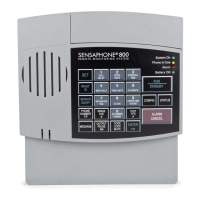
4HISCHAPTEREXPLAINSTHEALARMPROGRAMMINGANDMONITORING
capabilities of the Model 800, with specific instructions for the
following features:
s#ONFIGUREZONESASDRYCONTACTORTEMPERATURE
s %NABLEDISABLEZONES
s 0ROGRAMALARM2ECOGNITION4IMEFOREACHZONE
s 0ROGRAMHIGHANDLOWTEMPERATURELIMITS
s $ISABLEALARMRESPONSETOHIGHORLOWTEMPERATURE
s
0ROGRAMTEMPERATUREIN&AHRENHEITOR#ELSIUSSCALE
s
Calibrate temperature
s /BTAINCURRENTTEMPERATURE
s 0ROGRAM!#POWERFAILURE2ECOGNITION4IME
s %NABLEDISABLE!#POWERMONITORING
s 0ROGRAMSOUNDLEVELSENSITIVITY
s 0ROGRAMHIGHSOUND2ECOGNITION4IME
s $ISABLEALARMRESPONSETOHIGHSOUND
s 5SE%XIT$ELAYVIA3TATUS2EPORT
=RQH&RQILJXUDWLRQ
In preparing the Model 800 to sense an alert condition, the zones
MUSTBECONFIGUREDASDRYCONTACTEITHEROPENORCLOSEDORAS
TEMPERATUREZONES4HEDEFAULTSETTINGFORZONEISTEMPERATURE
FORZONESTHEDEFAULTISDRYCONTACTANDOPEN4OCONFIGURE
zone normality, sensors are first wired to the terminal strip at the
BACKOFTHEUNIT2EFERTO#HAPTER3ECTIONnFORAN
EXPLANATIONONWIRINGZONES
4HECONFIGURATIONPROCESSDIRECTSTHE-ODELTOINITIALIZETHE
8 zones and establish normal settings. Any change in the status of
AZONEFOREXAMPLEFROMANORMALLYOPENCONTACTTOASUDDENLY
CLOSEDCONTACTISRECOGNIZEDASANalert condition. In the case
of a temperature zone, an alert condition is recognized when
ESTABLISHEDTEMPERATURELIMITSAREEXCEEDED
NOTE
Before starting keyboard commands to configure
zone normality on the Model 800, it is very impor-
tant to check that the sensors you have wired to the
unit are set in their normal, non-alarm positions.


 To Next Page