Chapter 3: Quick Start
33
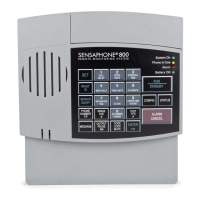
When these steps are completed, the Model 800 is fully
operational and able to monitor temperature, high sound, AC
power failure and battery backup condition; it can also be called
ONTHETELEPHONEFORA3TATUS2EPORTORBEUSEDFORLISTENINGTOON
SITESOUNDSFROMANYREMOTELOCATION.OWTHEUNITISREADYFOR
programming.
4XLFN6WDUW3URJUDPPLQJ6WHSV
6WHS6HW&RQILJXUDWLRQRI=RQHV
4HE-ODELWILLSCANTHEEXTERNALZONESANDDETERMINE
IFTHEYARE./NORMALLYOPEN.#NORMALLYCLOSEDOR
4EMPERATURE)FEXTERNALSENSORSAREADDEDMAKESURETHEYARE
in their normal positions before proceeding—refer to Chapter 5,
Section 5.1.
0RESS34!.$"9TOPLACETHE-ODELIN3TANDBY
mode.
RUN
STANDBY
)FYOUHAVEEXTERNALSENSORSAVAILABLEWIRETHESENSORSTOTHE
ZONESONTHEBACKOFTHE-ODELSEE#HAPTER
3ECTION/THERWISESKIPTHISSTEPANDMOVETOSTEP
0RESS25.4HESystem On light glows when the Model 800
RETURNSTO2UNMODE
RUN
STANDBY
0RESS3%4
SET
0RESS#/.&)'52%
CONFIG
4HE-ODELWILLAUDIBLYRECITETHENEWCONFIGURATIONFOR
each of the eight zones, responding with “normally open”,
“normally closed”, or “Temperature.” If a zone is unused, it
is treated as normally open.


 To Next Page