Sensaphone
®
Model 800 User’s Manual
108
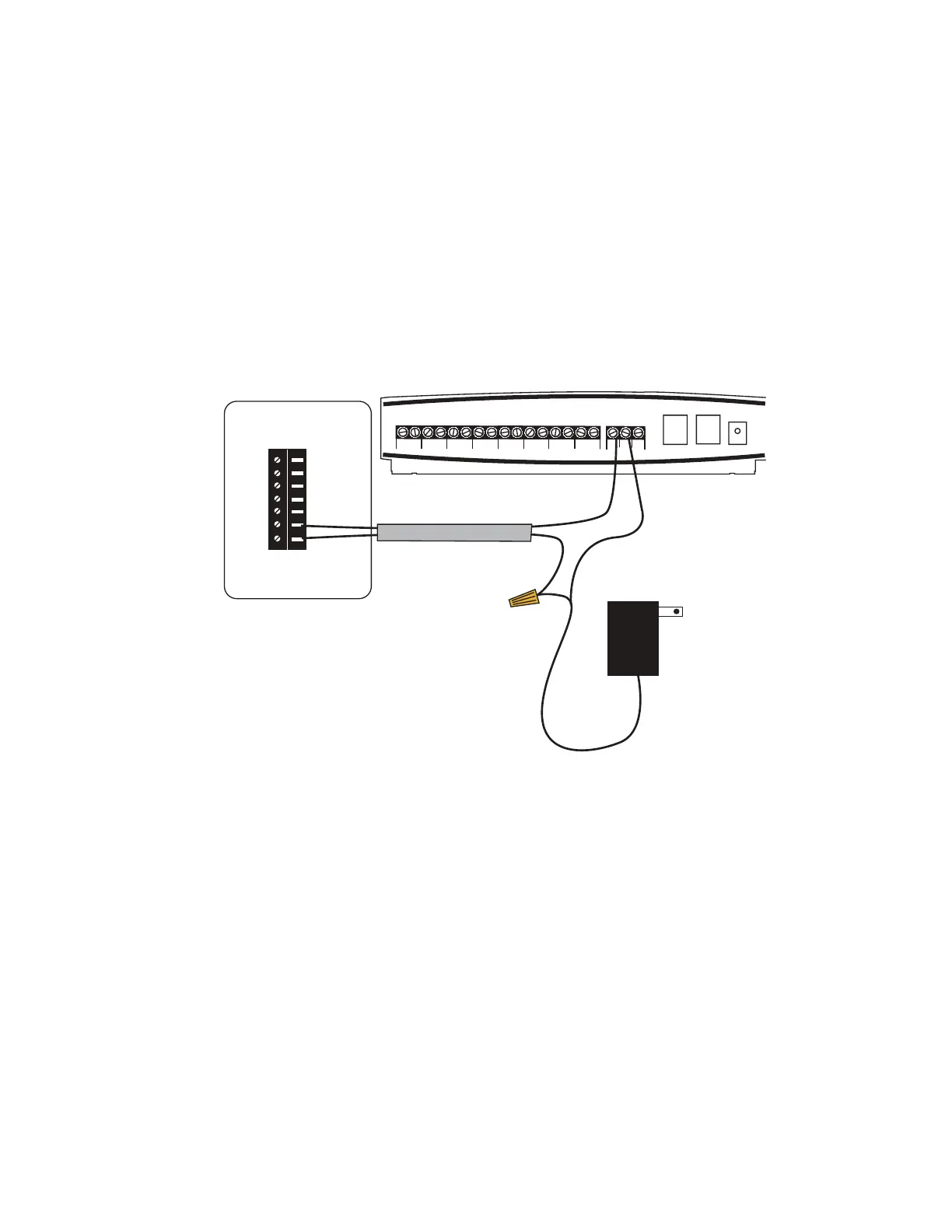
3TEP#ONNECTCABLEFROMTHERMOSTATTO3ENSAPHONE
4HIS3ENSAPHONEHASATERMINALSTRIPBELOWTHEINPUTOUTPUT
wiring door that will connect to the 12VDC power supply and X
#TERMINALSOFTHETHERMOSTAT3EE&IGURE4HISCONNECTION
is required to switch the thermostat between normal and vacation
MODES2UNATWOCONDUCTORCABLEFROMTHETHERMOSTATTOTHE
-ODEL/NTHETHERMOSTATCONNECTTHEREDWIRETOTHE8
TERMINALANDTHEBLACKWIRETOTHE#TERMINAL/NTHE
CONNECTTHEREDWIRETOTHE./TERMINAL#ONNECTTHEBLACKWIRE
to the negative wire from the power supply. Use a wire nut to
complete this connection. Connect the positive wire from the
power supply to the “C” terminal on the model 800.
2C
9
'
8
#
6
4HERMOSTAT
SHIELDEDACCESSORYCABLE
6$#
0OWER3UPPLY
RED
BLACK
#
:/.%3
#
#
#
#
#
#
#
./#.#
2H
7
Step 4: Program the Thermostat.
2EFERTOTHEMANUFACTURERSINSTRUCTIONSFORPROGRAMMINGTHE
thermostat. Be sure to program settings for both normal and
vacation modes.
&RQWUROOLQJWKH7KHUPRVWDW
4HEOPERATINGMODEOFTHETHERMOSTAT (normal/vacation) can be
CONTROLLEDATTHE-ODELKEYPADORREMOTELYVIA4OUCH4ONE
commands. Both methods are described below:


 To Next Page