Chapter 2: Installation
29
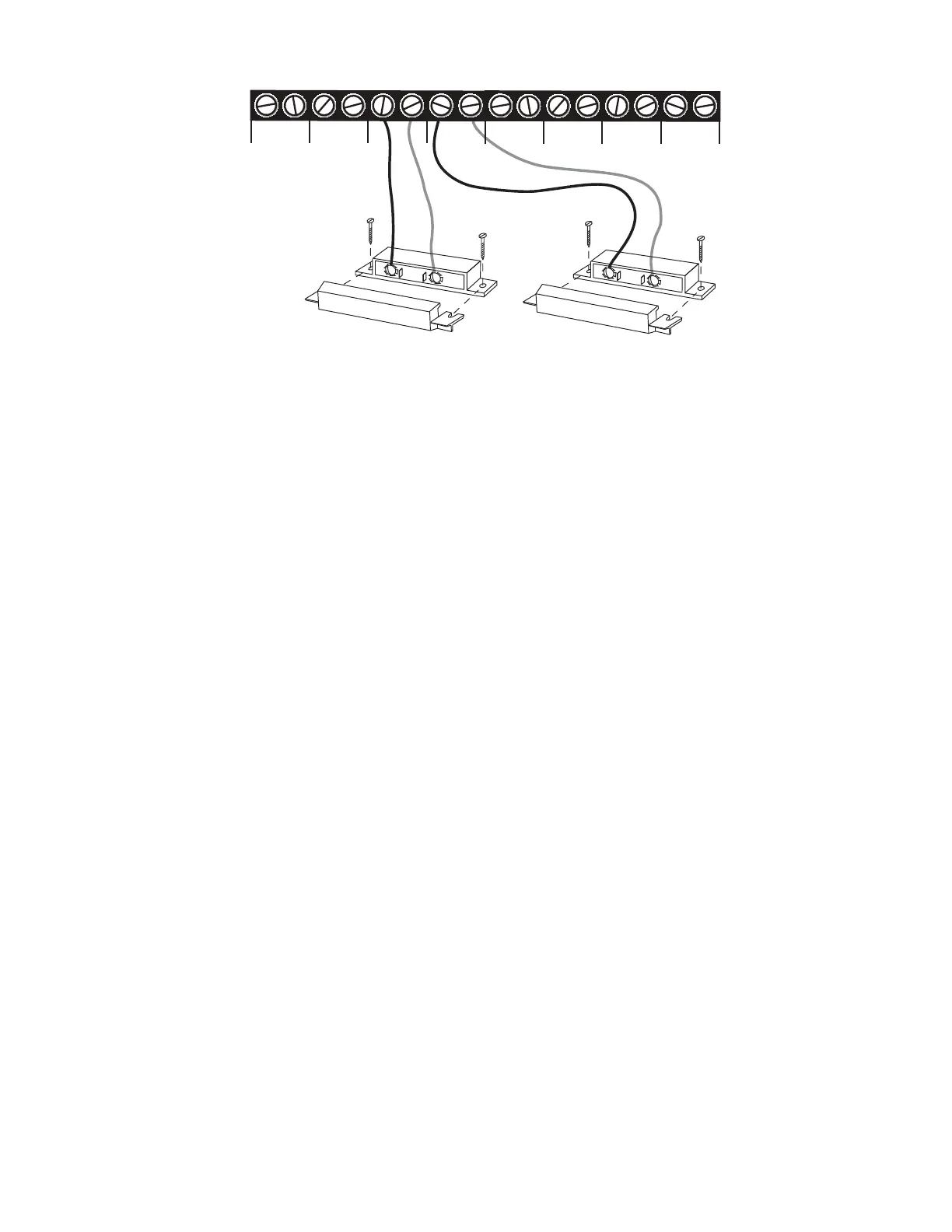
3ENSORWIREDTO
!LERT)NPUT
3ENSORWIREDTO
!LERT)NPUT6
#
:/.%3
#
#
#
#
#
#
#
)LJXUH7ZR6HQVRUV:LUHGWR$GMDFHQW=RQHV
NOTE
Do not use sensors, switches, or relays that supply
any voltage or current to the Model 800. Be aware
OFPROXIMITYTOOTHERELECTRICALWIRESORCOMPONENTS
when placing wires that lead from the sensors to the
unit. Avoid running the wires near electrical devices
that use high voltage or current, such as motors,
HEAVYMACHINERYETC4HISVOLTAGEMAYBEINDUC
tively coupled into the sensor wiring and could result
INDAMAGETOTHETHE-ODELSCIRCUITRY4RYTO
PLACEWIRESATLEASTINCHESFROMOTHERELECTRICALWIR
ing or devices.
0XOWLSOH6HQVRUV
4HE-ODELMAYHAVEMORETHANONESENSORCONNECTEDTOTHE
same alert zone, as long as the normal condition for each sensor
ONTHESAMEALERTZONEISIDENTICALEITHERALL./ORALL.#
(OWEVERONLYONEREMOTETEMPERATURESENSORCANBEUSEDON
each zone.
When wiring several normally closed sensors on one zone, they
must be connected in series. Connect one lead from the first
SENSORTOTHENUMBEREDSCREWOFTHEALERTZONE.EXTTAKETHE
other lead from the first sensor and connect it to one lead from
THENEXTSENSOR#ONTINUECONNECTINGSENSORSENDTOENDUNTILYOU
HAVECONNECTEDALLOFYOURSENSORS4AKETHESECONDLEADFROMTHE
last sensor and connect it to the common screw on the Model 800.


 To Next Page