17. NETWORK SETUP
Move the cursor to 【NETWORK SETUP】 (icon highlighted when selected), then press 【Enter】 to
access the setting interface.
TYPE: Options in Type include PPPOE, DHCP & Static.
1 Static
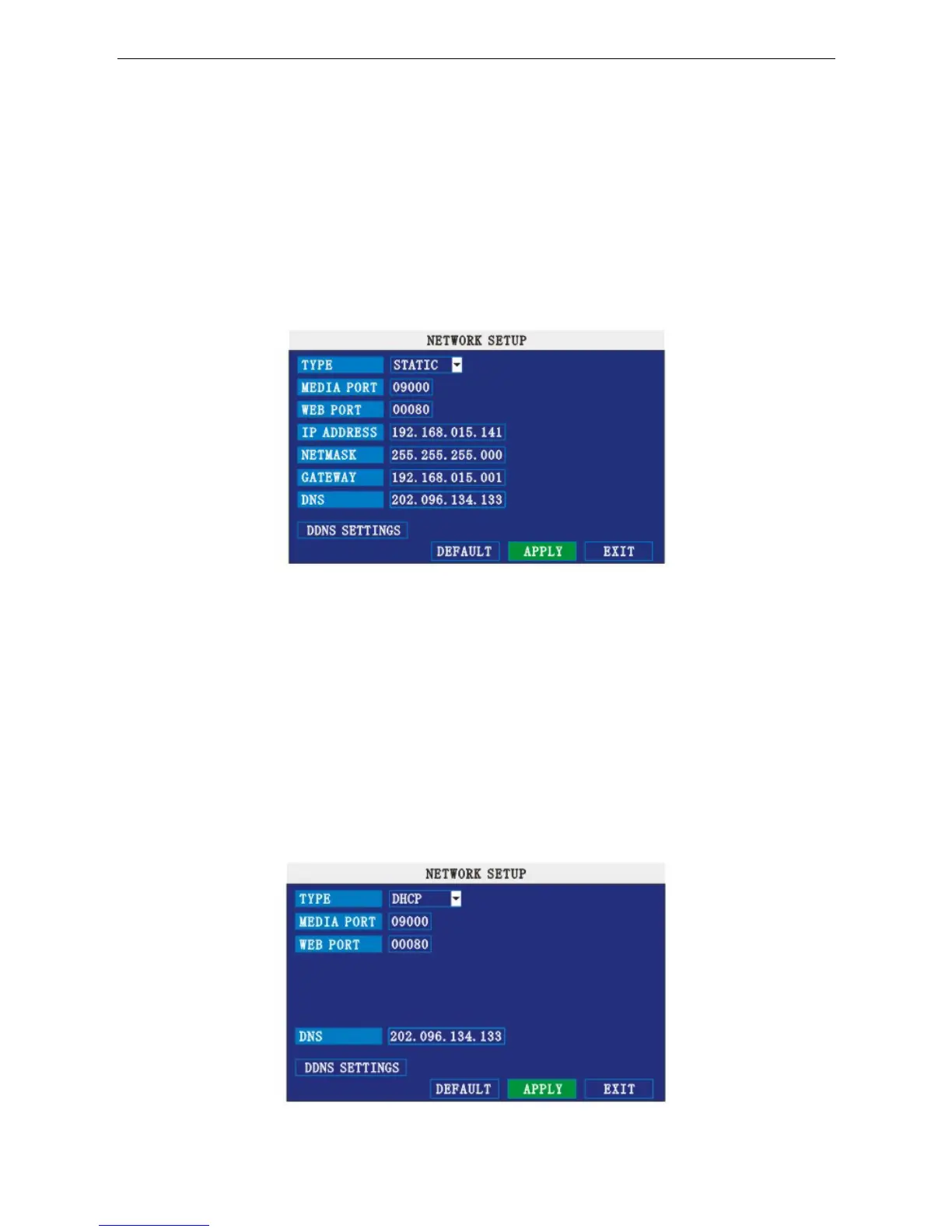
Select [Static] in the type, press [Enter] to access the interface as below:
MEDIA PORT: Transfers video data between the client and device.
WEB PORT: Setup the port for Internet Explorer to connect to via HTTP.
IP ADDRESS: Setup the IP address, and press 【Enter】 to input numbers to fill the IP Address.
NET MASK: Press 【Enter】 to input numbers to fill Net Mask.
GATEWAY: Press 【Enter】 to input numbers to fill Default Gateway.
2 DHCP
Select the DHCP, to enter into the interface shown below.
MEDIA PORT: Same as static setup.
21


 To Next Page