4. DVR INSTALLATION GUIDELINES
4.1 PRODUCT OVERVIEW
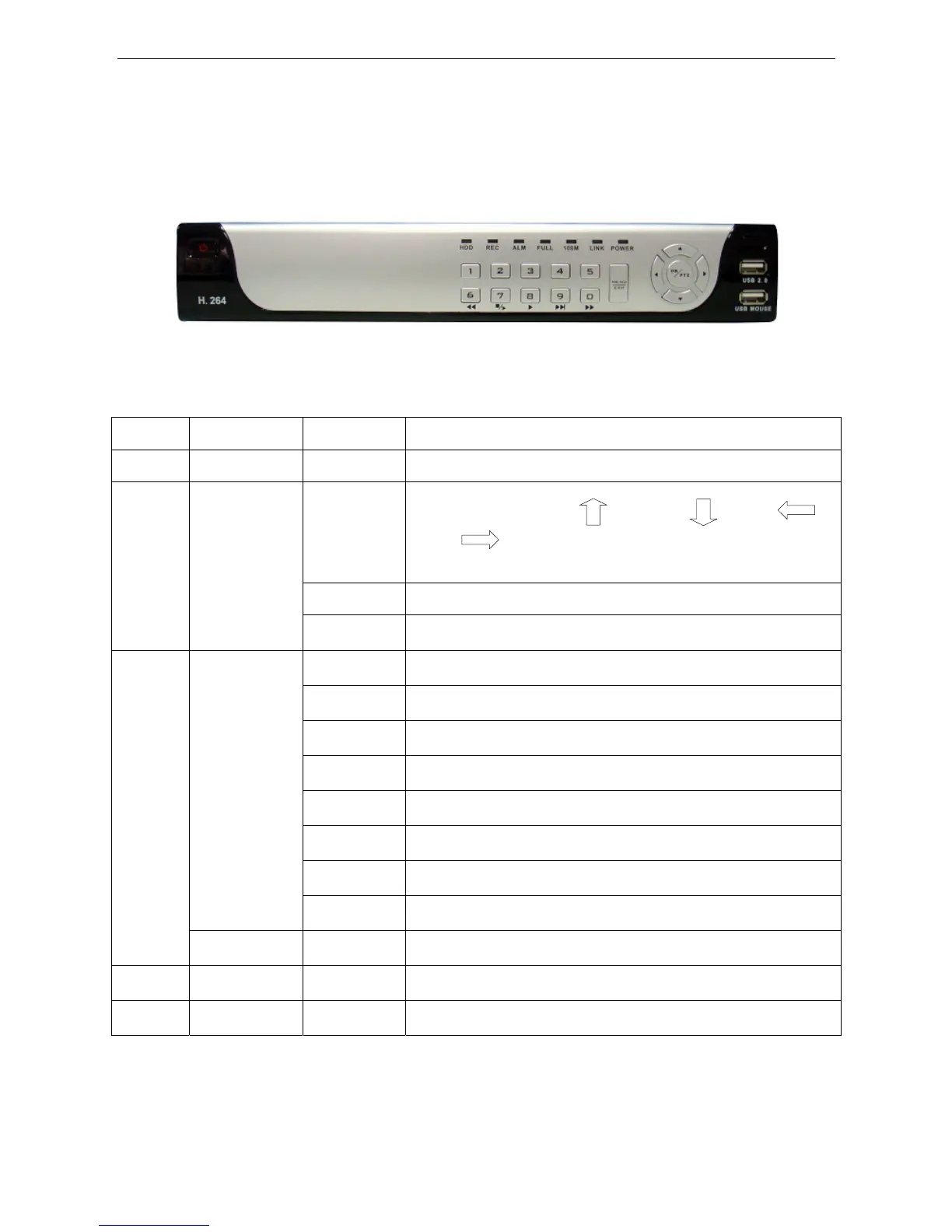
1. DEFINITION OF THE BUTTONS AND CONNECTORS ON THE FRONT PANEL
Buttons on Front Panel
Item Type Name Instruction
1 Standby STANDBY System standby button
Direction key
Direction keys include: up【】、down【】、left【 】、
right 【 】. Four buttons, which can move the cursor to setup and
control PTZ.
OK Confirm operation / in the PTZ control panel under live view
2
Control button
MUNE/EXIT Enter into main menu under live view, or exit sub menu
REC
Recording
ALM
Alarm
ERR
Error
FULL
On means the HDD is full.
HDD
HDD Status
100M
On means network is 100M
LINK
On means network has connected
Status indicator
POW
Power
3
IR receiver IR
Remote control receiver
4 USB2.0 USB2.0
USB2.0 for thumb drive to backup
5 USBMOUSE USB1.0
For USB mouse
32


 To Next Page