Introduction
1–4 700-1015 R002
1.4. Recording Capacity for DVR Drive Storage
The Trooper TL-HD uses H.264 and MJPEG video compression to maximize the
recording time on the drive. The amount of recorded video varies, depending on the
settings for frames per second (speed), resolution (pixel count), picture quality, and
number of cameras being recorded. The picture quality setting determines the amount
a picture is compressed versus the amount of memory the picture takes up on the
drive.
• A lower picture quality of setting 1, for example, means higher compression and a
lower memory requirement.
• A higher picture quality of setting 4, for example, means lower compression and a
higher memory requirement.
1.5. SD Card Backup Recording
The optional SD card is used as a back up storage device to the primary storage
device: the hard drive.
Since the SD card storage capacity is generally a small fraction of that of the HDD,
only the lower resolution Record 2 video stream is stored on the SD card.
Access to the video on the SD card is only possible through vMax View, because it is
recording for backup purposes only.
1.6. Product Interface and Devices
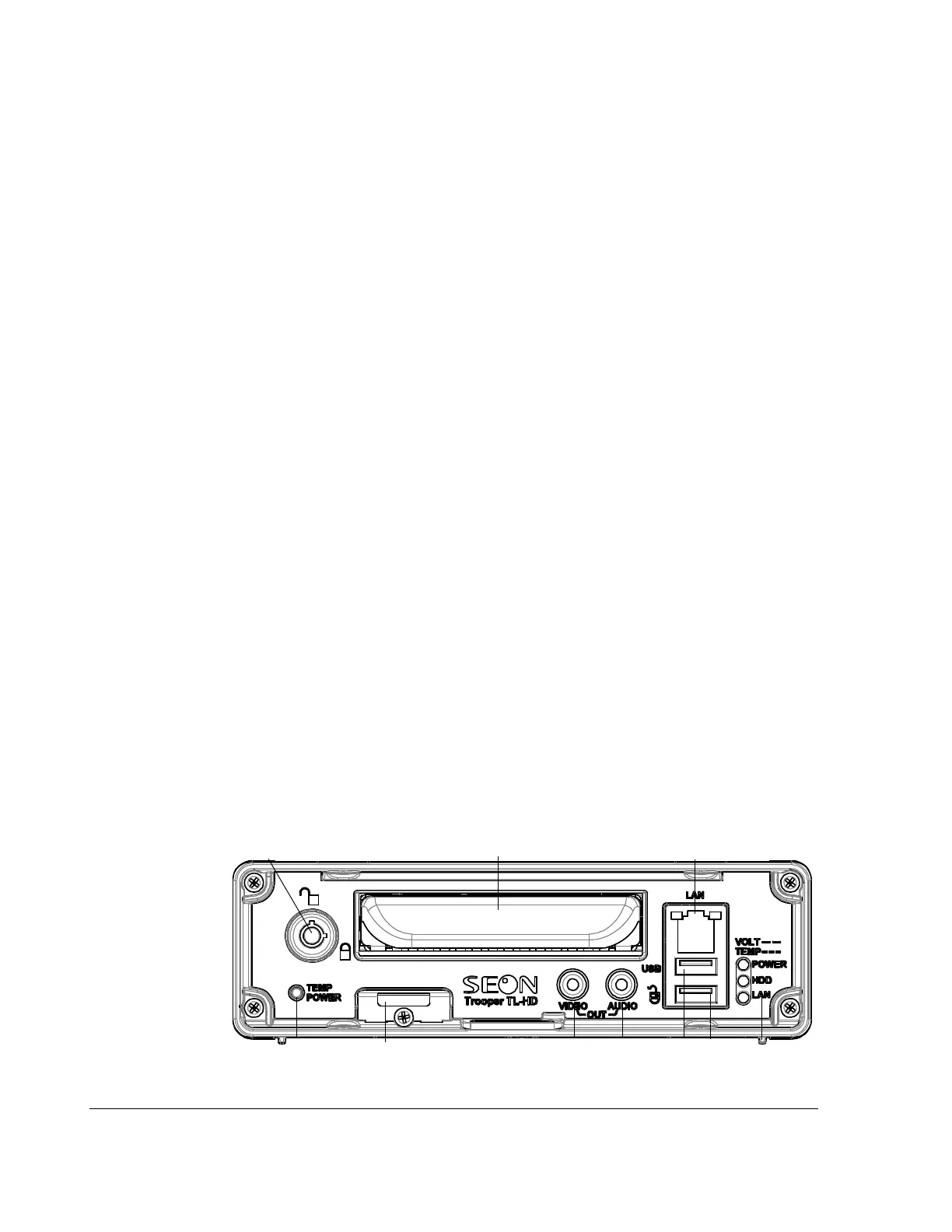
This section describes the features of the DVR (front and back panels) and the
trackball mouse.
1.6.1. DVR Front Panel Features
The TL-HD DVR front panel features are shown in the following figure and described
in the following table.
Figure 1-2
TL-HD Front Panel



 To Next Page