10
Front Mounting the SCC3 Console
The SCC3 console can be tted directly to the front panel of the SCG22
using the SCG22 Local Console Adaptor Kit (300-02050). The combined
unit can then be mounted using one of the bracket options, or into a DIN
mount slot in the vehicle.
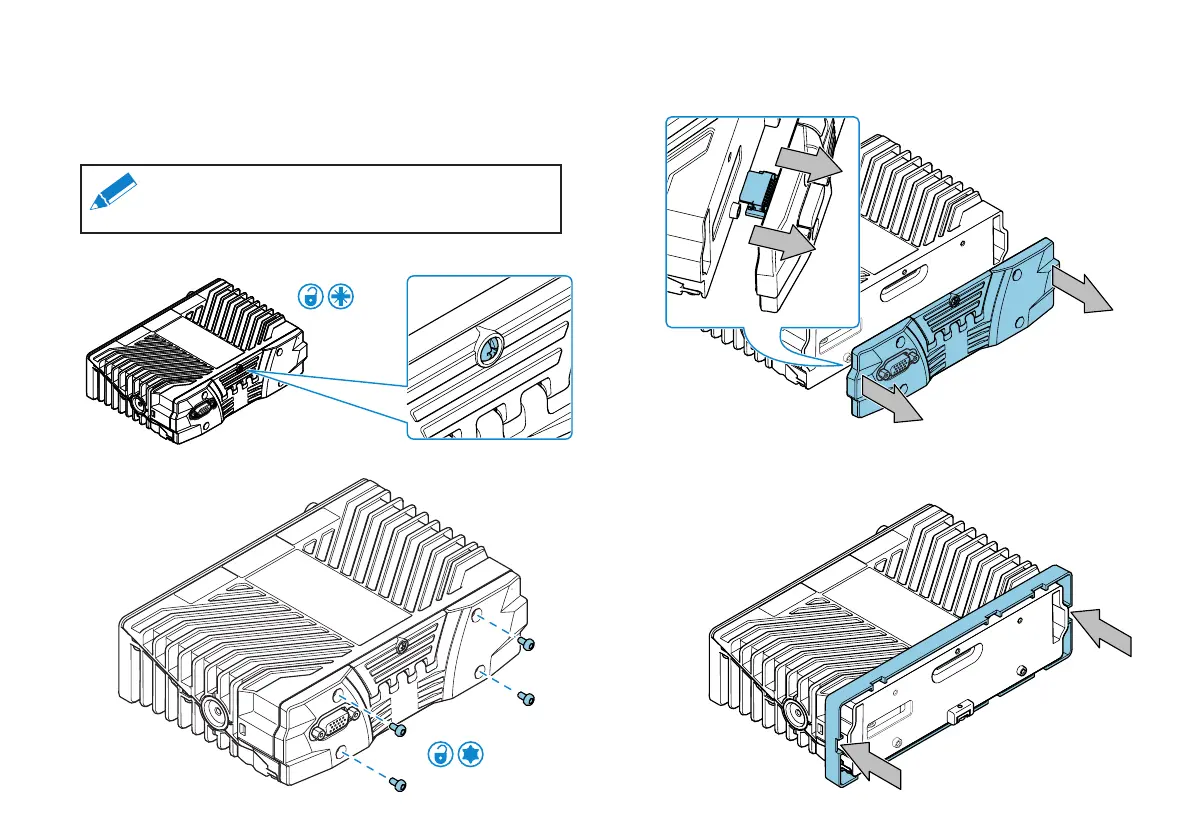
1. Undo the SIM card cover screw. The screw is retained on the cover.
PZ-2
2. Remove the four front fascia xing screws and retain them for re-use.
T10
3. Carefully pull the fascia cover away from the SCG22. Apply even
pressure to ensure the D-connector PCB is removed without
damaging the connectors.
4. If the SCG22 is to be tted in a DIN slot with depth restrictions, an
optional bezel is provided in the kit to act as a spacer. Slide the bezel
over the front panel of the SCG22 in the orientation shown.
Note: For installations where the SCC3 is mounted
separately to the SCG22, see the section "SCC3
Mounting Options" on page 24.


 To Next Page
 Loading...