5
3 Installation
HPE
TM
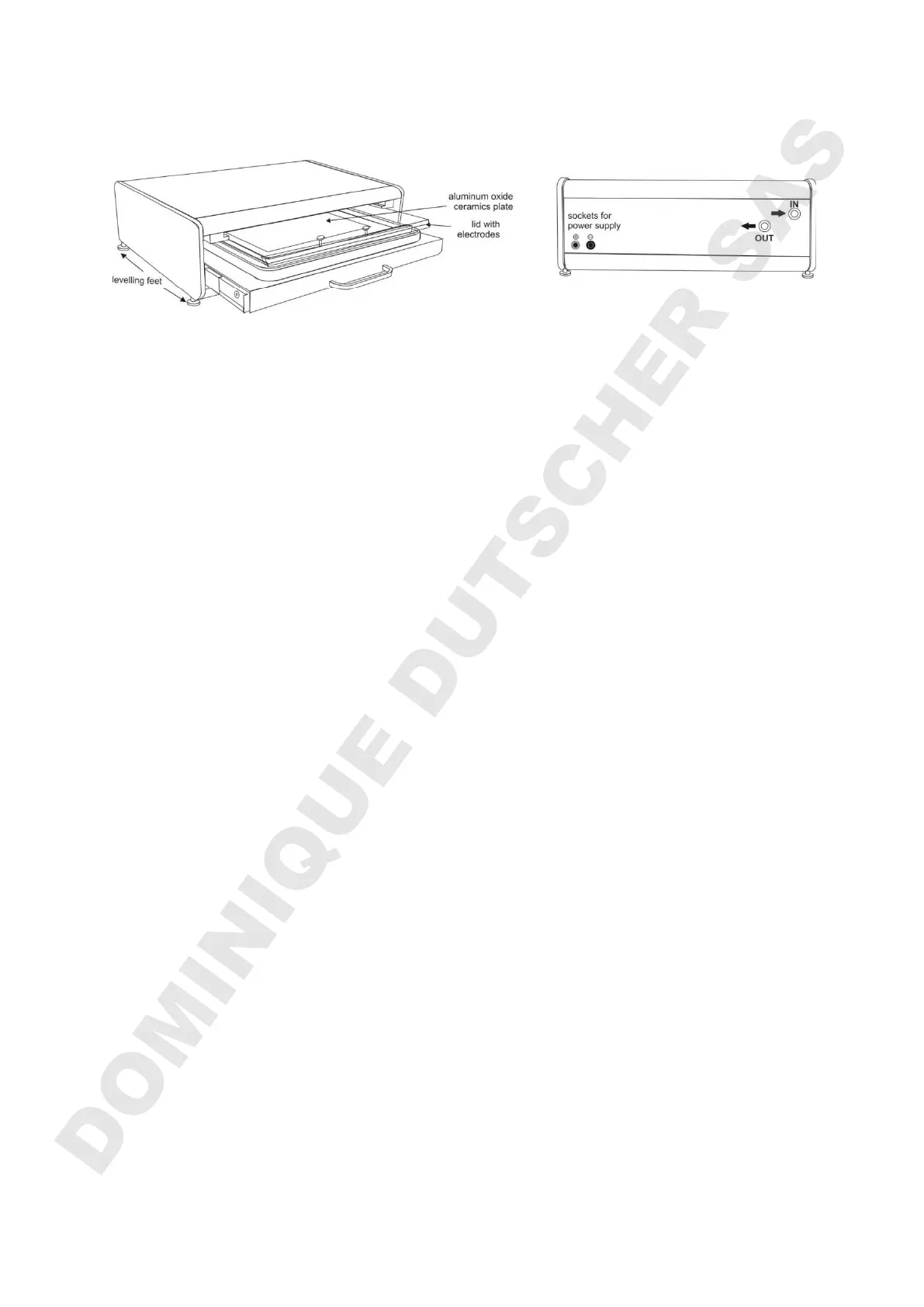
BlueHorizon (left: side/front view, right: back view)
The base-unit
Place the base unit on the bench. Unevenness of the lab bench can be corrected by
using a spirit level and adjusting the levelling feet.
Connecting the SERVA HPE™ Cooling Unit (Chiller)
Important note: Warm air should not be exhausted towards the BlueHorizon!
Connect the BlueHorizon to the chiller using the provided tubing and fix them with the
hose clamps. It is important to tighten these clamps sufficiently to obtain an air-tight
seal. The chiller ”Outlet“ must be connected to the BlueHorizon “Inlet” and the chiller
“Inlet” to the BlueHorizon “Outlet”. If the flow-direction is wrong, the cooling will work
incorrectly. In order to protect the cooling plate from corrosion, the cooling liquid must
contain an anti-corrosive additive (Cat. no. 43392)
Air Removal
For efficient cooling, it is vital to remove any air from within the cooling plate. Switch
on and leave the chiller running until all of the air in the connecting pipes is removed,
this may take several minutes. Then refill the chiller reservoir with cooling liquid (3
parts of water and 1 part anti-corrosive additive) as the BlueHorizon takes up about 1
litre.
Electrode Lid Storage
Remove the protection film and paper. Insert the lid into its “park” position” above the
drawer with the connecting plugs of the lid towards the backside of the BlueHorizon.
The electrodes are carefully constructed from platinum coated titanium rods and
could be damaged if not handled correctly. When not in use, always insert the lid into
its “park” position. Never place the lid on the bench with electrode side down to avoid
damage.
Connecting the Power Supply
Connect the power supply (black / red cables). Place it on top to save bench space.
DOMINIQUE DUTSCHER SAS


 To Next Page