Switched PDU
Installation and Operations Manual Installation 15
Mounting the PDU
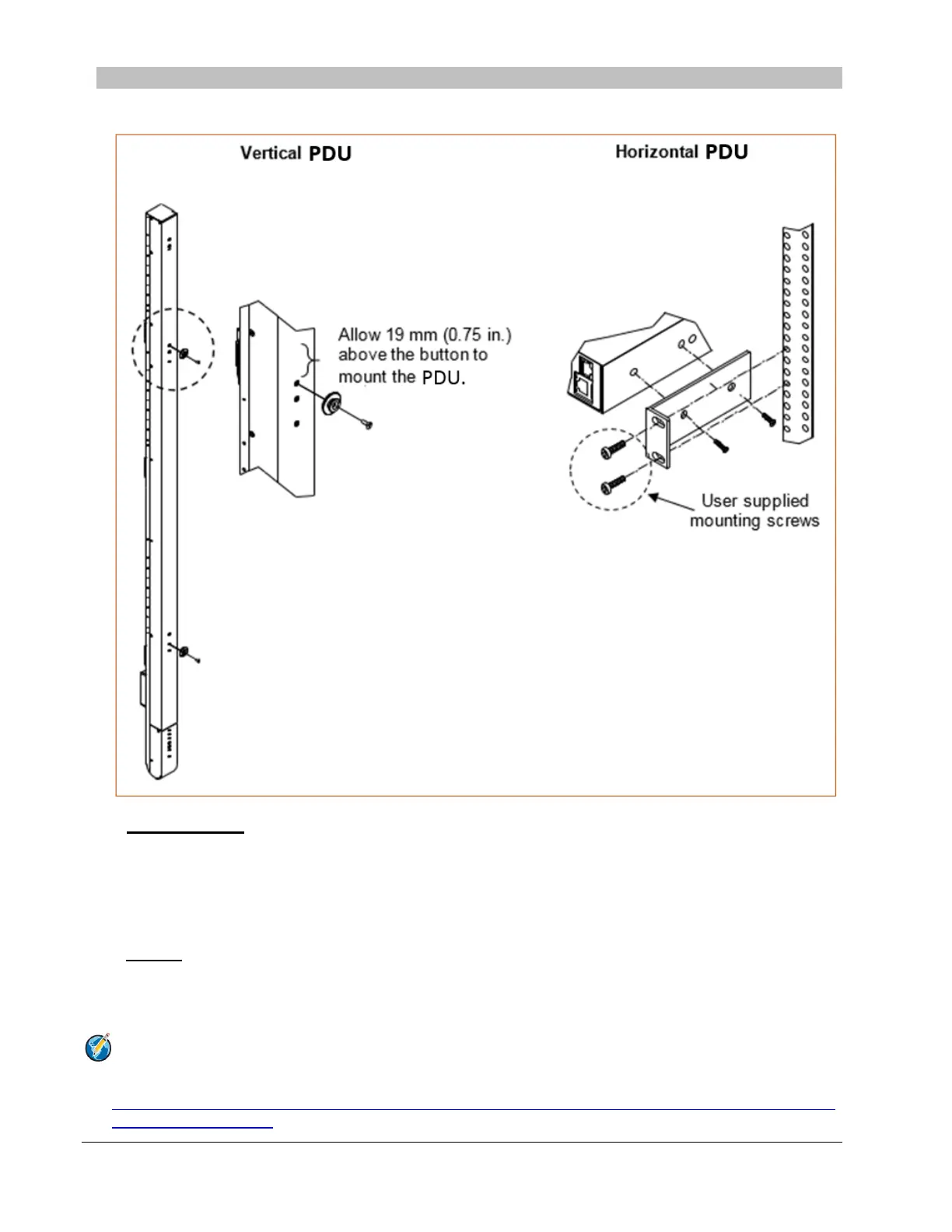
The following illustration shows how to mount the Switched PDU in vertical or horizontal orientation:
Horizontal/Rack
1. Select the appropriate bracket mounting points for proper mounting depth within the rack.
2. Attach the L-brackets to these mounting points with two screws for each bracket.
3. Install the enclosure into your rack, using the slots in each bracket. The slots allow about 6 mm (0.25 inch) of
horizontal adaptability to align with the mounting holes of your rack.
Vertical
The Switched PDU is supplied with button mounting kit(s). Distribute the buttons vertically and attach to the PDU as
appropriate for the cabinet. An additional 19 mm (0.75 inch) of clearance is required at the top of the PDU to allow the
button to mount into the keyholes.
Note: For more information about horizontal/vertical mounting options for the Switched PDU, see the
Server Technology PDU Mounting Bracket Catalog:
http://cdn1.servertech.com/assets/documents/documents/1803/original/Mounting_Bracket_Catalog.2014-
12-30.pdf?1420823515



 To Next Page