SETTOPSURVEY, S.L. Bofarull 14, 08027 Barcelona (Spain) Phone: (+34) 93 340 05 73 Fax: (+34) 93 351 95 18 www.settopsurvey.com info@settopsurvey.com
26
2. Post process
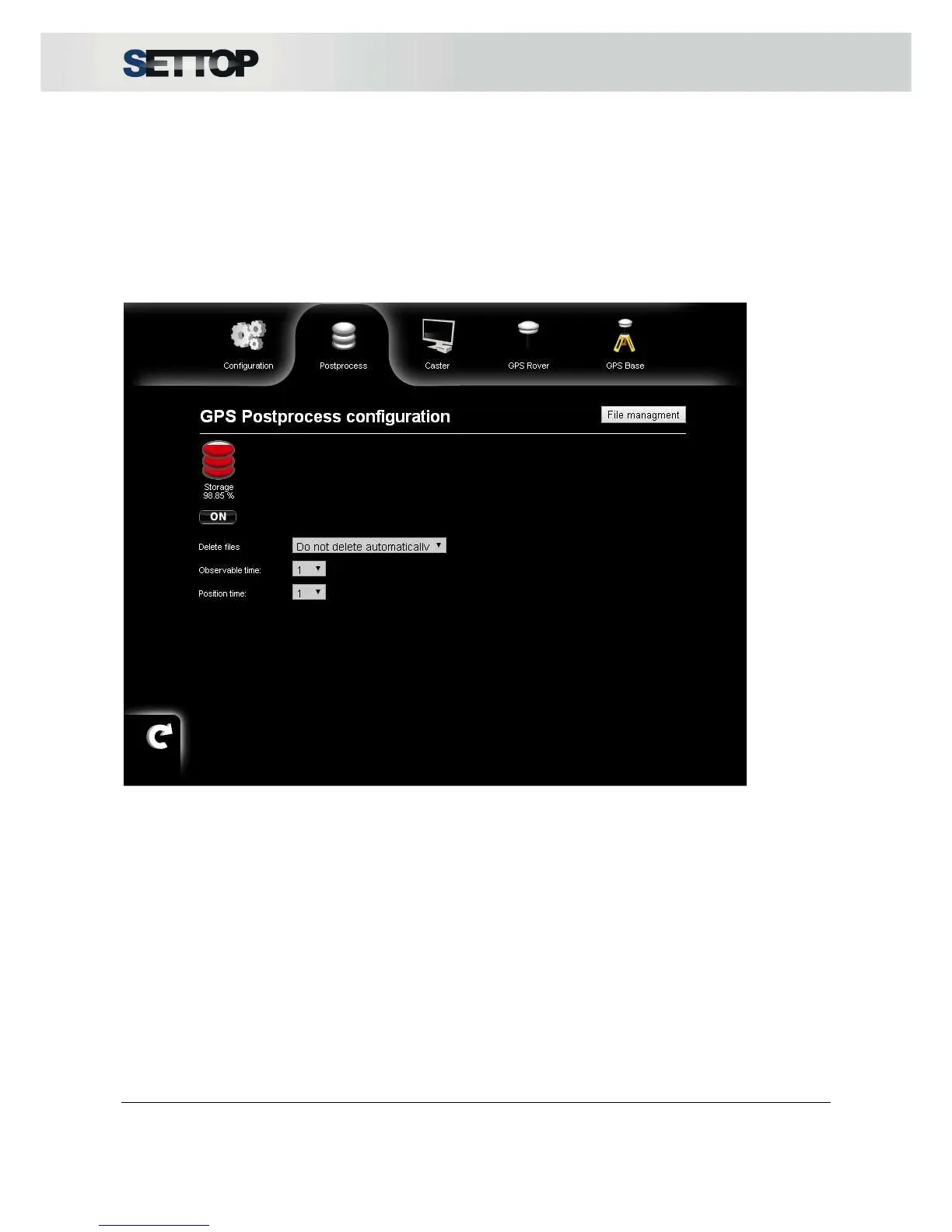
This option allows you to save files for GNSS post processing. Internal memory available is 1GB.
By pressing ON, starts to save a new file. By pressing OFF, it stops the record file. Before starting a new
postprocessing session the user needs to select if old files will be deleted automatically when memory is full.
If we choose Delete automatically it will delete the older file existing in memory, although if the option
selected Do not delete automatically, it will stop the record when memory is full.
Also, it is possible to choose Observable time records and Position time every 1s, 2s, 5s, 10s, 15s, 30s or
60s
In Base mode, every hour it generates a new file with RT27 logs. The name is
M10000SN_DDDH_YYYY.rt27, where:
•
SN: Serial Number
•
DDD: Day of the year (001, 002, 003, etc.)
•
H: Hour of the day (A, B, C, etc.)
•
YYYY: Year
In Rover mode it generates a new file like M10000SN_YYMMDD_N.rt27, where:
•
SN: Serial Number
•
YY: Year
•
MM: Month
•
DD: Day
•
N: Number of Rover postprocessing files of the day



 To Next Page