SETTOPSURVEY, S.L. Bofarull 14, 08027 Barcelona (Spain) Phone: (+34) 93 340 05 73 Fax: (+34) 93 351 95 18 www.settopsurvey.com info@settopsurvey.com
28
3. Caster
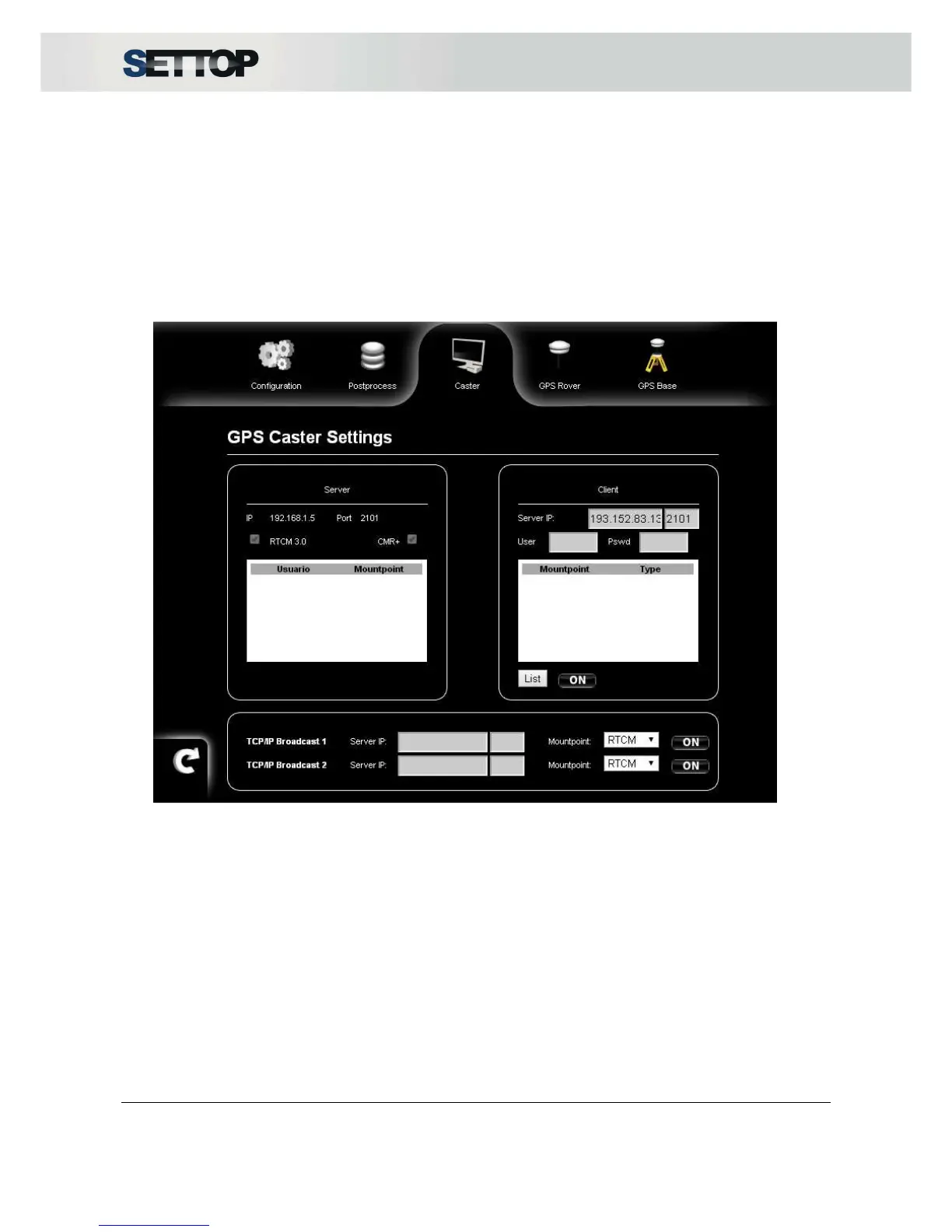
The Server service is always active since the SETTOP M1 is configured as Base. The transmit formats are
CMR +, RTCM 3.0 and RT27. Users can connect through the IP and port specified with the username and
password (default user: admin and pswd: m1)
Settop M1 can manage up to 8 users connected at the same time. To add and manage users you should go
to System → Manage.
To connect to a network as a Client, you need to enter the IP and Port. The IP must be numeric
(xxx.xxx.xxx.xxx). The username and password provided by the server/administrator.
By pressing List, it shows all the mount points available and when the user presses ON, it starts to receive
corrections.
The TCP / IP option Broadcaster allows data transmission to another computer via internet. Protocols
supported are RTCM3.0, CMR+ and RT27)
When the broadcaster is OFF, the user can modify IP, Port and select the mountpoint.
When the broadcaster is ON, IP, Port and mountpoints are blocked.



 To Next Page