SETTOPSURVEY, S.L. Bofarull 14, 08027 Barcelona (Spain) Phone: (+34) 93 340 05 73 Fax: (+34) 93 351 95 18 www.settopsurvey.com info@settopsurvey.com
31
5. Base
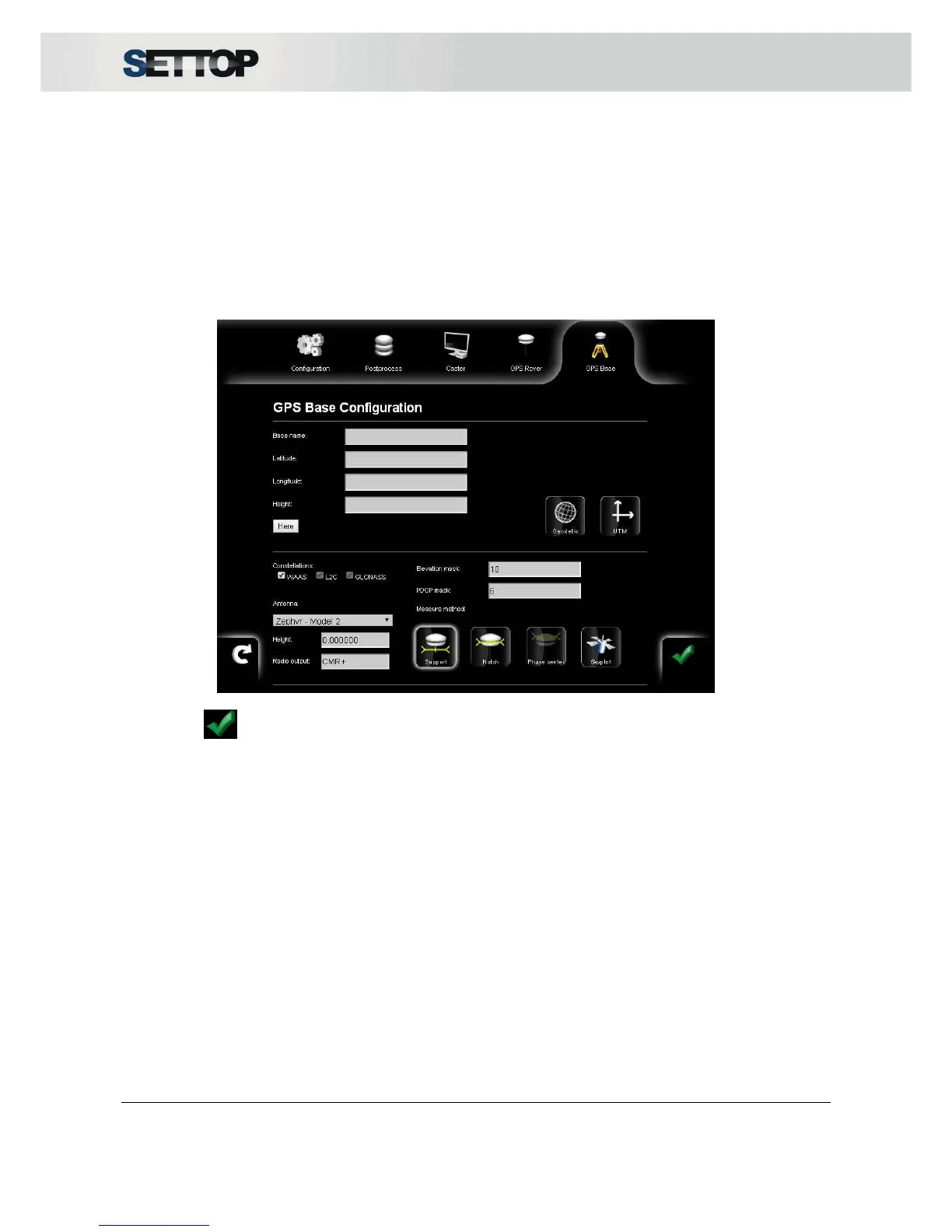
Option Base mode, allows you to configure SettopM1 for transmitting differential corrections through radio or
internet.
For setting up the receiver, you need to introduce the name and the coordinates in WGS84, may be geodetic
(Lat, Long, Elev) or projected UTM (East, North, Elevation). If you don’t know the coordinates of the control
point, you can press Here and the coordinates fields will be filled automatically.
If the Settop M1 receives corrections from another Base or Caster, is possible configure our receiver in Fixed
position before to press Here for an optimum configuration of the system coordinates. This system can
extend the distance between bases.
By pressing , Settop M1 starts to transmit the corrections.
In Rover mode the default configurations are as follows:
•
Constellations and tracking selection (WAAS, GLONASS, L2C)
•
Antenna, height and measurement selection
•
Elevation mask and PDOP mask
•
Skyplot (satellites distribution and signal intensity) and Skytable (satellites information list)



 To Next Page