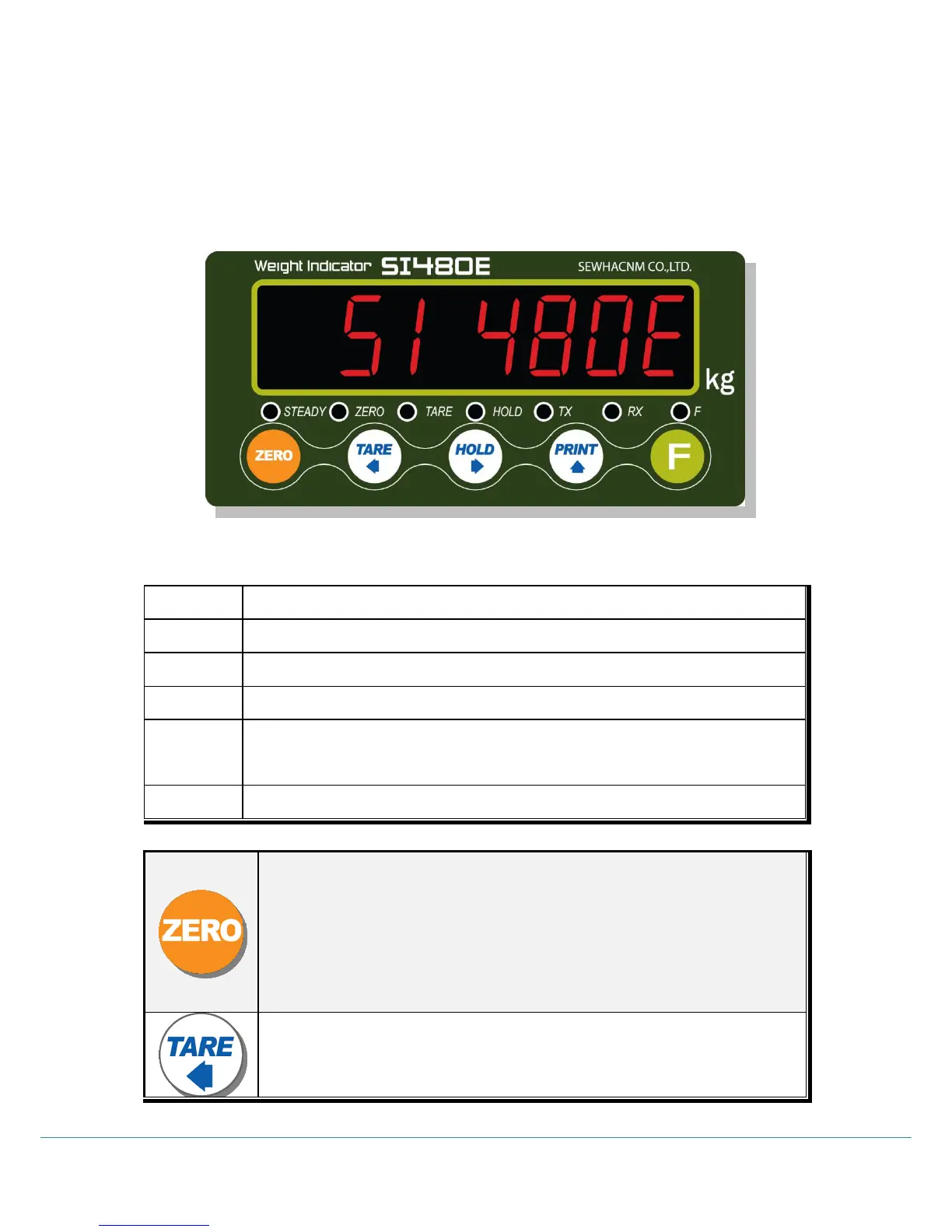
SI 480E DIN SIZE WEIGHING CONTROLER
3-2. Front Panel
3-2-1 Front Panel (Display / Key Pad)
3-2-2. State Lamp
When the weight is “STEADY”, Lamp is ON.
When the current weight is ”ZERO”, Lamp is ON.
“TARE” function is set, Lamp is ON.
“HOLD” function is set, Lamp is ON.
When the Indicator transmits Serial communication data (Print data),
Lamp is ON.
When the Indicator receives Serial communication data, Lamp is ON.
1. Normal Mode : Make Weight value as Zero. (F07, F08 setting)
2. Calibration Mode : Cancel the value or move to previous step.
3. F-Function setting : Cancel / ESC
4. Set point setting : Cancel / ESC
5.Test Mode 1 : Cancel or ESC
6.Test Mode 2 : Cancel or move to previous step
7.Set up Mode : Cancel
1.Normal Mode : Set the TARE Function .(F09 setting)
1
st
input : “TARE”, 2
nd
input : “TARE Reset”
(When “HOLD” or weight value is ZERO, then this key doesn’t work.)



 To Next Page