8
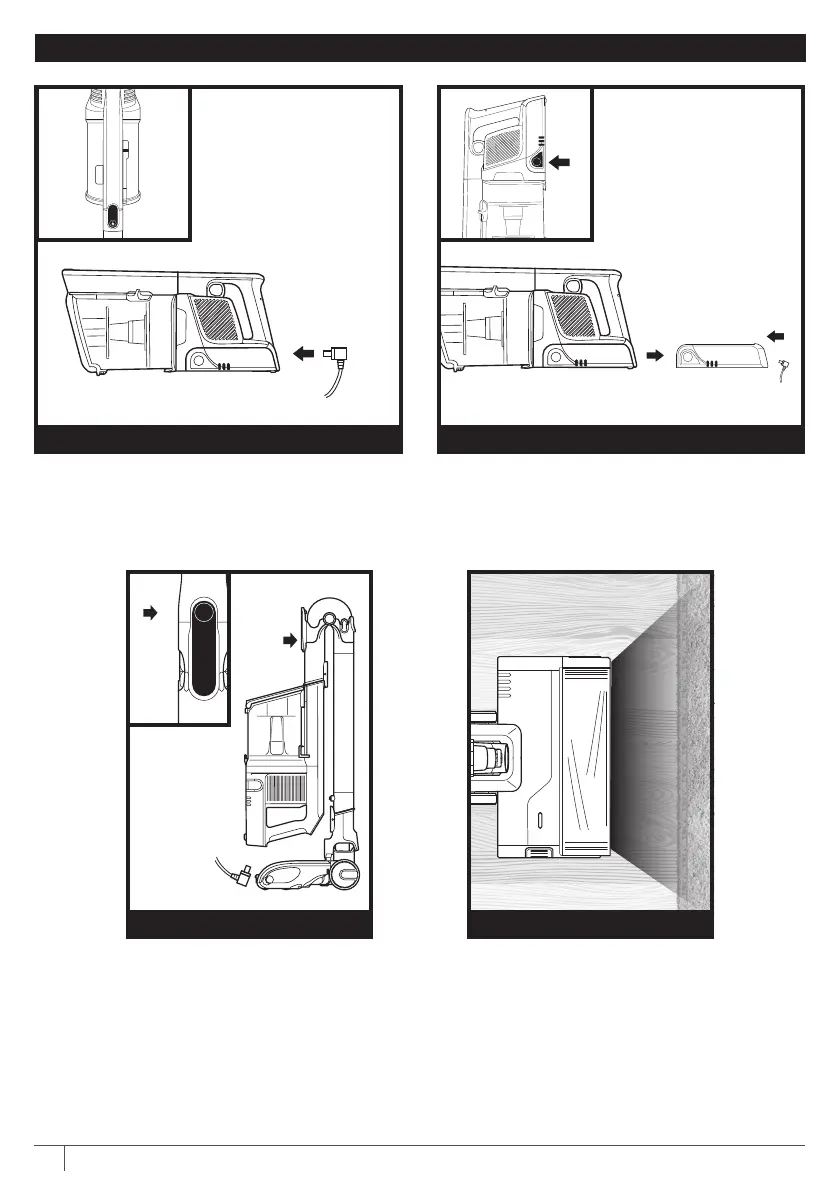
CHARGING YOUR LITHIUM ION POWER PACK BATTERY
Remove the handheld vacuum from the wand
by pressing the Wand Release button and pulling
up. Plug the charger into the charging port on the
handheld vacuum.
To remove the battery from vacuum, press the
release button on the battery and slide out of the
handle compartment. To reinstall, slide the Battery
back into the compartment until it clicks into place.
IN HANDHELD VACUUM
OUT OF THE VACUUM
To put the vacuum in storage
mode, press
the Unlock latch while folding the
handheld vacuum forward until
the wand clicks and locks.
Plug the charger into the charging
port on the handheld vacuum.
FLEXOLOGY® STORAGE MODE
Brushroll and vacuum respond
to surface changes and
automatically adjust to optimize
your clean.
FLOOR DETECT




 To Next Page