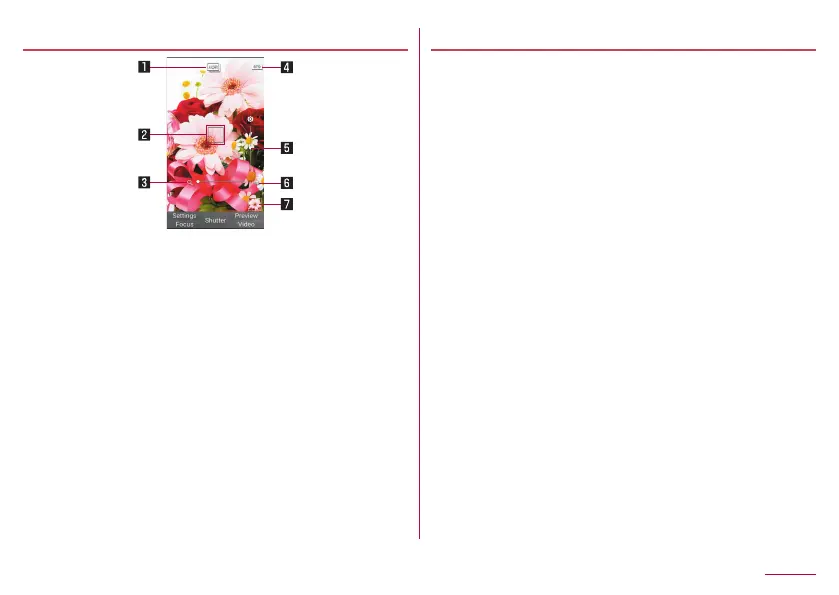
Still picture shooting screen
1
z
Displayed when the [HDR] setting is On.
2
z
When "Face AF" is set, the camera detects person's
face to focus.
3
4
z
Displays the current shooting mode (
☞
P. 113
"Settings for shooting still pictures").
5
6
z
Displayed when the remaining number for shooting
decreases to 99 or less as for the still picture
shooting mode.
7
z
Displays thumbnail of last shot still pictures.
Settings for shooting still pictures
z
Menu items may vary by usage function or condition.
1
Cz
2
Change to Video: Switch to video camera shooting.
Change Mode: Switch shooting mode according to
shooting environment or subject.
z
Alternatively, in the still picture shooting screen,
press 2 to set.
z
Camera: When "change mode" is set to
"Continuous shot", switch the mode to the
standard camera.
z
Standard: A standard mode.
z
Portrait: A mode suitable for portrait shot.
z
Night Portrait: A mode suitable for portrait shot
against a night view.
z
Scenery: A mode suitable for landscape shot.
z
Night Scenery: A mode suitable for night view
shot.
z
Sepia: A mode for shooting with a sepia effect
applied.
z
Monochrome: A mode for monochrome shot.
z
Continuous shot: A mode for shooting 18
pictures per one shot.
113
Camera














 To Next Page