GB-16
Remote (VCR Operation Buttons)
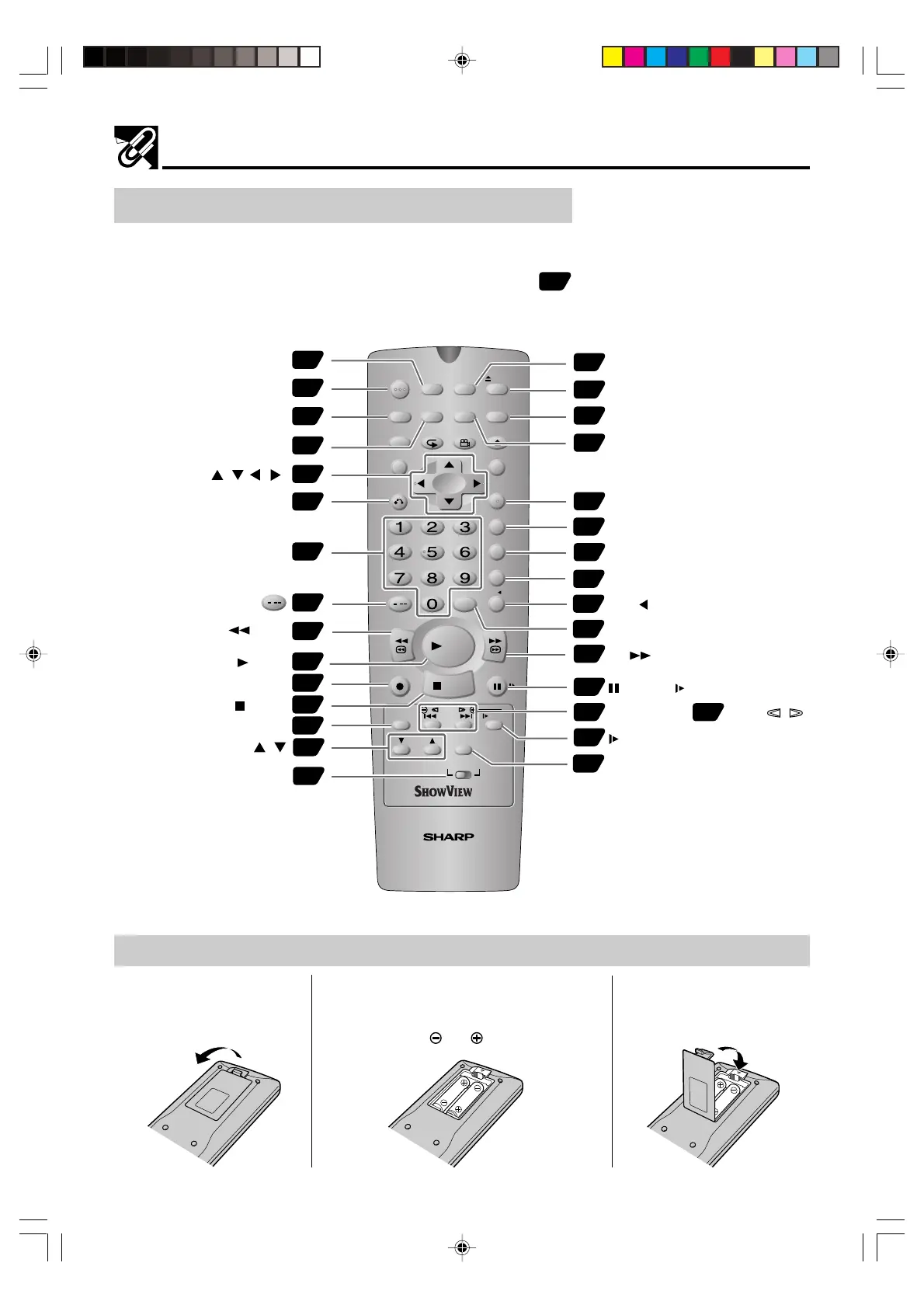
• The explanations on this page use the VCR/DVD CHANGE Switch in the VCR position.
Numbers in refer to the main pages in this
Operation Manual where the topic is explained.
Loading the Batteries
1 Open the battery cover
by pulling the lid in the
direction of the arrow.
2 Load the batteries.
Load the two batteries (R6 UM/SUM-3 or
AA) supplied with the Remote so that the
battery poles and are positioned as
indicated.
3 Close the battery cover
by lowering the lid in the
direction of the arrow.
Major Components
REV FWD
STOP
OPEN/
CLOSE
VCR/DVD
SELECTOR
VCR MENU
DVD SETUP
TAPE
SPEED
ON
SCREEN
TITLE
DVD MENU
DISPLAY
FUNCTION
CONTROL
PROG/
REPEAT
ANGLE
CLEAR
RETURN
OPERATE
TIMER
ON/OFF
SHOWVIEW
EJECT
SET
ENTER
ZERO BACK
SKIP SEARCH
TV/VCR
VCR DVDAM/PM
INPUT SELECT
PAUSE/STILL
REC
SLOW
CH
VCR DVD
SKIP
DPSS
AUDIO
OUTPUT
VCR/DVD COMBINATION
/
RRMCGA055WJSA
38
ON SCREEN
63
TIMER ON/OFF
24
OPERATE
51
DISPLAY
27
32
CLEAR
63
35
Number buttons
55
54
63
54
TAPE SPEED
63
VCR/DVD CHANGE Switch
24
63
64
SHOWVIEW
24
VCR/DVD SELECTOR
54
EJECT
27
VCR MENU
26
SET
61
ZERO BACK
62
SKIP SEARCH
TV/VCR
72
55
55
70
INPUT SELECT
55
54
59
AUDIO OUTPUT
VCR DVD
CURSOR ( / / / )
CH /
STOP
REW
FF
PAUSE/ STILL
REC
Æ
PLAY
AM/PM or
/
62
SLOW
—
/
±
, DPSS
/
SLOW
37
PLAY
DVNC65SE014_018.pm6 9/10/02, 10:10 am16
Downloaded from: http://www.usersmanualguide.com/


 To Next Page