GB-32
Channel Sort
When your Unit tunes in broadcast channels automatically, it sorts
them into a standard order using teletext information. You can
change the order of the channel with the following procedure.
1 Press VCR MENU.
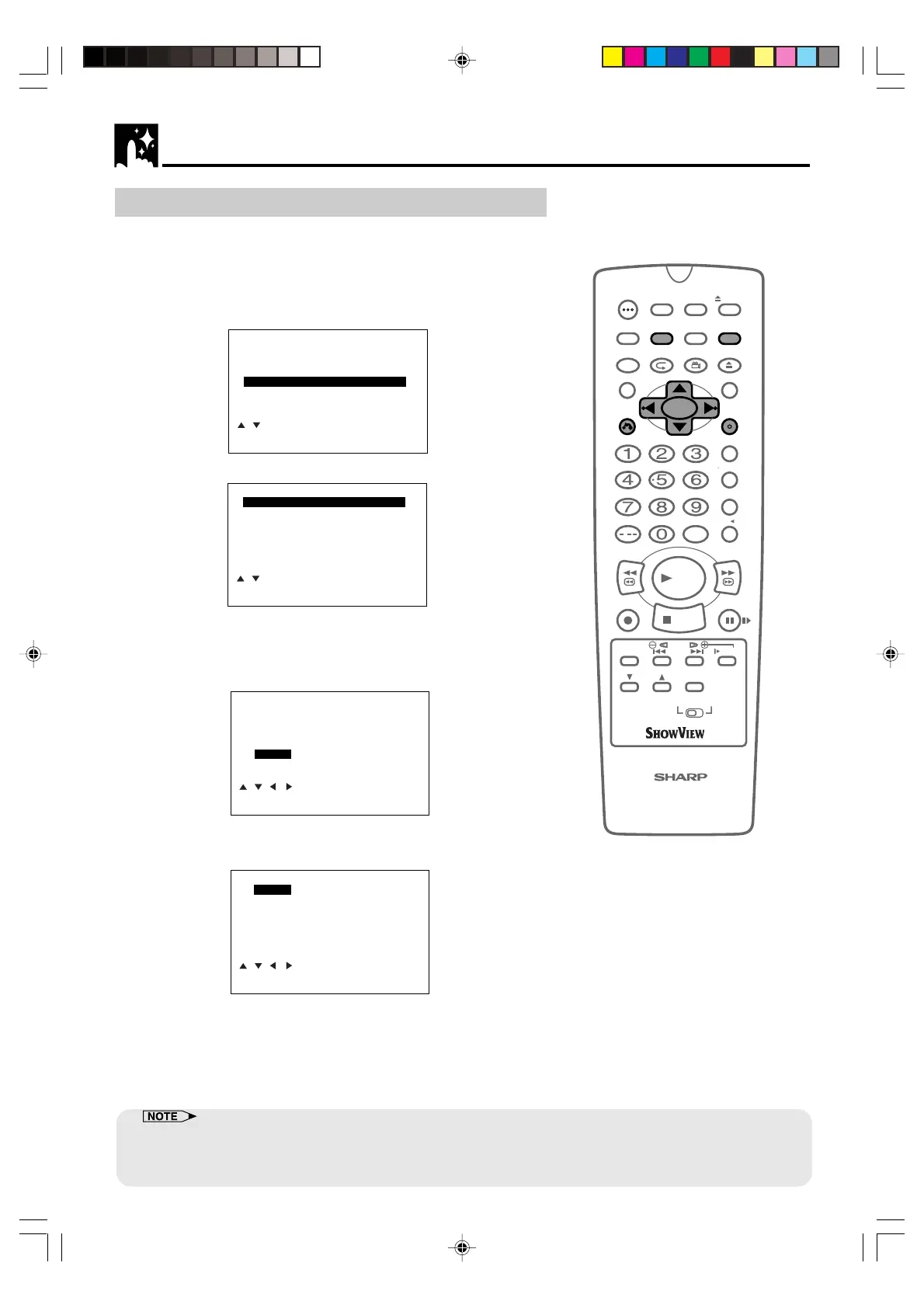
2 Press ' / " to select “SET UP”. Press SET to confirm.
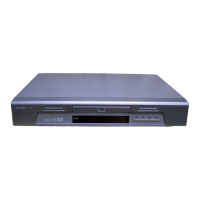
3 Press ' / " to select “CHANNEL SORT”. Press SET to confirm.
4 The MOVE position will be highlighted. Press SET to confirm.
5 Press ' / " /
\\
\\
\ /
||
||
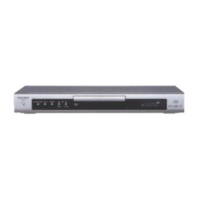
| to highlight the channel to be moved. Press
SET to confirm.
MOVE 1/5
1ARD1 7 13
2ZDF 8 14
3RTL1 9 15
4RTL2 10 16
5
NDR3 11 17
6 12 18
CLEAR:CHANNEL SORT
:SELECT
SET :ENTER MENU:EXIT
6 Press ' / " /
\\
\\
\ /
||
||
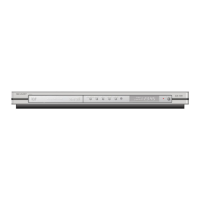
| to highlight the new position for the channel.
Press SET to confirm.
MOVE 1/5
1NDR3 7 13
2ARD1 8 14
3ZDF 9 15
4RTL1 10 16
5
RTL2 11 17
6 12 18
SELECTED: CH5
:SELECT
SET :ENTER MENU:EXIT
7 If any more channels are to be moved, repeat the procedure
from step 5.
8 When all the channels are in your preferred order, either press
CLEAR to return to the CHANNEL SORT menu or press VCR
MENU to return to the normal screen.
/
OPEN/
CLOSE
OPERATE
VCR/DVD
SELECTOR
VCR MENU
DVD SETUP
TAPE
SPEED
ON
SCREEN
TIMER
ON/OFF
TITLE
DVD MENU
DISPLAY
SHOWVIEW
EJECT
FUNCTION
CONTROL
PROG/
REPEAT
ANGLE
CLEAR
RETURN
REV FWD
SET
ENTER
ZERO BACK
SKIP SEARCH
TV/VCR
VCR DVDAM/PM
INPUT SELECT
PAUSE/STILL
REC
PLAY
STOP
SLOW
CH
VCR DVD
SKIP
DPSS
AUDIO
OUTPUT
VCR/DVD COMBINATION
RRMCGA071WJSA
VCR Setup
MENU
SHOWVIEW
TIMER
MODE
SET UP
:SELECT
SET :ENTER MENU:EXIT
CHANNEL SORT
MOVE
CANCEL
NAME
SET UP
:SELECT
SET :ENTER MENU:EXIT
• If when moving channels the picture becomes unclear and the on-screen display is unreadable, ON SCREEN can
be used to toggle between a blue background and the normal picture.
• The blue background will be shown until either another channel is selected or ON SCREEN is pressed again.
DVNC65SE028_038.pm6 7/10/02, 5:49 pm32
Downloaded from: http://www.usersmanualguide.com/


 To Next Page