GB-30
Manually Tuning Channel Setting
It should not be necessary to tune in a broadcast channel manually
except in unusual circumstances such as poor signal.
To manually tune in a channel, follow the procedure below.
Preparation
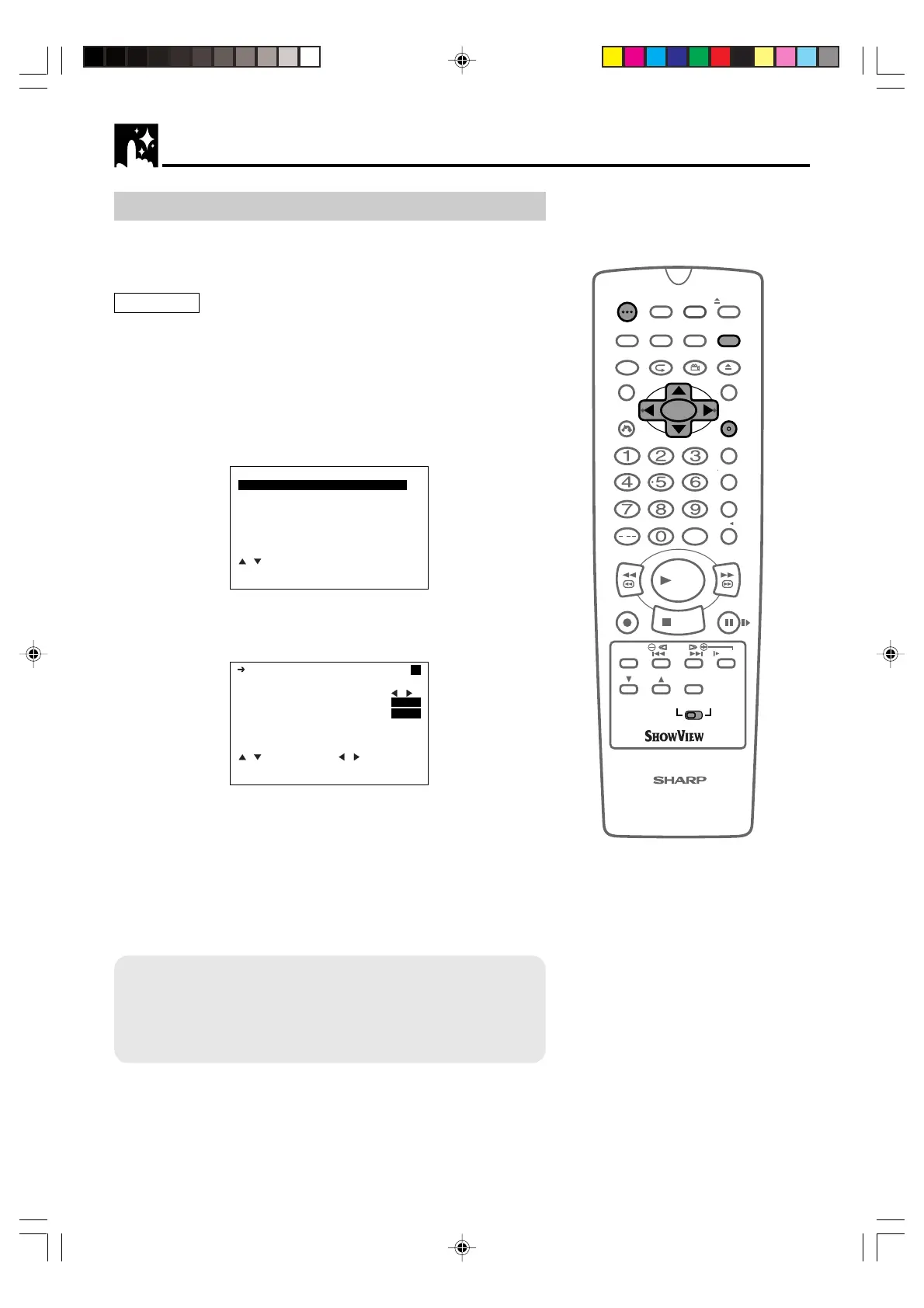
• Press OPERATE. Then move the VCR/DVD CHANGE Switch to
VCR.
• Ensure the Video channel is selected on the TV.
1 Press VCR MENU. Press ' / " to select SET UP. Press SET to
confirm.
2 “CHANNEL PRESET” will be highlighted. Press SET to confirm.
SET UP
CHANNEL PRESET
CHANNEL SORT
CLOCK
LANGUAGE
:SELECT
SET :ENTER MENU:EXIT
3 “PRESET” will be selected. Press
\\
\\
\ /
||
||
| to choose the required
VCR preset channel.
PRESET 1
CHANNEL CH21
FINE TUNING
DECODER ON
OFF
SKIP ON OFF
:SELECT :CHANGE
SET :ENTER MENU:EXIT
4 Press ' / " to select “CHANNEL”.
5 Press
\\
\\
\ /
||
||
| to start tuning in either direction. Tuning will stop
when a channel is received. If it is not the desired channel, press
\\
\\
\ /
||
||
| to continue tuning.
6 Press ' / " to select “FINE TUNING”. Press and hold
\\
\\
\ /
||
||
|
until the sharpest colour picture is obtained.
IMPORTANT NOTE:
7 Press ' / " to select “DECODER”. This is preset to OFF. If
you connect a decoder, as shown previously, you must use
\ \
\ \
\ /
||
||
| to turn the decoder function ON. Refer to DECODER
SWITCHING OPERATION on page 37.
/
OPEN/
CLOSE
OPERATE
VCR/DVD
SELECTOR
VCR MENU
DVD SETUP
TAPE
SPEED
ON
SCREEN
TIMER
ON/OFF
TITLE
DVD MENU
DISPLAY
SHOWVIEW
EJECT
FUNCTION
CONTROL
PROG/
REPEAT
ANGLE
CLEAR
RETURN
REV FWD
SET
ENTER
ZERO BACK
SKIP SEARCH
TV/VCR
VCR DVDAM/PM
INPUT SELECT
PAUSE/STILL
REC
PLAY
STOP
SLOW
CH
VCR DVD
SKIP
DPSS
AUDIO
OUTPUT
VCR/DVD COMBINATION
RRMCGA071WJSA
VCR Setup
DVNC65SE028_038.pm6 7/10/02, 5:49 pm30
Downloaded from: http://www.usersmanualguide.com/


 To Next Page