GB-61
Auto Repeat/Auto Zero Back
/
OPEN/
CLOSE
OPERATE
VCR/DVD
SELECTOR
VCR MENU
DVD SETUP
TAPE
SPEED
ON
SCREEN
TIMER
ON/OFF
TITLE
DVD MENU
DISPLAY
SHOWVIEW
EJECT
FUNCTION
CONTROL
PROG/
REPEAT
ANGLE
CLEAR
RETURN
REV FWD
SET
ENTER
ZERO BACK
SKIP SEARCH
TV/VCR
VCR DVDAM/PM
INPUT SELECT
PAUSE/STILL
REC
PLAY
STOP
SLOW
CH
VCR DVD
SKIP
DPSS
AUDIO
OUTPUT
VCR/DVD COMBINATION
RRMCGA071WJSA
Auto Repeat
This function replays the specified part.
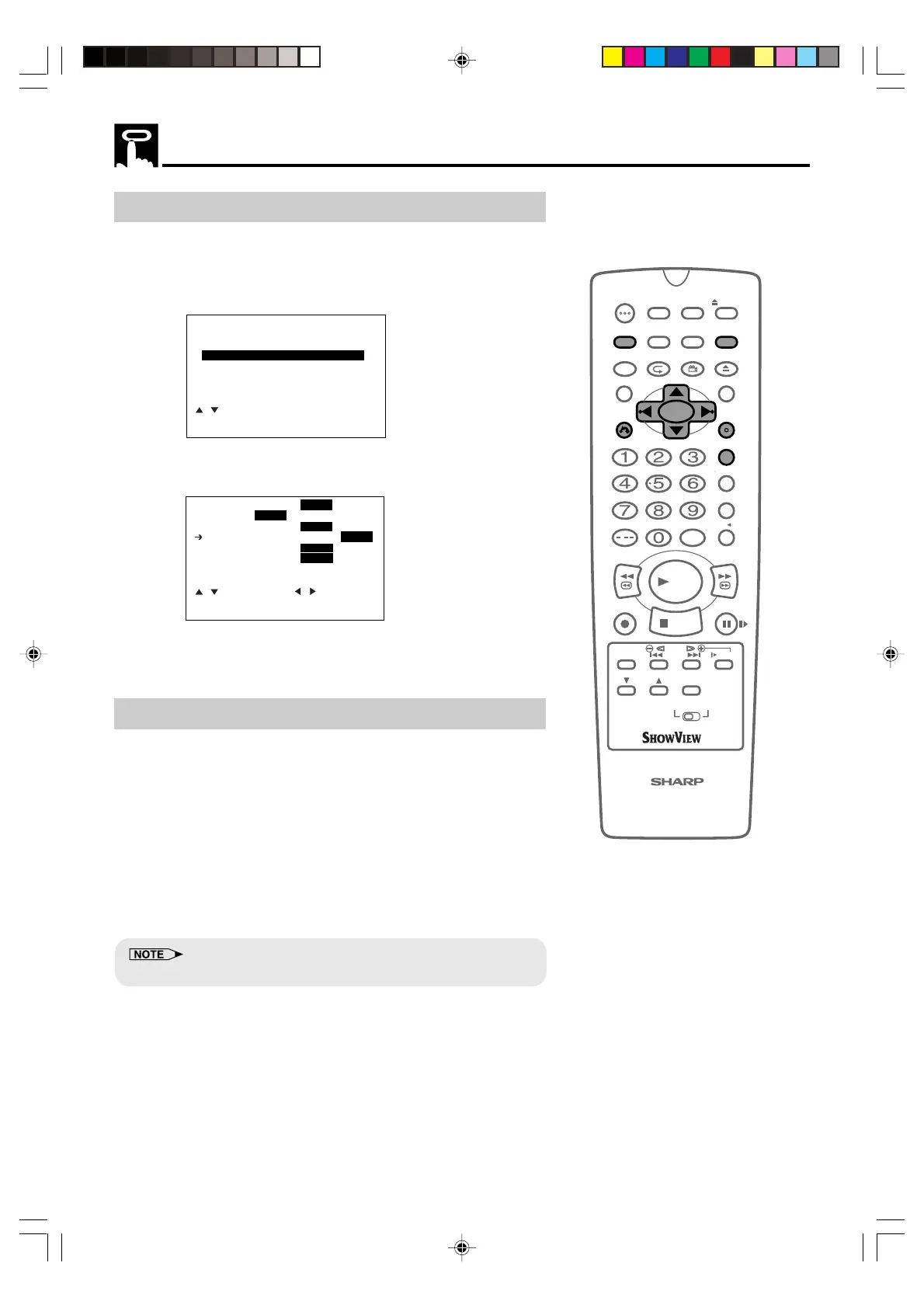
1 Press VCR MENU to display the menu screen.
2 Select “MODE” with ' / " and then press SET.
3 Select “REPEAT” mode with ' / ". Then set the mode to “ON”
or “OFF” with
\\
\\
\ /
||
||
|.
4 Press SET to confirm and return to the menu screen.
5 Press VCR MENU to return to normal screen.
Auto Zero Back
ZERO BACK uses the tape counter to determine a specific point on
a cassette you may wish to return to.
1 Press DISPLAY until tape counter appears.
2 Press CLEAR to identify the current position on a video cassette
and the tape counter will appear.
3 Press ZERO BACK when you wish to return to this position on
the video cassette. The cassette will rewind/advance to this
point.
• The tape counter will only operate on recorded sections of cassette.
MENU
SHOWVIEW
TIMER
MODE
SET UP
:SELECT
SET :ENTER MENU:EXIT
NICAM AUTO OFF
COLOUR
AUTO PAL MESECAM
BLUE MUTE
AUTO OFF
REPEAT ON
OFF
16:9 AUTO OFF
SUPER.P
ON OFF
:SELECT :CHANGE
SET :ENTER MENU:EXIT
DVNC65SE054_062.pm6 8/10/02, 8:43 am61
Downloaded from: http://www.usersmanualguide.com/


 To Next Page