GB-67
Timer Recording
/
OPEN/
CLOSE
OPERATE
VCR/DVD
SELECTOR
VCR MENU
DVD SETUP
TAPE
SPEED
ON
SCREEN
TIMER
ON/OFF
TITLE
DVD MENU
DISPLAY
SHOWVIEW
EJECT
FUNCTION
CONTROL
PROG/
REPEAT
ANGLE
CLEAR
RETURN
REV FWD
SET
ENTER
ZERO BACK
SKIP SEARCH
TV/VCR
VCR DVDAM/PM
INPUT SELECT
PAUSE/STILL
REC
PLAY
STOP
SLOW
CH
VCR DVD
SKIP
DPSS
AUDIO
OUTPUT
VCR/DVD COMBINATION
RRMCGA071WJSA
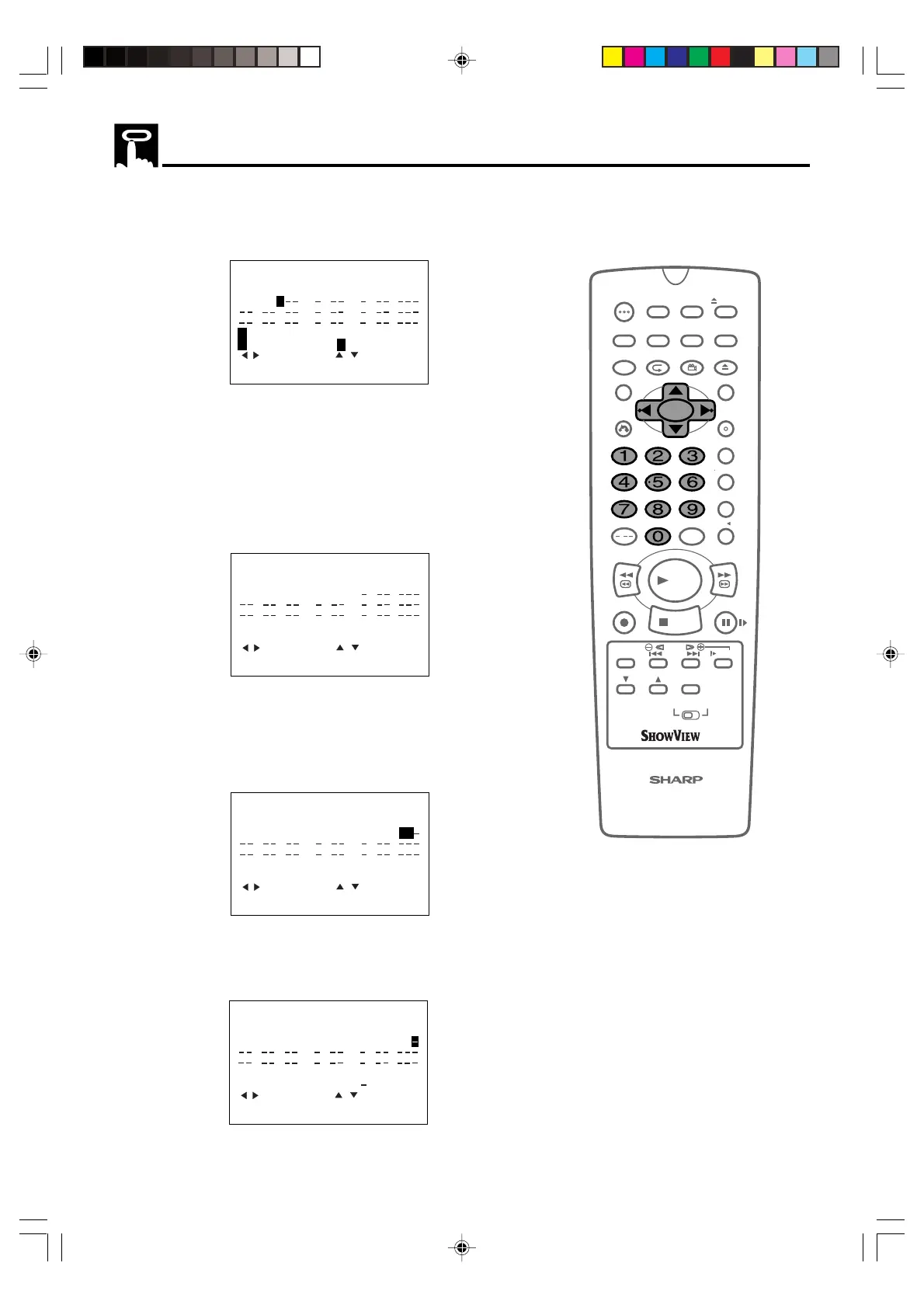
5 If you want to make additional recordings at the same time each
day or week, use ' / " to select D (daily) or W (weekly). Then
press
||
||
| to move to the next setting.
:CHANGE
1/2
DATE PR START STOP
21/06 02 12:00
13:00
SP*
9/07D : :
/ : :
/ : :
:ONCE
W:WEEKLY D:DAILY
:SELECT
SET :ENTER MENU:EXIT
— -:— -:— —-
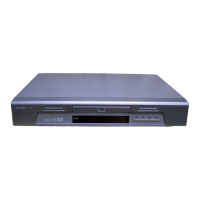
6 Enter the channel number using ' / " or the number buttons.
For example to record a programme on channel 3, press 0 3.
Then press
||
||
| to move to the next setting.
7 Enter the start time using ' / " or the number buttons, hours
first then minutes (when entering less than 10 hours or minutes
add a ‘0’ before the number), for example for 21:05 start, press 2
1 0 5. Then press
||
||
| to move to the next setting.
1/2
DATE PR START STOP
21/06 02 12:00
13:00
SP*
9/07D03 21:05
:
/ : :
/ : :
:SELECT
SET :ENTER MENU:EXIT
:CHANGE
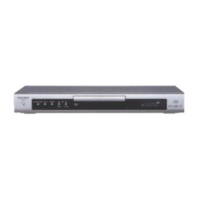
8 Enter the stop time, for example for 22:30 stop, press 2 2 3 0.
9 If you wish to change the “RECORDING SPEED”, use
\\
\\
\ /
||
||
| to
highlight SP. Press ' / " to select standard play (SP), long
play (LP) or extended play (EP) as required.
1/2
DATE PR START STOP
21/06 02 12:00
13:00
SP*
9/07D03 21:05
22:30
SP
/ : :
/ : :
SP/LP/EP:TAPE SPEED
:SELECT
SET :ENTER MENU:EXIT
:CHANGE
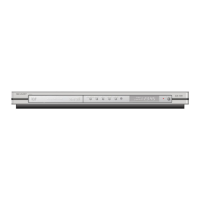
10 For VPS/PDC setting use
\\
\\
\ /
||
||
| to highlight the final column
(See note on next page). Using ' / " will select VPS/PDC “ON”
or “OFF” (
✽ = ON – = OFF).
1 /2
DATE PR START STOP
1/2
DATE PR START STOP
21/06 02 12:00
13:00
SP*
9/07D03 21:05
22:30
SP
/ : :
/ : :
VPS/PDC :ON :OFF
:SELECT
SET :ENTER MENU:EXIT
:CHANGE
*
DVNC65SE063_070.pm6 8/10/02, 9:11 am67
Downloaded from: http://www.usersmanualguide.com/


 To Next Page