EasyManua.ls Logo

Sharp KI-N50 - HOW TO CHANGE VARIOUS SETTINGS; Modifying Product and Wi-Fi Functions

Sharp KI-N50
120 pages
Print Icon
To Next Page IconTo Next Page
To Previous Page IconTo Previous Page
Loading...
EN-14
HOW TO CHANGE VARIOUS SETTINGS
• You can change the product and Wi-Fi
functions on page 15 - 18.
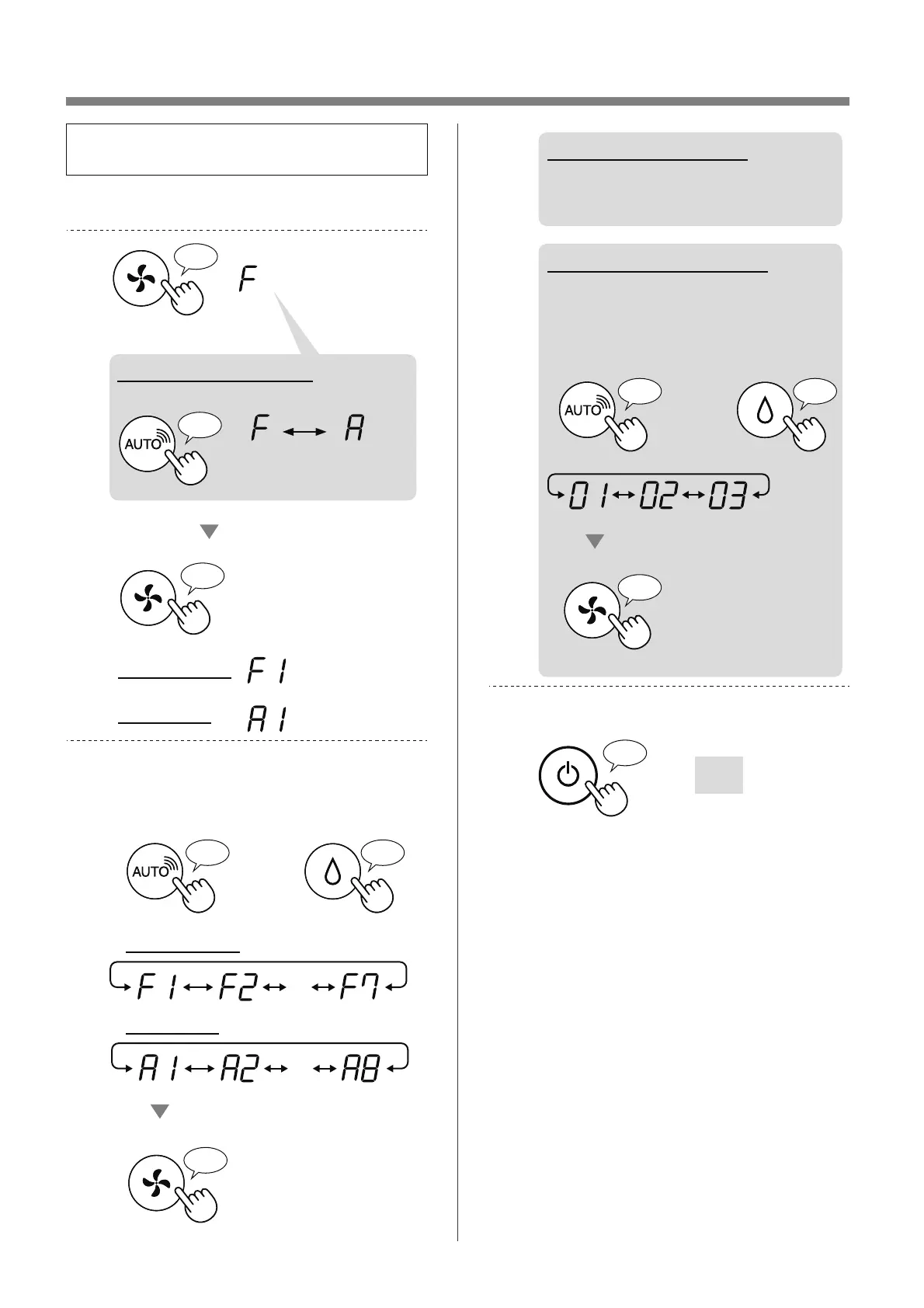
1.
Turn the product OFF.
2.
Press for 3 sec.
♪
♪
Set
Wi-Fi setting
Product setting
♪
When on Wi-Fi setting
Change “F” to “A”.
Product
setting
Wi-Fi
setting
3.
Select “Function number (F1-F7 or
A1-A8)” on page 15 - 18.
or
Go Forward
♪
Go Back
♪
・・・
Set
♪
Wi-Fi setting
Product setting
・・・
4.
When on Wi-Fi setting
Refer to page 16 - 18 for the
details of each function.
When on Product setting
Select “Setting number
(01 - 03)” on page 15.
Set
♪
〜
or
Go Forward
♪
Go Back
♪
5.
Finish the setting.
Goes off
♪
〜