19
LC-26GA5E
LC-32GA5E
LC-32GA8/LC-32BV8
LC-37GA8/LC-37BV8
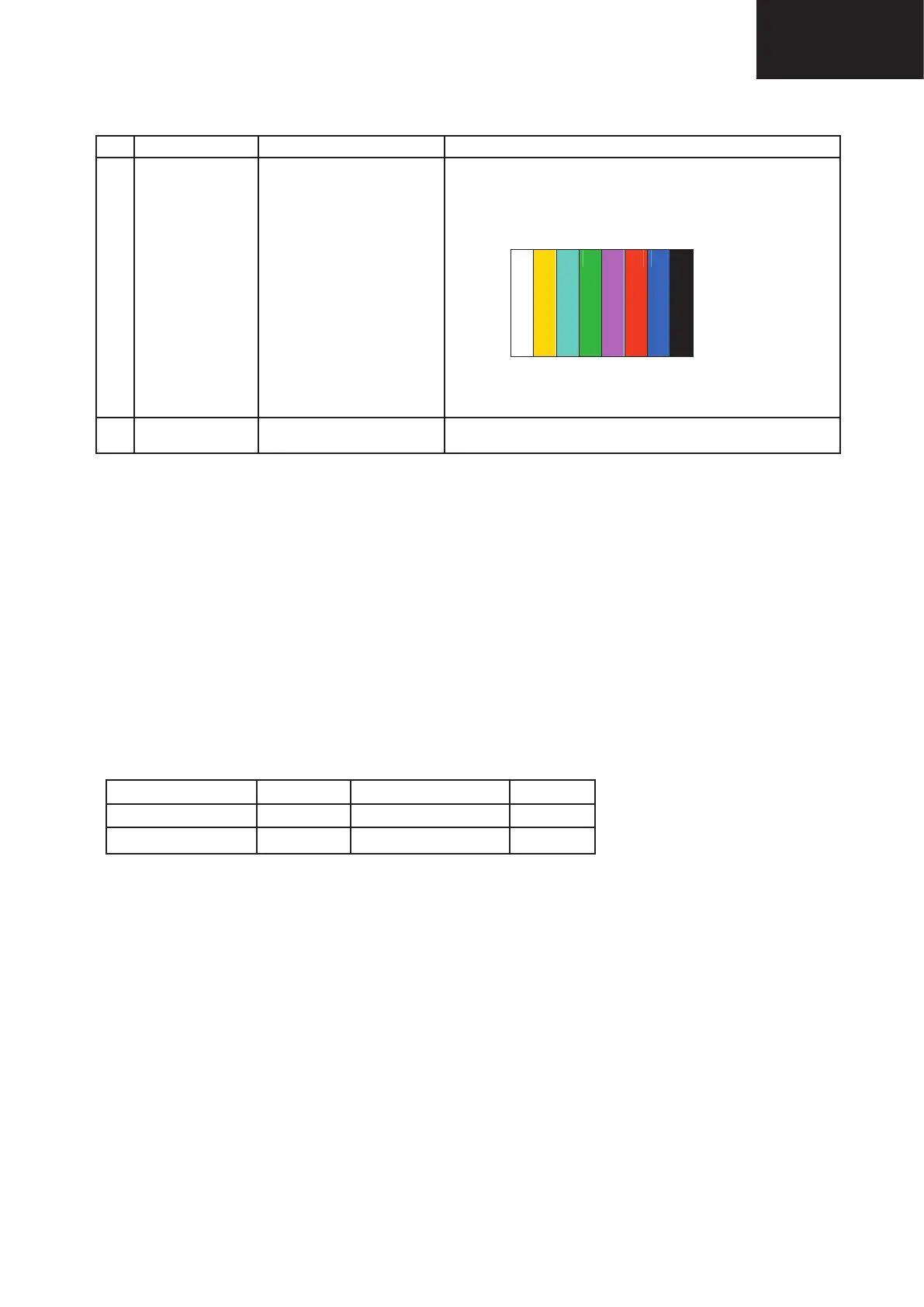
5.7. ADC Adjustment (Component 15K)
Adjustment Point Adjustment conditions Adjustment procedure
1 Setting [Signal] (576i/50)
COMP 15K, 50Hz
100% Full Field Color Bar
[Terminal]
EXT4 [COMPONENT]
• Feed the COMPONENT 15K 100% full field color bar signal (100%
color saturation) to EXT4 COMPONENT IN.
2 Auto adjustment
performance
Adjustment process page 4. Bring the cursor on [▪COMP15K ADJ] and press [OK].
[▪COMP15 ADJ OK] appears when finished.
↑ 100% white
[EXT 4]
6. White Balance Adjustment
Adjustment procedure Page 7/11 shows the value of adjustment gradation (IN value) and Adjustment procedure Page
8/11 & 9/11 show adj. offset value (initial value : 0). White balance adjustment is executed adjusting the adj. offset value,
indicated on Page 8/11 & 9/11.
Condition of the inspection: • Backlight: MAX (+8) [DYNAMIC]
• Colorimeter at screen centre
Adjustment reference device: Minolta CA-210
Tolerance adjustment spec. ±0.004, Inspection spec. : ±0.006 (GAMMA 1)
Tolerance adjustment spec. ±0.002, Inspection spec. : ±0.004 (GAMMA 2...6)
Adjustment: Check that the values on page 7/11 of process adjustment are set as below. If not, change them ac
-
cordingly.
M GAMMA IN 1 160 M GAMMA IN 2 320
M GAMMA IN 3
480 M GAMMA IN 4 640
M GAMMA IN 5
800 M GAMMA IN 6 960
1- Display the current adjustment status at point 6. (Page 9/11 of process adjustment)
The pattern for checking the adjustment status is toggled by pressing the “6” button on the remote control. (Normal
OSD display -> “6” -> pattern for check (OSD disappears) -> “6” -> normal OSD display -> …)
2- Read the value of the luminance meter.
3- Change M GAMMA R6/M GAMMA B6 (adjustment offset value) on page 9/11 of process adjustment so that the
values of the luminance meter approach x = 0.272 and y = 0.277.
(Basically, G is not changed. If adjustment fails only with R and B, then G should be reduced. In this case, the weaker
of R and B must be fixed.)
4- If G is changed in step “3”, change the values of M GAMMA G1 - M GAMMA G5 on pages 8/11 and 9/11 of process
adjustment as follows. When not changed, go to step “5”.
Offset value of M GAMMA G1 = (Offset value of M GAMMA G6)*(160/960)
Offset value of M GAMMA G2 = (Offset value of M GAMMA G6)*(320/960)
Offset value of M GAMMA G3 = (Offset value of M GAMMA G6)*(480/960)
Offset value of M GAMMA G4 = (Offset value of M GAMMA G6)*(640/960)
Offset value of M GAMMA G5 = (Offset value of M GAMMA G6)*(800/960)
← Black












 To Next Page