23
LC-26GA5E
LC-32GA5E
LC-32GD8E/RU
LC-32BT8E/RU
LC-37GD8E/RU
LC-37BT8E/RU
LC-32/37GD8E/RU
LC-32/37BT8E/RU
SOFTWARE UPDATING
There are 3 methods to update software in the VCTp: I2C method, RS-232C HyperTerminal and RS-232C Tera Term
method.
· RS-232C method is allowed when the TV is working properly and the action should be only software upgrade.
· I2C method is required when the VCTp fl ash is empty or corrupted (it means, any software inside IC running)
.
1. RS-232C Method Description (HyperTerminal).
The hardware tools requirement are:
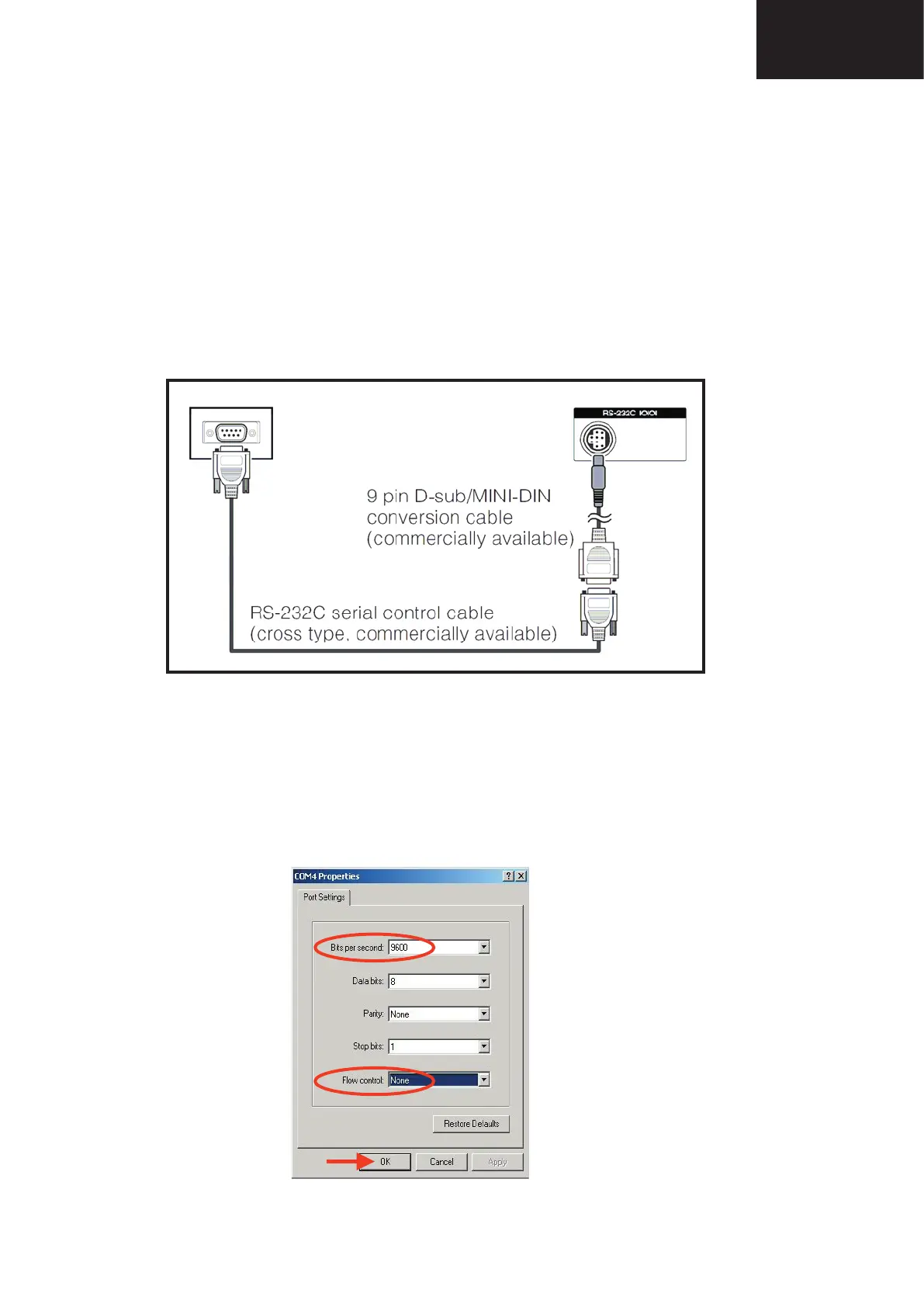
1. A Modem-null (Cross type) DB9 female to DB9 female cable.
2. An adaptor DB9 male to mini-Din 9 pin male cable (Sharp Code: QCNWGA015WJPZ)
3. Make the connections as indicated in the fi gure:
Before using RS-232C updating method is necessary to confi gure a Terminal PC software. HyperTerminal has been
selected as a Terminal software because it’s include in all Windows versions as an accessory, and you can fi nd it inside
“Accessories\Communications” folder. For this reason, please follow carefully the next steps:
1. First time HyperTerminal is used, it’s necessary to confi gure some settings. Follows next action to confi gure two
connection: low speed (9600bps) and high speed (115200bps).
2. Create a New Connection fi le with name “P55_9600bps”.
3. Select a free COM port and select the Port Settings properties as follows:
RS-232C METHOD DESCRIPTION.
The hardware tools requirement are:
1. A Modem-null (Cross type) DB9 female to DB9 female cable.
2. An adaptor DB9 male to mini-Din 9 pin male cable (Sharp Code: QCNWGA015WJPZ)
3. Make the connections as indicated in the figure:
Before using RS-232C updating method is necessary to configure a Terminal PC software.
HyperTerminal has been selected as a Terminal software because it’s include in all Windows
versions as an accessory, and you can find it inside “Accessories\Communications” folder. For
this reason, please follow carefully the next steps:
1. First time HyperTerminal is used, it’s necessary to
configure some settings. Follows next action to configure
two connection: low speed (9600bps) and high speed
(115200bps).
2. Create a New Connection file with name “P55_9600bps”.
3. Select a free COM port and select the Port Settings
properties as follows:
Computer TV set
RS-232C METHOD DESCRIPTION.
The hardware tools requirement are:
1. A Modem-null (Cross type) DB9 female to DB9 female cable.
2. An adaptor DB9 male to mini-Din 9 pin male cable (Sharp Code: QCNWGA015WJPZ)
3. Make the connections as indicated in the figure:
Before using RS-232C updating method is necessary to configure a Terminal PC software.
HyperTerminal has been selected as a Terminal software because it’s include in all Windows
versions as an accessory, and you can find it inside “Accessories\Communications” folder. For
this reason, please follow carefully the next steps:
1. First time HyperTerminal is used, it’s necessary to
configure some settings. Follows next action to configure
two connection: low speed (9600bps) and high speed
(115200bps).
2. Create a New Connection file with name “P55_9600bps”.
3. Select a free COM port and select the Port Settings
properties as follows:
Computer TV set










 To Next Page