33
LC-26GA5E
LC-32GA5E
LC-32GD8E/RU
LC-32BT8E/RU
LC-37GD8E/RU
LC-37BT8E/RU
LC-32/37GD8E/RU
LC-32/37BT8E/RU
2. How to update the Digital Board Software.
There are 2 methods to update the Digital Board Software on Flash Memory (IC4203) throught the Digital Proces-
sor (IC4001).
• Jig RS-232 Method (From PC trough RS-232C COM port).
• PCMCIA CARD (Compact Flash Memory) Method.
Note: The PCMCIA method is only compatible with those PCs running XP Windows Version.
2.1. Jig RS-232 Method Description
• Hardware requirements:
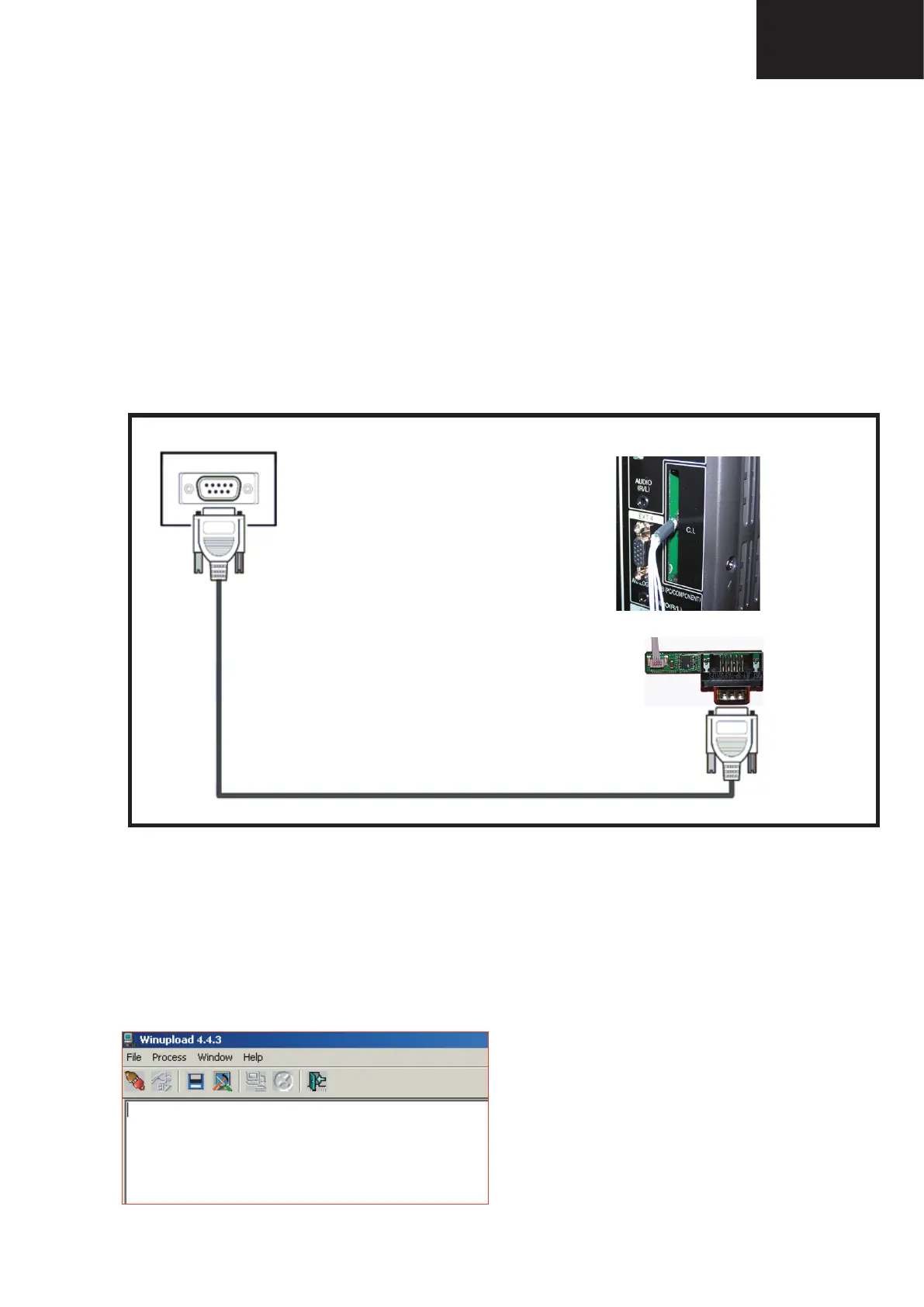
1. A modem null (Cross type) DB9 female to DB9 female cable.
2. The Jig Kit (Sharp Code: QCNWKA012WJZZ)
3. Make the connections as in the below fi gure.
24
LC-26GA5E
LC-32GA5E
LC-26P55E
LC-32P55E
LC-37P55E
SOFTWARE UPDATING
There are 2 methods to update software in the VCTp: I2C method and RS-232C method.
· RS-232C method is allowed when the TV is working properly and the action should be only software upgrade.
· I2C method is required when the VCTp flash is empty or corrupted (it means, any software inside IC running)
.
1 RS-232C Method Description
The hardware tools requirement are:
1. A Modem-null (Cross type) DB9 female to DB9 female cable.
2. An adaptor DB9 male to mini-Din 9 pin male cable (Sharp Code: QCNWGA015WJPZ)
3. Make the connections as indicated in the figure:
Software requirements :
To upgrade VCTp software from RS-232C external connector is necessary to use a Tera Term (Pro) free software.
The URL of Tera Term home page is:
http://hp.vector.co.jp/authors/VA002416/teraterm.html
(The address may be changed in future)
Tera Term (Pro) supported operating systems:
MS-Windows 95 or upper
MS-Windows NT 3.5 and 4.0 or upper
Note.- For Windows 3.1 use Tera Term version 1.X.
Copy all the distribution files to an empty floppy disk or temporary directory (for example C:\ TEMP ).
Run SETUP.EXE and follow the instruction given by it.
After the installation, the distribution files are no longer needed, you can delete them or may keep them in the floppy
disk.
How to use Tera Term Pro :
When the Tera Term (Pro) program is used, it’s necessary to configure some settings. Follows next action to config
-
ure the connection:
Computer
TV Set
(CI Terminal)
Jig
RS-232C serial control cable
(cross type, commercially available)
• Software requirements:
1. “Winupload” application software on PC.
• How to setup the “Winupload” software for the fi rst time:
1. Start “Winupload”. It will appear the following picture.










 To Next Page