37
LC-26GA5E
LC-32GA5E
LC-32GD8E/RU
LC-32BT8E/RU
LC-37GD8E/RU
LC-37BT8E/RU
LC-32/37GD8E/RU
LC-32/37BT8E/RU
2.2. PCMCIA Card (Compact Flash) Method.
• Hardware requirements:
1. Compact Flash Memory Card.
2. PCMCIA Compact Flash Adapter or USB Multi Card Reader.
• Software requirements:
1. “StorageMediaManager1.0.1“ application software, installed on PC.
2. “Loader 2.2” or higher application software, installed on DTV Set.
Note: Storage Media Manager only for Windows XP.
• How to prepare the CF Card using the “Storage Media Manager 1.0.1” (SMM):
1. Insert PCMCIA (Compact Flash(CF) + CF-Adapter)
5
2.B. PCMCIA Card (Compact Flash) Method.
Hardware requirements:
1. Compact Flash Memory Card.
2. PCMCIA Compact Flash Adapter or USB Multi Card Reader.
Software requirements:
1. “StorageMediaManager1.0.1“ application software, installed on PC.
2. “Loader 2.2” or higher application software, installed on DTV Set.
Note:
SMM only for Windows XP.
How to prepare the CF Card using the “Storage Media Manager 1.0.1” (SMM):
1. Insert PCMCIA (Compact Flash(CF) + CF-Adapter)
2. Execute SMM. If SMM does not appear or a Windows Error Box appears, please verify there are no USB
media drives connected to the PC.
Note:
Consider that it’s recommended remove unnecessary media during SMM execution. Probably, If you try to use an USB Multi Card
Reader with SMM doesn’t work fine.
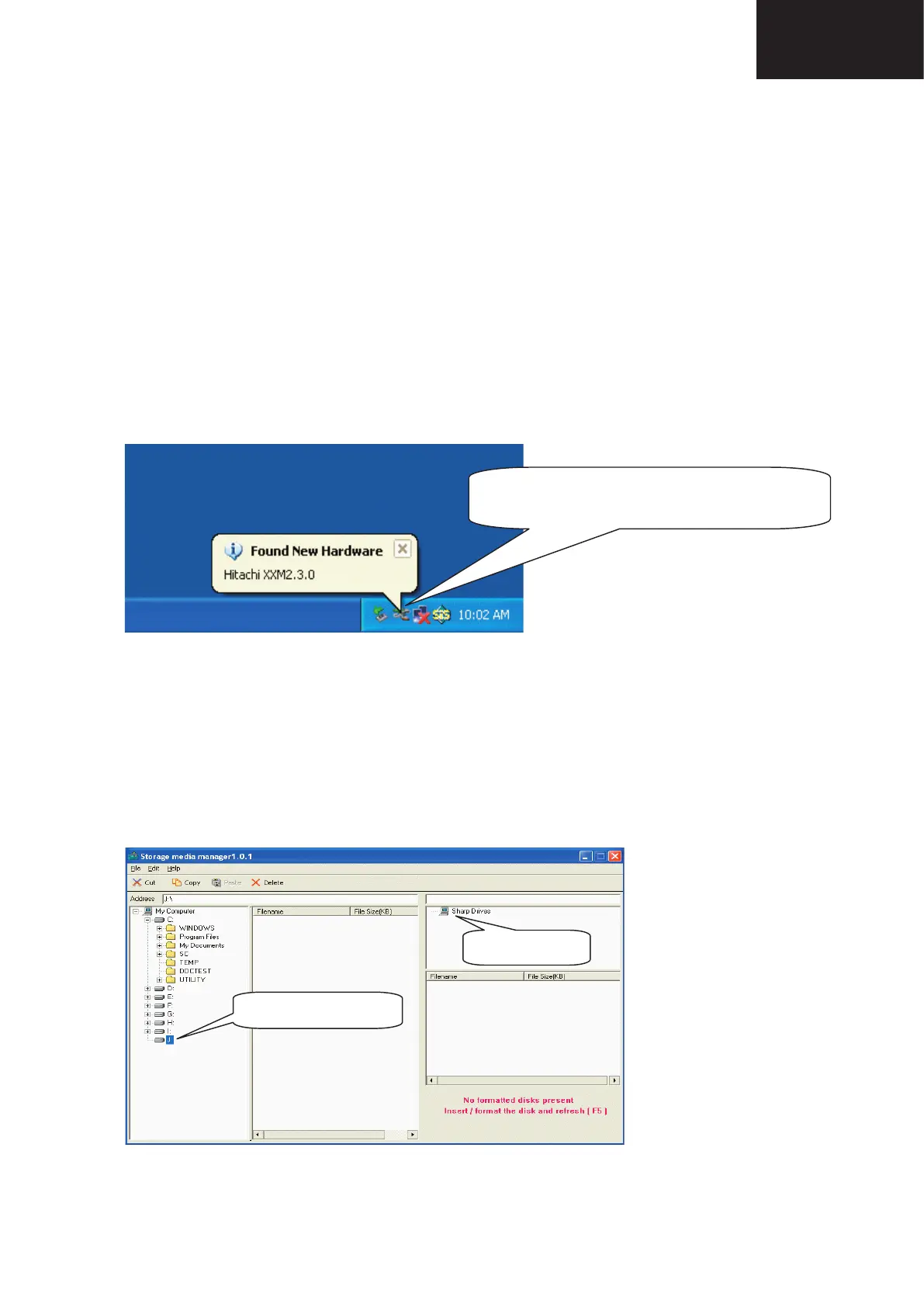
3. If the CF card has never been formatted for the SMM (is not same format type used in Windows), the SMM
will show you the PCMCIA-CF drive as a Windows Media Drives, hanged of the “My Computer” tree (“J” Drive
in the picture showed below).
But, if the PCMCIA-CF card had been formatted previously by SMM, directly the PCMCIA-CF drive will appear
in the SMM formatted Drives box (
Sharp Drives
). Please go to Item #6.
Please wait until OS recognizes the CARD.
Note: Sometimes this message doesn't appear.
EW PCMCIA-CF drive.
CARD is not SMM formatted yet.
Already SMM Formatted
CF CARDS!!!
2. Execute SMM. If SMM does not appear or a Windows Error Box appears, please verify there are no USB
media drives connected to the PC.
Note: Consider that it’s recommended remove unnecessary media during SMM execution. Probably, If you try
to use an USB Multi Card Reader with SMM doesn’t work fi ne.
3. If the CF card has never been formatted for the SMM (is not same format type used in Windows), the SMM
will show you the PCMCIA-CF drive as a Windows Media Drives, hanged of the “My Computer” tree (“J” Drive
in the picture showed below).
5
2.B. PCMCIA Card (Compact Flash) Method.
Hardware requirements:
1. Compact Flash Memory Card.
2. PCMCIA Compact Flash Adapter or USB Multi Card Reader.
Software requirements:
1. “StorageMediaManager1.0.1“ application software, installed on PC.
2. “Loader 2.2” or higher application software, installed on DTV Set.
Note:
SMM only for Windows XP.
How to prepare the CF Card using the “Storage Media Manager 1.0.1” (SMM):
1. Insert PCMCIA (Compact Flash(CF) + CF-Adapter)
2. Execute SMM. If SMM does not appear or a Windows Error Box appears, please verify there are no USB
media drives connected to the PC.
Note:
Consider that it’s recommended remove unnecessary media during SMM execution. Probably, If you try to use an USB Multi Card
Reader with SMM doesn’t work fine.
3. If the CF card has never been formatted for the SMM (is not same format type used in Windows), the SMM
will show you the PCMCIA-CF drive as a Windows Media Drives, hanged of the “My Computer” tree (“J” Drive
in the picture showed below).
But, if the PCMCIA-CF card had been formatted previously by SMM, directly the PCMCIA-CF drive will appear
in the SMM formatted Drives box (
Sharp Drives
). Please go to Item #6.
Please wait until OS recognizes the CARD.
Note: Sometimes this message doesn't appear.
NEW PCMCIA-CF drive.
CARD is not SMM formatted.
Already SMM Formatted
CF CARDS!!!
But, if the PCMCIA-CF card had been formatted previously by SMM, directly the PCMCIA-CF drive will appear
in the SMM formatted Drives box (Sharp Drives). Please go to Item #6.










 To Next Page