38
LC-26GA5E
LC-32GA5E
LC-32/37GD8E/RU
LC-32/37BT8E/RU
Digital Board Software Updating , PCMCIA (continued)
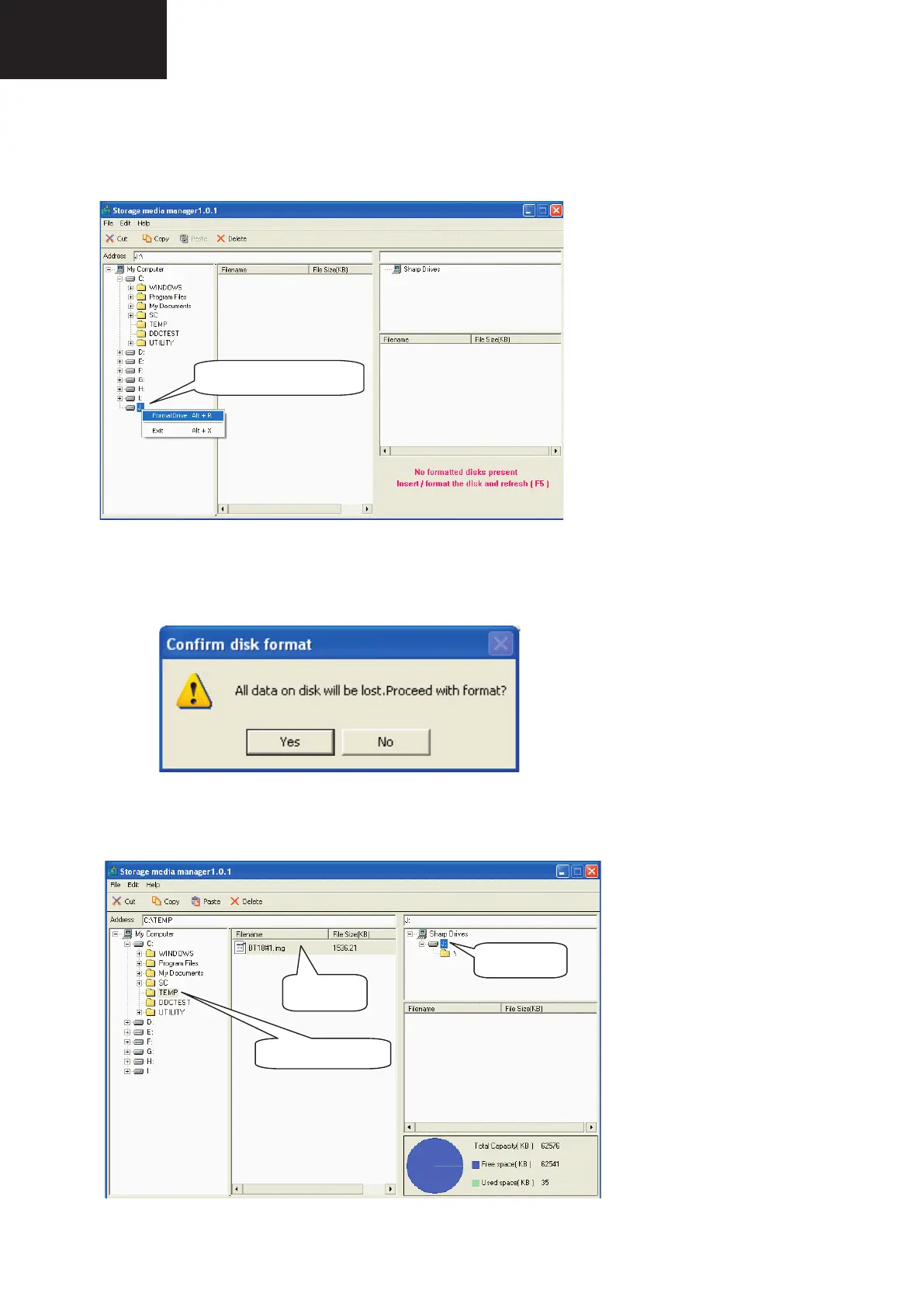
4. In case of not SMM formatted card, select PCMCIA-CD Drive and using the Right-Click Pop up Menu
please format the Drive.
6
4. In case of not SMM formatted card, select PCMCIA-CD Drive and using the Right-Click Popup Menu please
format the Drive.
5. Formatting the CF card. Select “Yes” to confirm the action.
NOTICE: All FC’s data of the inside are erased.
6. If SMM formatted card already appears under SHARP DRIVES box please continue, if not try to repeat from
item #1. Select origin folder and “.img” data file to be written in the CF card.
Select PCMCIA-CF Drive.
Select FormatDrive from Popup Menu.
selecting origin data folder
selecting origin
data ".img" file
5. Formatting the CF card. Select “Yes” to confi rm the action.
NOTICE: All FC’s data of the inside are erased.
NOTICE: All FC's data of the inside are erased
#5
select write ver. of "
img" file folder.
#6
select copy drive. (This is important.) and Drag&drop "img" file.
select write ver. of ".img" file
at first, select copy drive.
This is important.
next, Drag&Drop "img" file.
6. If SMM formatted card already appears under SHARP DRIVES box please continue, if not try to repeat from
item #1. Select origin folder and “.img” data fi le to be written in the CF card.
6
4. In case of not SMM formatted card, select PCMCIA-CD Drive and using the Right-Click Popup Menu please
format the Drive.
5. Formatting the CF card. Select “Yes” to confirm the action.
NOTICE: All FC’s data of the inside are erased.
6. If SMM formatted card already appears under SHARP DRIVES box please continue, if not try to repeat from
item #1. Select origin folder and “.img” data file to be written in the CF card.
Select PCMCIA-CF Drive.
Select FormatDrive from Popup Menu.
selecting origin data folder
selecting origin data
".img" file
SMM formatted
Card










 To Next Page