40
LC-26GA5E
LC-32GA5E
LC-32/37GD8E/RU
LC-32/37BT8E/RU
10. Close SMM application.
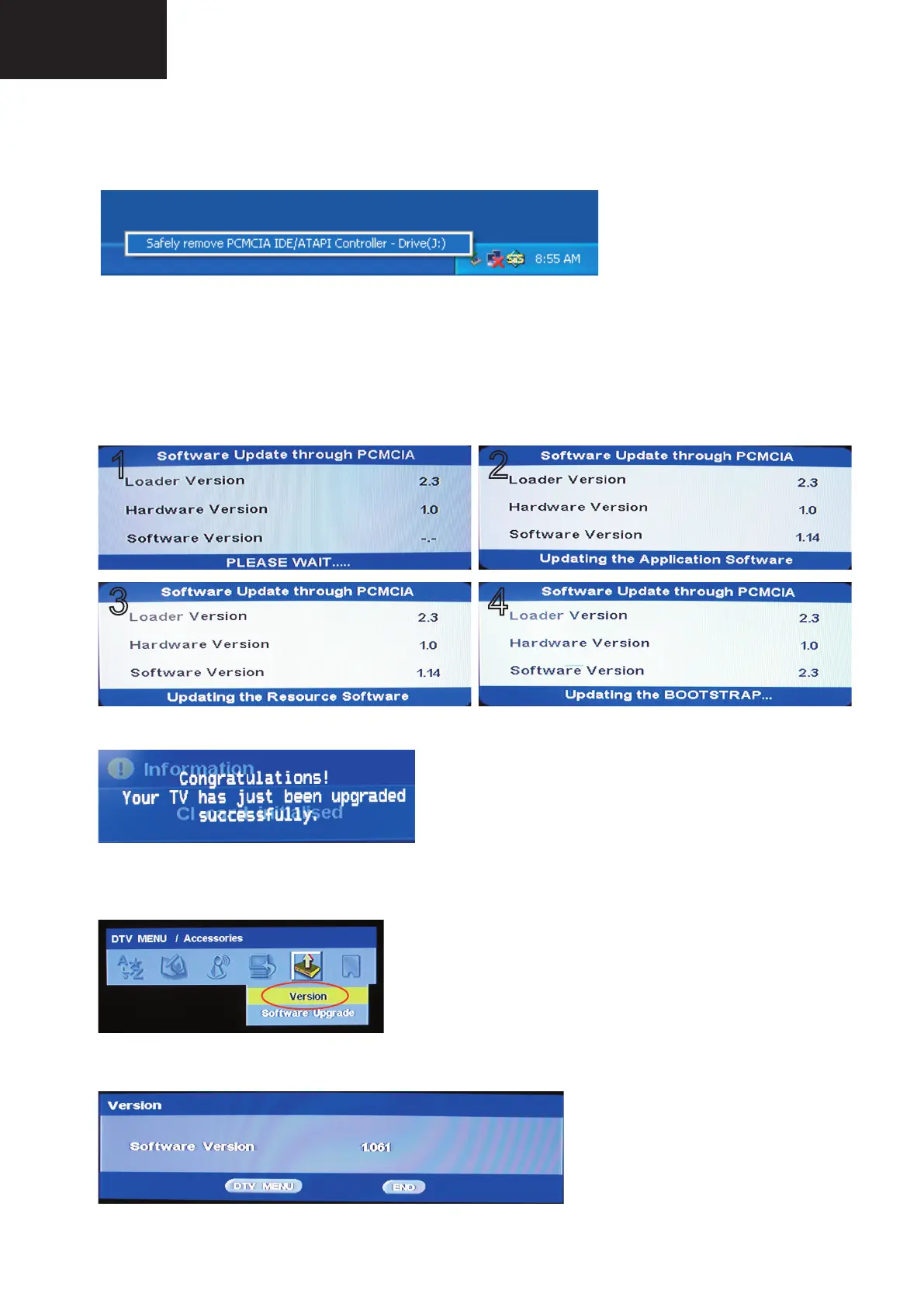
11. Remove PCMCIA safely using the Windows Task bar pop up menu (Right-click over the Tray Icon).
12. Now, the PCMCIA-CF card is prepared to update the TV set.
• Procedure to update the TV Set using PCMCIA-CF Card:
1. Switch Off the LCD TV Set.
2. Insert PCMCIA Card (already prepared according the details before given at “How to prepare the CF Card
using the “Storage Media Manager 1.0.1” (SMM))”.
3. Switch On the LCD TV Set (it starts automatically the updating, Items #1 to #4).
1
2
4
3
4. Wait till the fi nishing indication is shown.
5. For checking the correct update, please Select DTV Menu on TV Set. The following On Screen Display will
appear.
6. Select “Version”. The updated version can be verifi ed.
Digital Board Software Updating , PCMCIA (continued)










 To Next Page