9
Using external equipment
Setting the input source
To view external source images, select the input source using b on the remote control unit or TV.
NOTE
• The cables marked with * are commercially available items.
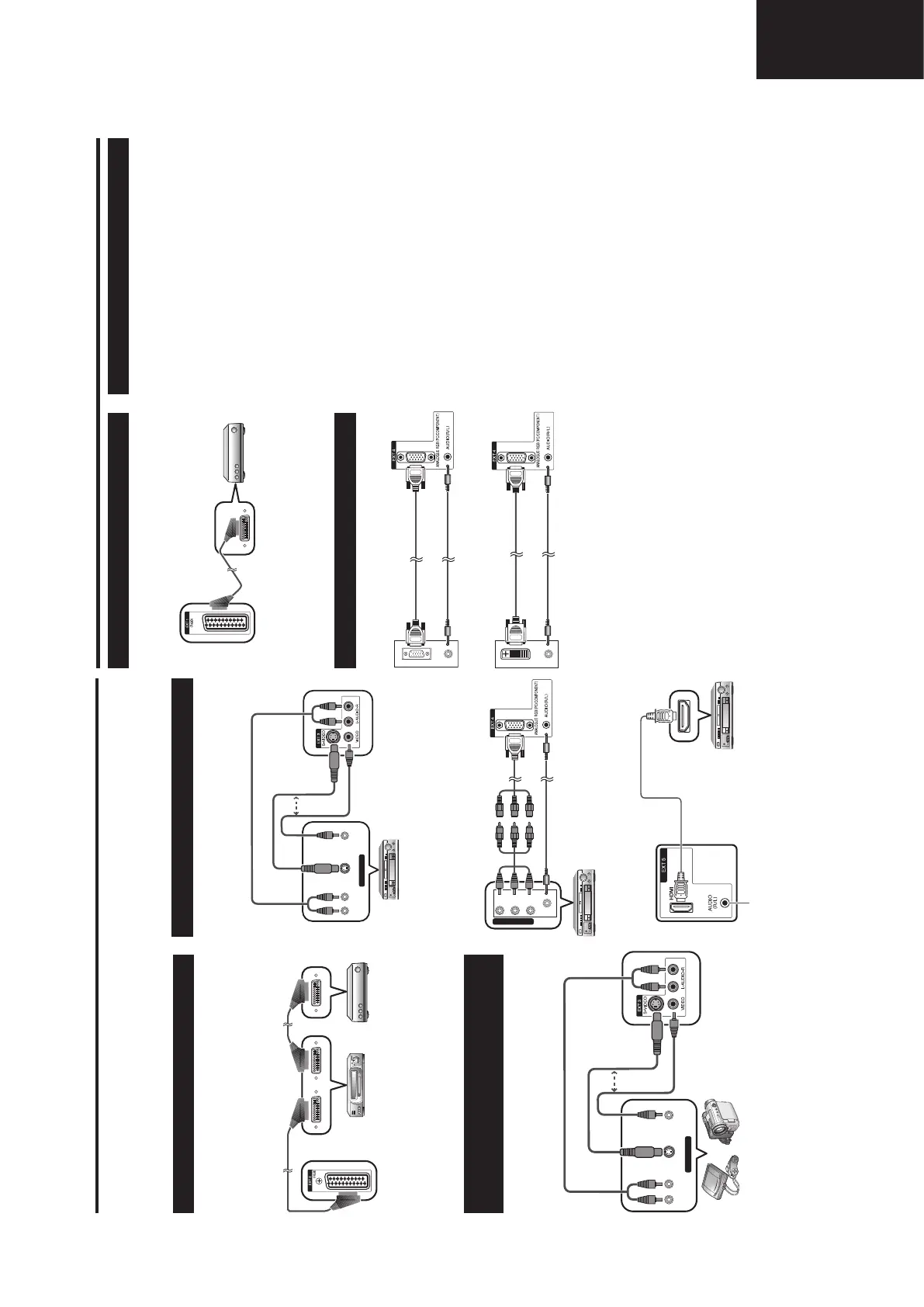
Connecting a VCR
You can use the EXT 1 or 2 terminals when connecting
a VCR and other audiovisual equipment.
If your VCR supports TV-VCR advanced AV Link
systems, you can connect the VCR to the EXT 2
terminal of the TV using the fully-wired SCART cable.
NOTE
• TV-VCR advanced AV Link systems may not be compatible
with some external sources.
• TV-OUT from EXT 1 is not outputted when EXT 5 (HDMI)
or DTV is selected as the input.
VCR Decoder
SCART cable* SCART cable*
EXT 1 or 2
VIDEOS-VIDEOL-AUDIO-R
AV OUTPUT
Connecting a DVD player
You can use the EXT 2, 3, 4 or 5 (HDMI) terminals
when connecting to a DVD player and other
audiovisual equipment.
DVD player
EXT 3
A game console, camcorder and some other
audiovisual equipment are conveniently connected
using the EXT 3 terminals.
NOTE
• EXT 3: The S-VIDEO terminal has priority over the VIDEO
terminals.
Connecting a game console or
camcorder
Game console Camcorder
or
S-video cable*
Composite
video cable*
AUDIO cable*
EXT 3
VIDEOS-VIDEOL-AUDIO-R
AV OUTPUT
or
AUDIO cable*
S-video cable*
Composite
video cable*
Y P
B
(
C
B)
P
R
(
C
R)
COMPONENT
EXT 4
ø 3.5 mm stereo minijack cable*
Component
cable*
3 RCA to 15-pin
D-sub adapter
(Supplied)
DVD player
HDMI cable*
When using an HDMI-DVI conversion
adapter/cable, input the Audio signal
here.
EXT 5
DVD player
NOTE
• When connecting an HDMI-DVI conversion adapter/cable
to the HDMI terminal, the image may not come in clearly.
NOTE
• EXT 3: The S-VIDEO terminal has priority over the VIDEO
terminals.
LC-32GD8E_GB_a 06.5.1, 0:07 PM9
10
Using external equipment
NOTE
• The cables marked with * are commercially available
items.
• The PC input terminals are DDC1/2B-compatible.
• Refer to page 33 for a list of PC signals compatible with
the TV.
• Macintosh adaptor may be required for use for some
Macintosh computers.
• When connecting to a PC, the correct input signal type is
automatically detected.
This TV incorporates three typical AV Link functions
for smooth connections between the TV and other
audiovisual equipment.
One Touch Play
While the TV is in standby mode, it automatically turns
on and plays back the image from the audiovisual
source (e.g. VCR, DVD).
WYSIWYR (What You See Is What You Record)
When the remote control unit of the connected VCR
has the WYSIWYR button, you can automatically start
recording by pressing the WYSIWYR button.
Preset Download
Automatically transfers the channel preset information
from the tuner on the TV to the one on the connected
audiovisual equipment (e.g. VCR) via the EXT 2
terminal.
NOTE
• Refer to operation manuals of each external equipment
for the details.
• Only works when the audiovisual equipment is connected
to the EXT 2 terminal on the TV with AV Link via a fully
wired SCART.
• The use of the AV Link function is only possible if the TV-
set has enforced a complete auto-installation with the
connected audiovisual equipment (page 8, Initial auto
installation).
The availability of the AV Link function depends on the
audiovisual equipment used. Depending on the
manufacturer and type of equipment used, it is possible
that the described functions may be completely or partially
unusable.
Using AV Link function
Connecting a PC
Use the EXT 4 terminals to connect a PC.
PC
ø 3.5 mm stereo minijack cable*
RGB cable*
PC
RGB/DVI conversion cable*
ø 3.5 mm stereo minijack cable*
EXT 4
EXT 4
Connecting a decoder
You can use the EXT 1 terminal when connecting a
decoder and other audiovisual equipment.
NOTE
• In cases when the decoder needs to receive signal from
the TV, make sure to set “Decoder” to “EXT1” in the
Programme Setup “Manual Adjust” menu. (See page 16.)
• Do not connect the decoder to the EXT 2 terminal.
Decoder
EXT 1
SCART cable*
LC-32GD8E_GB_b 06.5.1, 0:07 PM10










 To Next Page