3
Supplied accessories
Quick guide
Remote control unit (g1) AC cord (g1)
Pages 5 and 6
Product shape varies in
some countries.
Page 4
• “AAA” size battery (
g2) ...... Page 5
Cable clamp (g1)
Page 4
Cable tie (g1)
Page 4
3 RCA to 15-pin D-sub
adapter (
g1)
Page 9
• Operation manual (This publication)
Stand unit (g1)
Page 3
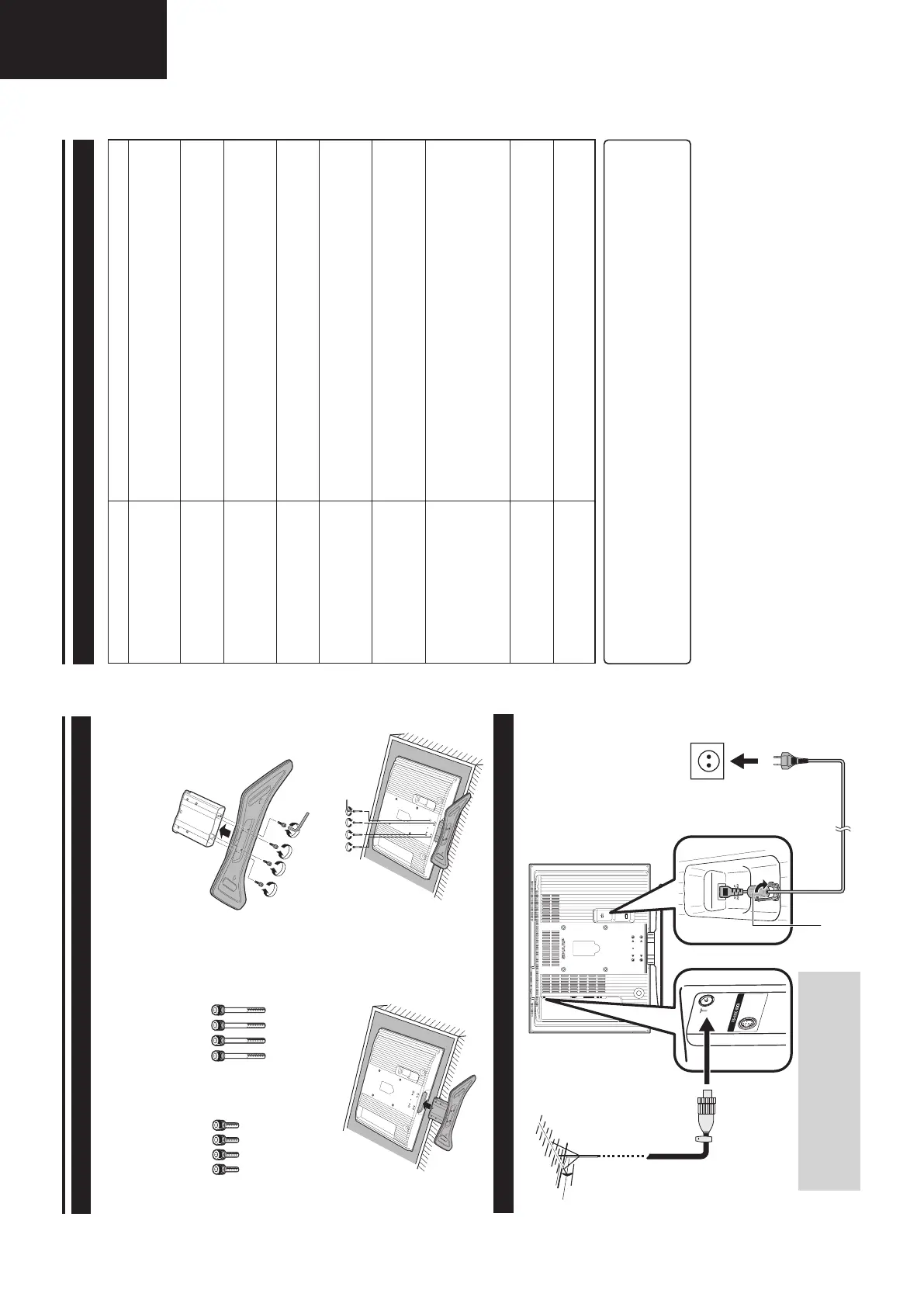
Attaching the stand
Before attaching (or detaching) stand, unplug the AC cord from the AC INPUT terminal.
1 Confirm the 8 screws supplied with the TV.
Short screws (
m4)
(used in step 2)
Long screws (m4)
(used in step 4)
2 Attach the two parts of the stand unit to each other
using the 4 short screws as shown.
3 Insert the stand into the opening on the bottom of
the TV.
4 Insert and tighten the 4 long screws on the rear
of the TV as shown.
NOTE
• To detach the stand, perform the above steps in reverse order.
Before performing work spread cushioning over the base area to lay the TV on, making sure the area is
completely flat. This will prevent it from being damaged.
LC-32GD8E_GB_a 06.5.1, 0:06 PM3
4
Quick guide
Setting the TV
Bundling the cables
Setting the TV on the wall
• Installing the LCD Colour TV requires special skill that should only be performed by qualified service personnel.
Customers should not attempt to do the work themselves. SHARP bears no responsibility for improper mounting
or mounting that results in accident or injury.
• You can ask a qualified service personnel about using an optional bracket to mount the TV to the wall.
Standard DIN45325 plug
(IEC 169-2)
75-ohm coaxial cable
Antenna
Connect the antenna cable from your antenna-/
cable socket or the (room-/roof) antenna for
antenna input terminal on the back of your TV set
to receive digitally/terrestrially broadcast stations.
An indoor antenna can also be used under good
reception conditions. Passive and active room
antennas are offered commercially. In an active
antenna its power is supplied via the antenna
input terminal.
The supply voltage (5V) must be correspondingly
set under “Supply Voltage”. (See page 18.)
Ferrite Core
The Ferrite Core should be permanently attached
and never removed from the AC cord.
AC cord
Product shape
varies in some
countries.
Cable clampCable tie
Place the TV close
to the AC outlet, and
keep the power plug
within reach.
Ferrite Core
LC-32GD8E_GB_a 06.5.1, 0:06 PM4
32
• Check if you pressed B on the remote control unit. (See page 8.)
If the indicator on the TV lights up red, press
B.
• Is the AC cord disconnected? (See page 4.)
• Check if you pressed
a on the TV. (See page 8.)
• External influences such as lightning, static electricity, etc., may cause improper
operation. In this case, operate the unit after first turning the power off, or
unplugging the AC cord and re-plugging it in after 1 or 2 minutes.
• Are batteries inserted with polarity (
e, f) aligned? (See page 5.)
• Are batteries worn out? (Replace with new batteries.)
• Are you using it under strong or fluorescent lighting?
• Is a fluorescent light illuminated to remote control sensor?
• Is the image position correct? (See page 18.)
• Are screen mode adjustments (4:3 Mode/WSS) such as picture size made
correctly? (See pages 18 and 20.)
• Adjust the picture tone. (See pages 13 and 14.)
• Is the room too bright? The picture may look dark in a room that is too bright.
• Check the colour system setting. (See pages 16 and 19.)
• Check the HDMI Setup setting. (See page 19.)
• The unit’s internal temperature has increased.
Remove any objects blocking vent or clean.
• Check the power control setting. (See page 15.)
• Is sleep timer set? Press SLEEP on the remote control unit until it sets to Off.
• Is connection to other components correct? (See pages 9 and 10.)
• Is input signal type selected correctly after connection? (See page 19.)
• Is the correct input source selected? (See page 9.)
• Is non-compatible signal being input? (See page 33.)
• Is picture adjustment correct? (See pages 13 and 14.)
• Is the antenna connected properly? (See page 4.)
• Is “On” selected in “Audio Only”? (See page 18.)
• Is the volume too low? (See pages 6 and 7.)
• Make sure that headphones are not connected. (See page 7.)
• Check if you pressed
e on the remote control unit. (See page 6.)
• Check if “Monochrome” is set to “On”. If so, set it to “Off”. (See page 14.)
Troubleshooting
Appendix
IMPORTANT NOTE ON RESETTING THE PIN
We suggest that you remove the following instruction from the operation manual to prevent children from
reading it. As this operation manual is multilingual, we also suggest the same with each language. Keep it in
a safe space for future reference.
Cautions regarding use in high and low temperature environments
• When the unit is used in a low temperature space (e.g. room, office), the picture may leave trails or appear slightly
delayed. This is not a malfunction, and the unit will recover when the temperature returns to normal.
• Do not leave the unit in a hot or cold location. Also, do not leave the unit in a location exposed to direct sunlight or near
a heater, as this may cause the cabinet to deform and the LCD panel to malfunction.
Storage temperature: –20°C to
e60°C.
1 Repeat steps 1 to 3 in Changing the PIN. (See page 17.)
2 Enter “3001” to cancel out the current PIN.
• The PIN resets to the factory preset “1234”.
Problem Possible Solution
• No power.
• Unit cannot be operated.
• Remote control unit does not
operate.
• Picture is cut off.
• Strange colour, light colour, or
dark, or colour misalignment.
• Power is suddenly turned off.
• No picture.
• No sound.
• The DTV menu screen is
displayed in monochrome and
hard to select the item.
LC-32GD8E_GB_f 06.5.1, 0:11 PM32










 To Next Page