9
LC-26GA5E
LC-32GA5E
LC-32GD8E/RU
LC-32BT8E/RU
LC-37GD8E/RU
LC-37BT8E/RU
LC-32/37GD8E/RU
LC-32/37BT8E/RU
33
Appendix
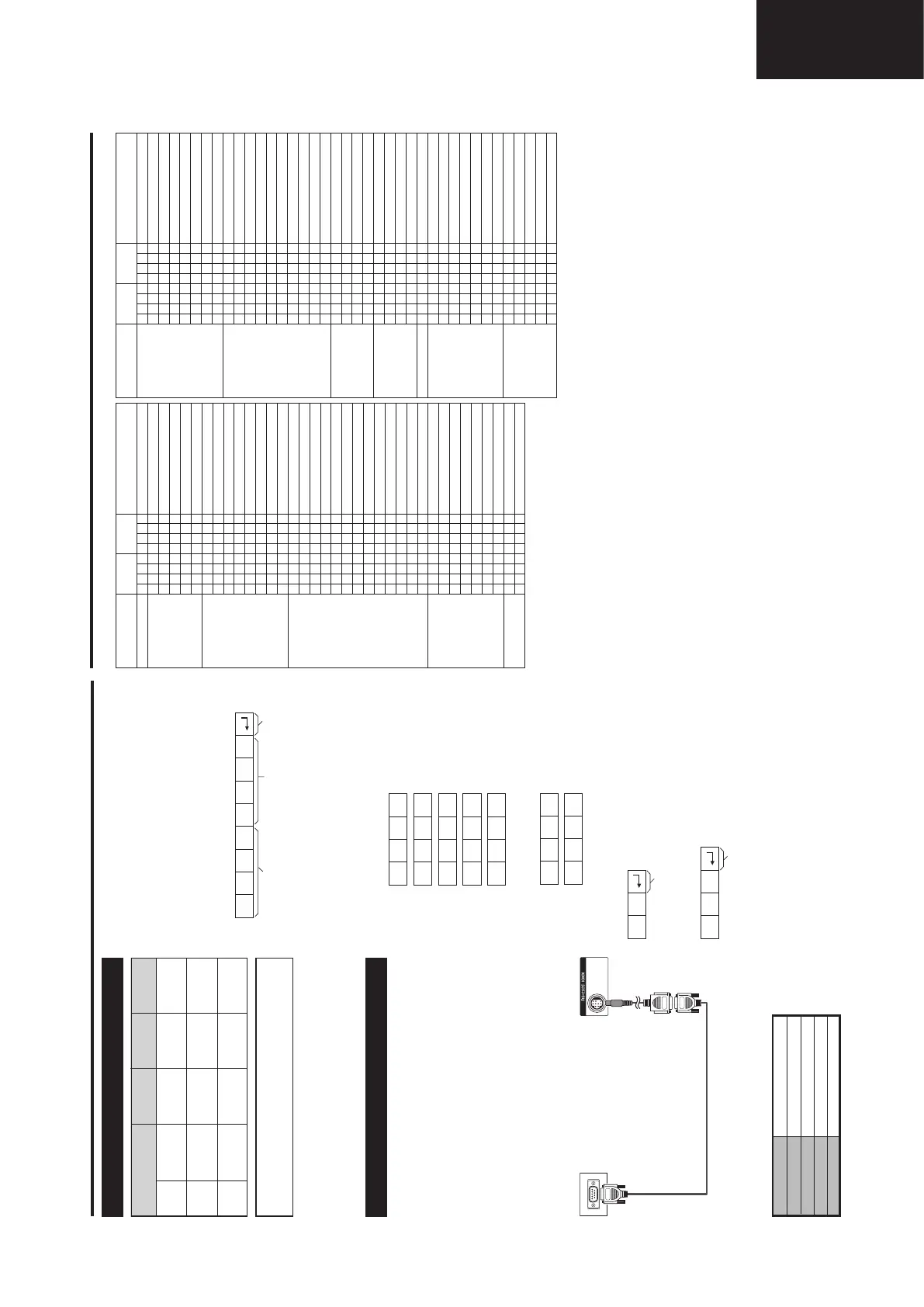
PC compatibility chart
Resolution
Horizontal
Frequency
Vertical
Frequency
VESA
Standard
640 g 480VGA
31.5 kHz 60 Hz �
800 g 600SVGA
37.9 kHz 60 Hz �
1024 g 768XGA
48.4 kHz 60 Hz
�
Communication procedure
Send the control commands from the PC via the RS-
232C connector.
The TV operates according to the received command
and sends a response message to the PC.
Do not send multiple commands at the same time. Wait
until the PC receives the OK response before sending
the next command.
Return codeCommand 4-digits Parameter 4-digits
Command format
Eight ASCII codes
e CR
Command 4-digits: Command. The text of four characters.
Parameter 4-digits: arameter 0 – 9,
g, blank, ?
C1 C2 C3 C4 P1 P2 P3 P4
Parameter
Input the parameter values, aligning left, and fill with
blank(s) for the remainder. (Be sure that four values are
input for the parameter.)
When the input parameter is not within an adjustable
range,
“ERR” returns. (Refer to “Response code format”.)
When
“?” is input for some commands, the present setting
value responds.
0 0 5 5
1 0 0
– 3 0
0 0 0 9
0
? ? ? ?
?
Return code (0DH)
Response code format
Normal response
Problem response (communication error or incorrect
command)
Return code (0DH)
O K
E R R
RS-232C port specifications
PC Control of the TV
• When a program is set, the TV can be controlled
from the PC using the RS-232C terminal.
The input signal (PC/video) can be selected, the
volume can be adjusted and various other
adjustments and settings can be made, enabling
automatic programmed playing.
• Attach an RS-232C cable cross-type (commercially
available) to a 9 pin D-sub/MINI-DIN (optional: AN-
A1RS) for the connections.
NOTE
• This operation system should be used by a person who is
accustomed to using PCs.
Communication conditions
Set the RS-232C communications settings on the PC
to match the TV
’s communications conditions. The TV’s
communications settings are as follows:
Baud rate:
Parity bit:
Data length:
Stop bit:
Flow control:
9,600 bps
8 bits
None
1 bit
None
RS-232C serial control cable
(cross type, commercially available)
9 pin D-sub/MINI-DIN
conversion cable
(optional: AN-A1RS)
VGA, SVGA and XGA are registered trademarks
of International Business Machines Co., Inc.
NOTE
• This TV has only limited PC compatibility, correct operation
can only be guaranteed if the video card conforms exactly
to the VESA 60Hz standard. Any variations from this
standard will result in picture distortions.
LC-32GD8E_GB_f 06.5.1, 0:11 PM33
34
Appendix
Commands
P
I
I
I
I
I
D
D
C
C
D
D
D
D
I
I
I
I
I
I
I
I
I
I
I
I
I
A
A
A
A
A
A
A
V
V
POWER OFF
INPUT SWITCHING (Toggle)
TV (CHANNEL FIXED)
DTV (CHANNEL FIXED)
EXT1
– 5 (1 – 5)
1 to 5, ERR (TV/DTV)
TV DIRECT CHANNEL (1
– 99)
1 to 99
CHANNEL UP
CHANNEL DOWN
DTV DIRECT CHANNEL (1 to 999)
1 to 999
DTV CHANNEL UP
DTV CHANNEL DOWN
EXT1 (Y/C)
EXT1 (CVBS)
EXT1 (RGB)
0 to 2
EXT2 (Y/C)
EXT2 (CVBS)
EXT2 (RGB)
0 to 2
EXT3
EXT4 (RGB)
EXT4 (COMPONENT)
0 to 1
EXT5 (HDMI)
AV MODE SELECTION (Toggle)
STANDARD
SOFT
ECO
USER
DYNAMIC
1 to 5
VOLUME (0
– 60)
0 to 60
POWER SETTING
INPUT SELECTION A
CHANNEL
INPUT SELECTION B
AV MODE
SELECTION
VOLUME
O
T
T
D
A
A
C
C
H
H
T
T
T
T
N
N
N
N
N
N
N
N
N
N
N
N
N
V
V
V
V
V
V
V
O
O
W
G
V
T
V
V
C
C
U
D
V
V
U
D
P
P
P
P
P
P
P
P
P
P
P
P
P
M
M
M
M
M
M
M
L
L
R
D
D
V
D
D
H
H
P
W
D
D
P
W
1
1
1
1
2
2
2
2
3
4
4
4
5
D
D
D
D
D
D
D
M
M
0
_
_
_
*
?
*
?
_
_
*
?
_
_
0
1
2
?
0
1
2
?
0
0
1
?
0
0
1
2
3
4
5
?
*
?
_
_
_
_
_
?
*
?
_
_
*
?
_
_
_
_
_
?
_
_
_
?
_
_
_
?
_
_
_
_
_
_
_
?
*
?
_
_
_
_
_
?
_
?
_
_
*
?
_
_
_
_
_
?
_
_
_
?
_
_
_
?
_
_
_
_
_
_
_
?
_
?
_
_
_
_
_
?
_
?
_
_
_
?
_
_
_
_
_
?
_
_
_
?
_
_
_
?
_
_
_
_
_
_
_
?
_
?
CONTROL ITEM
COMMAND PARAMETER
CONTROL
CONTENTS
CONTROL ITEM
COMMAND PARAMETER
CONTROL
CONTENTS
H
H
V
V
C
C
P
P
W
W
W
W
W
W
W
W
W
W
M
M
M
M
A
A
A
A
A
O
O
O
O
O
O
O
T
T
T
D
D
H-POSITION AV (
10 – 10)
AV (
10 – 10)
V-POSITION AV (
20 – 20)
AV (
20 – 20)
CLOCK (0
– 180)
0 to 180
PHASE (0
– 40)
0 to 40
WIDE MODE (Toggle)
NORMAL (AV)
ZOOM 14:9 (AV)
PANORAMA (AV)
FULL (AV)
CINEMA 16:9 (AV)
CINEMA 14:9 (AV)
NORMAL (PC)
FULL (PC)
1 to 10
MUTE (Toggle)
MUTE ON
MUTE OFF
1 to 2
SURROUND (Toggle)
SURROUND ON
SURROUND OFF
1 to 2
SOUND SELECT (ST/Bilingual/mono)
OFF
30 m
1 h 00 m
1 h 30 m
2 h 00 m
2 h 30 m
0 to 150
TEXT OFF
TEXT CHANGE (Toggle)
0 to 1
DIRECT PAGE JUMP (100
– 899)
100 to 899
P
P
P
P
L
L
H
H
I
I
I
I
I
I
I
I
I
I
U
U
U
U
C
C
C
C
C
F
F
F
F
F
F
F
E
E
E
C
C
O
O
O
O
C
C
S
S
D
D
D
D
D
D
D
D
D
D
T
T
T
T
D
D
D
D
H
T
T
T
T
T
T
T
X
X
X
P
P
S
S
S
S
K
K
E
E
E
E
E
E
E
E
E
E
E
E
E
E
E
E
V
V
V
V
A
M
M
M
M
M
M
M
T
T
T
G
G
*
?
*
?
*
?
*
?
0
1
2
3
4
5
6
9
1
?
0
1
2
?
0
1
2
?
_
0
1
2
3
4
5
?
0
1
?
*
?
*
?
*
?
*
?
*
?
_
_
_
_
_
_
_
_
0
?
_
_
_
?
_
_
_
?
_
_
_
_
_
_
_
?
_
_
?
*
?
*
?
*
?
*
?
_
?
_
_
_
_
_
_
_
_
_
?
_
_
_
?
_
_
_
?
_
_
_
_
_
_
_
?
_
_
?
*
?
_
?
_
?
_
?
_
?
_
_
_
_
_
_
_
_
_
?
_
_
_
?
_
_
_
?
_
_
_
_
_
_
_
?
_
_
?
_
?
WIDE MODE
POSITION
SURROUND
MUTE
AUDIO CHANGE
SLEEP TIMER
TEXT
NOTE
• If an underbar (_) appears in the parameter column, enter a space.
• If an asterisk (*) appears, enter a value in the range indicated in brackets under CONTROL CONTENTS.
User-
adjusted rating
Universal
Parental
X-rated
Universal
Parental
X-rated
—
�
�
—
�
—
—
—
—
Rating table for Child Lock
Broadcasted
rating
User-
adjusted rating
Broadcasted
rating
4 5 6 7 8 9 10 11 12 13 14 15 16 17 18
AGE
Universal
Parental
X-rated
�
�
�
� � � � — — — — — — — — — —
� � � � � � � � � � � � � �
— — — — — — — — — — — — — —
LC-32GD8E_GB_f 06.5.1, 0:11 PM34
Operation Manual (Continued)










 To Next Page