Home
Sharp
TV
LC-32LE40E
Page 36
Sharp LC-32LE40E - Page 36
157 pages
Manual
Save Page as PDF
To Next Page
To Next Page
To Previous Page
To Previous Page
Loading...
LC-32LE40E-LC-42LE40E
36
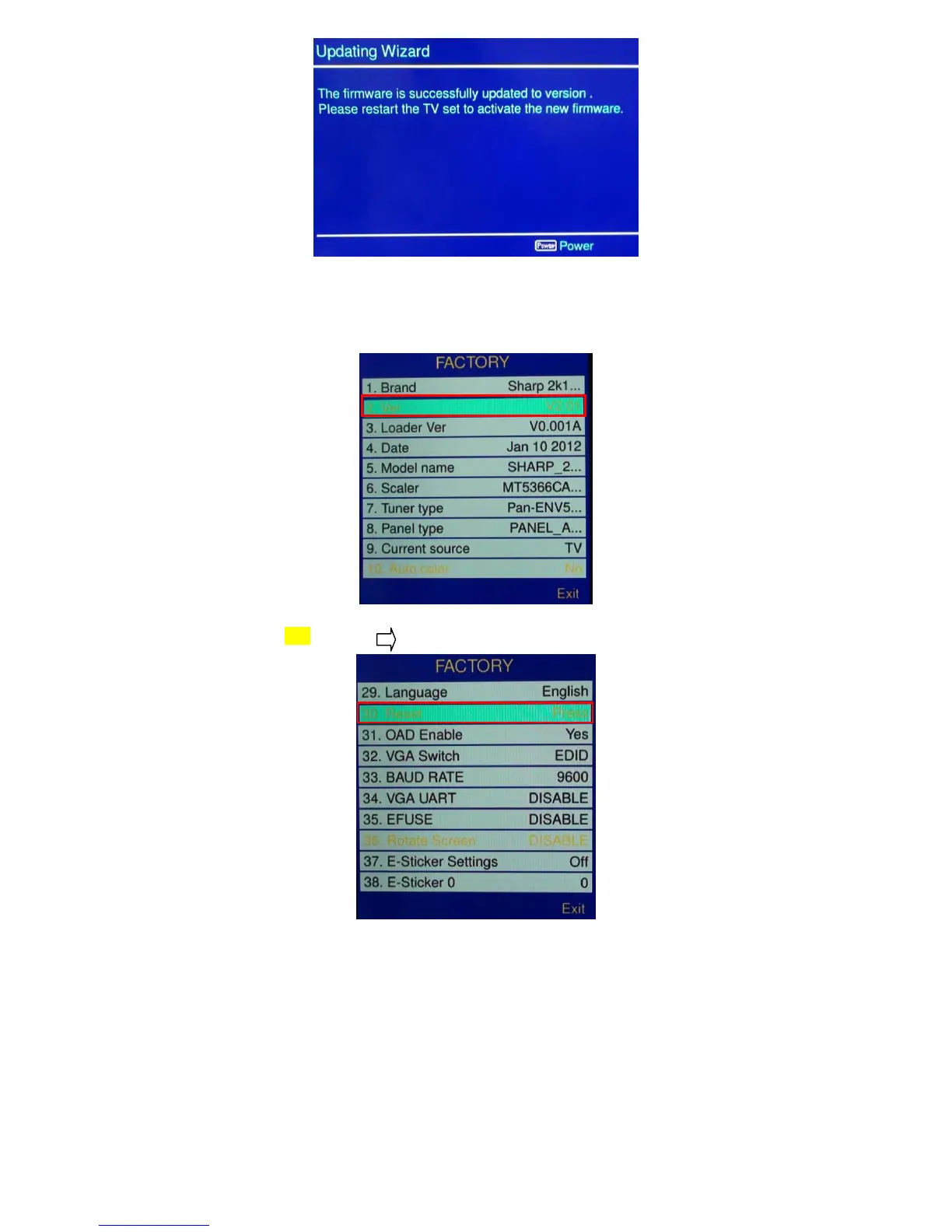
2.5 Remove USB disk from TV.
2.6 Check if the software version is correct.
Press “MENU+1999+PRE PR”, enter factory mode.
2.7 Please do factory reset, select reset then press
.
2.8 Reset finish, AC OFF.
35
37
Table of Contents
Main Page
Default Chapter
1
Table of Contents
1
Sharp Corporation
1
Safety Precaution Important Service Safety Precaution
2
Precautions for Using Lead-Free Solder
3
Chapter 1. Operation Manual [1] Specifications
4
Operation Manual
6
Mount the Tv Base
8
Wall Mounting
8
Installing Batteries in the Remote Control Unit
9
Using the Remote Control Unit
9
Information on the Software License for this Product
10
Dimensions
11
Chapter 2. Removing of Major Parts [1] Assy/Panel Removal
12
Set Re-Assembly
22
Chapter 3. Adjustment Procedure
23
Adjustment Procedure
23
Software Upgrade Produce
35
Chapter 4. Troubleshooting Table [1] Troubleshooting Table
41
Chapter 5. Major IC Informations [1] Major IC Information
50
DETAIL Ics INFORMATION
62
Chapter 6. Block Diagram/Wiring Diagram [1] Block Diagram
72
Wirign Diagram
74
Chapter 7. Printed Wiring Board
76
Main Unit Printed Wiring Board
76
Power Unit Printed Wiring Board
78
Key Unit Printed Wiringboard
82
Ir Unit Printed Wiring Board
82
Chapter 8. Schematic Diagram
83
Main Schematic Digram
83
Power Schematic Digram
96
Key Schematic Digram
101
Ir Schematic Digram
102
Chapter 9 . Parts Gauild
103
Spare Parts List
103
Cabinet Parts
151
Packing Parts
155
Related product manuals
Sharp LC-32LE630E
176 pages
Sharp LC-32LE244E
40 pages
Sharp LC-32LE600E
120 pages
Sharp LC-32LE150M
61 pages
Sharp LC-32LE700UN
48 pages
Sharp Aquos LED LC-32LE550M
8 pages
Sharp LC-32LB261U
87 pages
Sharp LC-32LB370U
78 pages
Sharp AQUOS LC-32L400M
36 pages
Sharp Roku TV LC-32LB601U
11 pages
Sharp LC-32G4U
114 pages
Sharp LC-32Q3170U
18 pages













 To Next Page