LC-40D68UT
5 – 23
6.3. Tuner/V-Chip test
7. Adjustment of white balance
Adjustment item Adjustment conditions Adjustment procedure
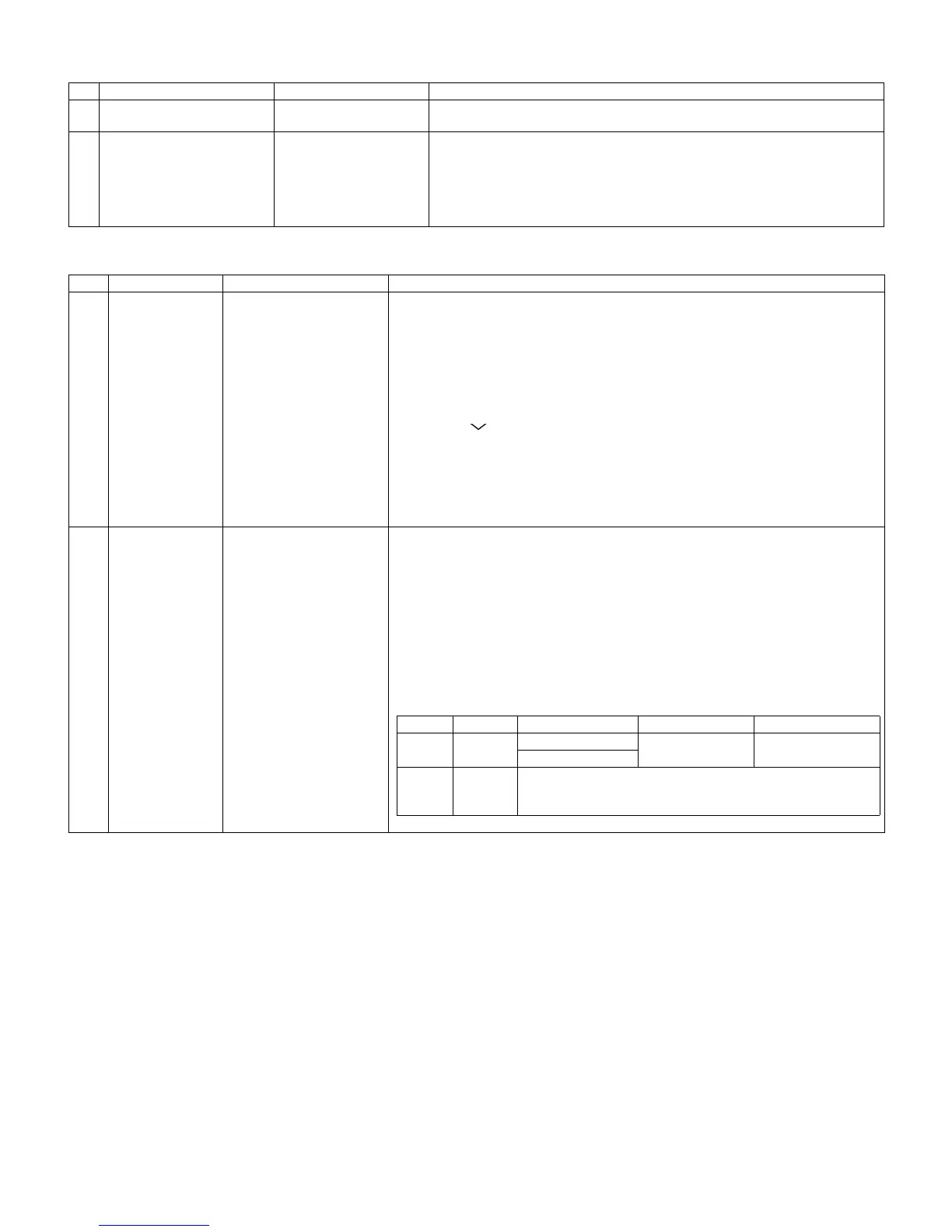
1 Adjustment NTSC RF signal
US-7 (AIR) ch
Feed the NTSC signal to RF ANTENNA input.
2 Auto adjustment
performance
Bring the cursor on [OTHERS]→[OTERRS2]→[.TUNER VCHIP TEST (*07ch)]
and press [LEFT]. (*Select the channel according to the RF signal.)
[.A-OK (***.**)/VM-OK] appears in blue when finished. (If [A-NG/VM-NG] appears
in yellow or red, the test is incomplete.)
Make sure a displacement of ±0.0625 MHz from the center frequency is accept-
able.
Adjustment item Adjustment conditions Adjustment procedure
1 Setting Backlight: +16 (MAX)
Active contrast: OFF
Monochrome: ON
For detailed adjustment procedure refer to “Kameyama Model Integral WB Adjustment
Specifications”.
1) Insert AC code in TV while pushing [INPUT] button and [VOL -] button (The buttons
are located at right side of TV) and “K” mark is displayed.
2) Make the following setting for the TV.
AV MODE: Dynamic
Backlight: +16
Aging time: Min. 60 minutes
3) Push [CH ] button and [VOL -] button to enter the Adjustment Mode. (The buttons
are located at right side of TV.)
4) Select [OTHERS] by R/C and push [ENTER] button of R/C.
5) Select [CENTER CROSS] and push [ENTER].
And the Cross is displayed. (It's center of the display.)
6) Set the CA210 probe at the center of display.
7) Push [Enter] button and the Cross is cleared.
2 Adjustment
procedure
1) On the Adjustment Mode, select the [DVP] and push [Enter] button of R/C.
2) Move to [DVP 2] and push [6] button of R/C.
3) With the strongest color being fixed, turn down the R, G and B settings to their refer-
ence levels.
* Initial R, G and B settings at the point 1: Gradation level set at 512.
[Adjustment value]
AS per the “standard set” submitted by Engineering Department.
[Adjustment reference] Instrument: [Minolta CA-210] Engineering instrument.
Level Reference Adj. spec Ins. spec
Point 1 512
X=0.272
±0.0015 ±0.003
y=0.277
Note Set conditions for inspection
AV MODE: [DYNAMIC] (Reset)
Aging Time: Min. 60 minutes





 To Next Page