33
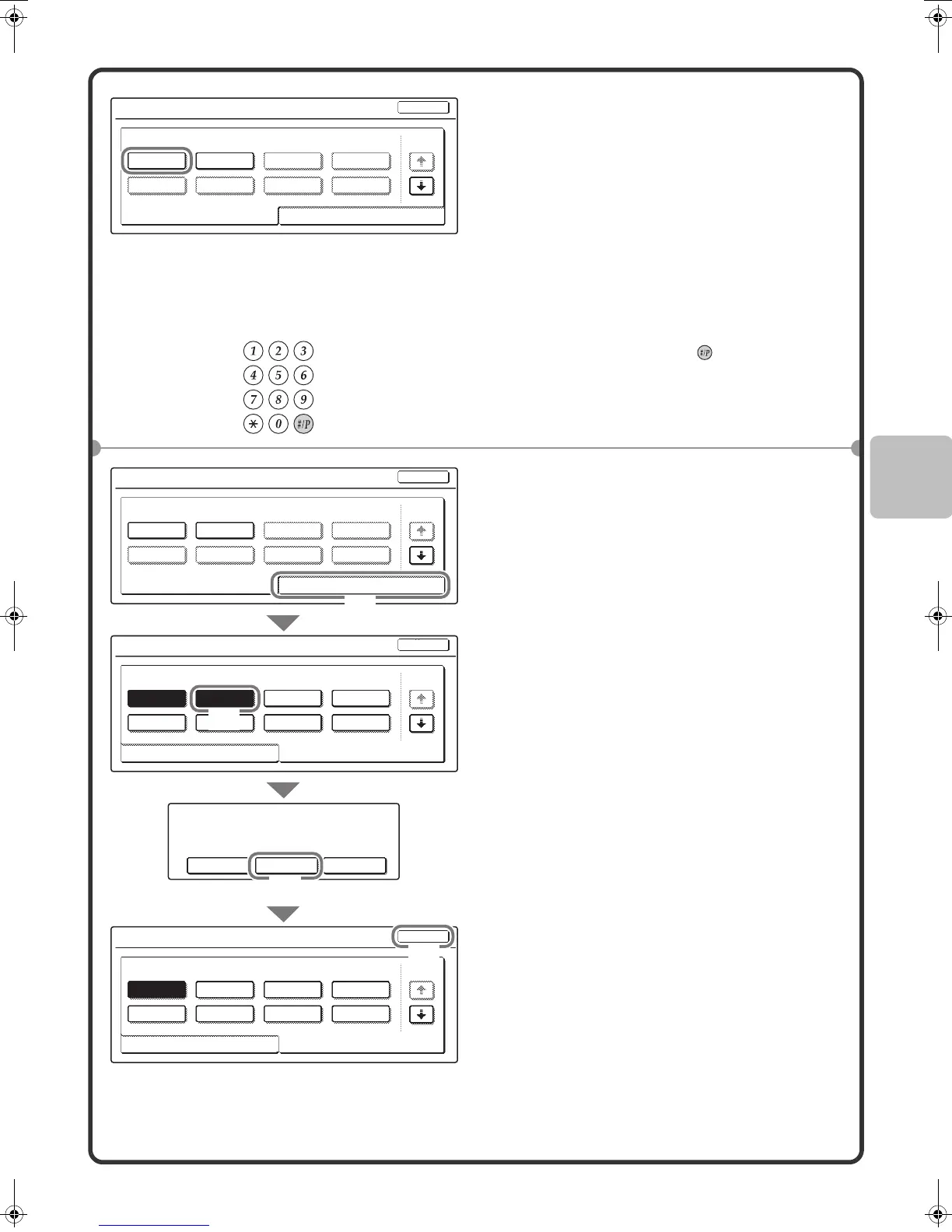
Deleting a job program
2 Touch the key of the desired job
program.
After selecting the job program, set the number
of copies and press the [COLOUR START] key
or [BLACK & WHITE START] key to begin
copying.
1 Press the [#/P] key ( ).
2 Select settings in the touch panel.
(1) Touch the [Store/Delete] tab.
(2) Touch the key of the job program
that you wish to delete.
Touch a key that is highlighted.
Keys that have a job program stored are
highlighted.
(3) Read the displayed message and
touch the [Delete] key.
(4) Touch the [Exit] key.
4
8
3
7
2
6
1
5
1/6
Store/DeleteRecall
Press program.
Job Programs
Exit
A job program has been already stored
in this location.
Cancel Delete Store
4
8
3
7
2
6
1
5
1/6
Store/DeleteRecall
Press program.
Job Programs
4
8
3
7
2
6
1
5
1/6
Store/DeleteRecall
Press program.
Job Programs
Exit
Exit
4
8
3
76
2
1
5
1/6
Store/DeleteRecall
Press program.
Job Programs
Exit
(3)
(2)
(1)
(4)
mx2301_ex_qck.book 33 ページ 2009年8月7日 金曜日 午後4時6分



 To Next Page