MX3500N SIMULATION 7 – 93
<Reflection to item M after settlement of values>
When [EXECUTE] key is pressed after changing and settlement of
exposure adjustment values A to L, the data are saved to EEPROM
and RAM and set to item M at the same time.
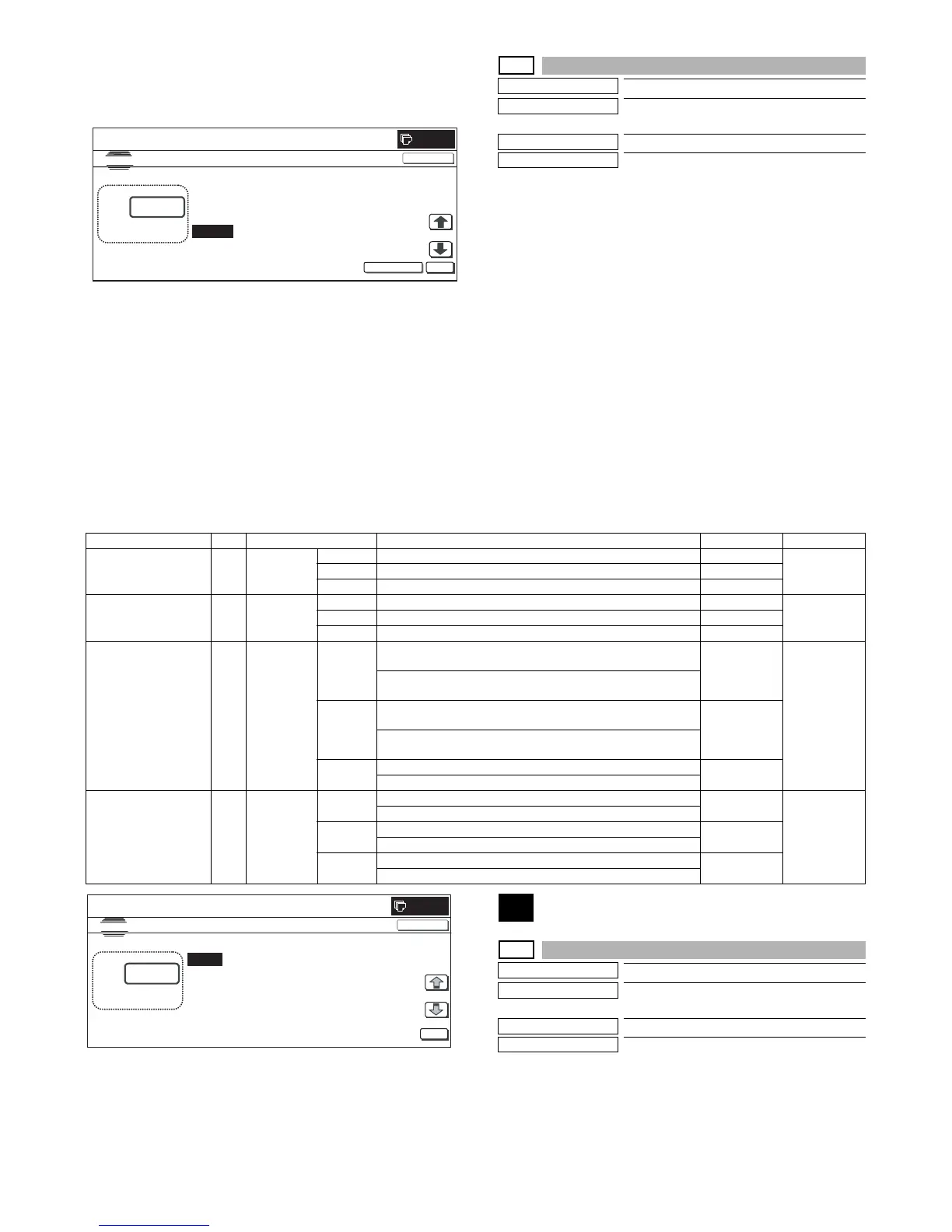
46-47
Purpose
Setting
Function (Purpose)
Used to set the JPEG compression rate in
Copy/Scanner (PUSH SCAN).
Section
—
Item
Setting
Operation/Procedure
1) Select the set item with [↑] and [↓] buttons.
The highlighted set value is switched and the value is dis-
played in the setting area.
* If there is any item over [↑], an active display is made and
item is shifted.
If there is no item over [↑], the display grays out and the
operation is invalid.
If there is any item under [↓], an active display is made and
item is shifted.
If there is no item over [↓], the display grays out and the
operation is invalid.
2) Enter the set value with 10-key.
* Press [C] key to clear the entered values.
3) When [OK], [↑], [↓] button, [COLOR], or [BLACK] key is
pressed, the currently entered data are saved to EEPROM and
RAM.
<Set range and default value of each setup>
48
48-1
Purpose
Adjustment
Function (Purpose)
Used to execute the magnification adjust-
ment in the scan system.
Section
RSPF/DSPF/Scanner
Item
Image quality (Size/magnification ratio)
Operation/Procedure
1) Select the set item with [↑] and [↓] buttons.
The highlighted set value is switched and the value is dis-
played in the setting area.
* If there is any item over [↑], an active display is made and
item is shifted.
EXECUTE
0
L:
J㧦 50
㧧 EXPOSURE3 H_TONE
K㧦 50 㧧 EXPOSURE4 H_TONE
SIMULATION
NO.46-45
EXPOSURE ADJUSTMENT(FAX㧦600DPI)
45
㨇 1㨪 99㨉
OK
TEST
CLOSE
L㧦 45 㧧 EXPOSURE5 H_TONE
M㧦 12 㧧 EXECUTE MODE ; EXP5 H_TONE
Category Item Display Content Set range Default value
COPY (COLOR) A COPY (C) LOW Low compression (Color) 0 0 (LOW)
MIDDLE Middle compression (Color) 1
HIGH High compression (Color) 2
COPY (GRAY) B COPY (G) LOW Low compression (Gray) 0 0 (LOW)
MIDDLE Middle compression (Gray) 1
HIGH High compression (Gray) 2
PUSH SCAN (COLOR) C SCAN (C) MIDDLE1 Middle compression mode 1, for compression, Q table (for
brightness, color difference)
0 0 (MIDDLE1)
Middle compression mode 1, for decompression, Q table (for
brightness, color difference)
MIDDLE2 Middle compression mode 2, for compression, Q table (for
brightness, color difference)
1
Middle compression mode 2, for decompression, Q table (for
brightness, color difference)
MIDDLE3 Middle compression mode 3, for compression, Q table 2
Middle compression mode 3, for decompression, Q table
PUSH SCAN (GRAY) D SCAN (G) MIDDLE1 Middle compression mode 1, for compression, Q table 0 0 (MIDDLE1)
Middle compression mode 1, for decompression, Q table
MIDDLE2 Middle compression mode 2, for compression, Q table 1
Middle compression mode 2, for decompression, Q table
MIDDLE3 Middle compression mode 3, for compression, Q table 2
Middle compression mode 3, for decompression, Q table



 To Next Page