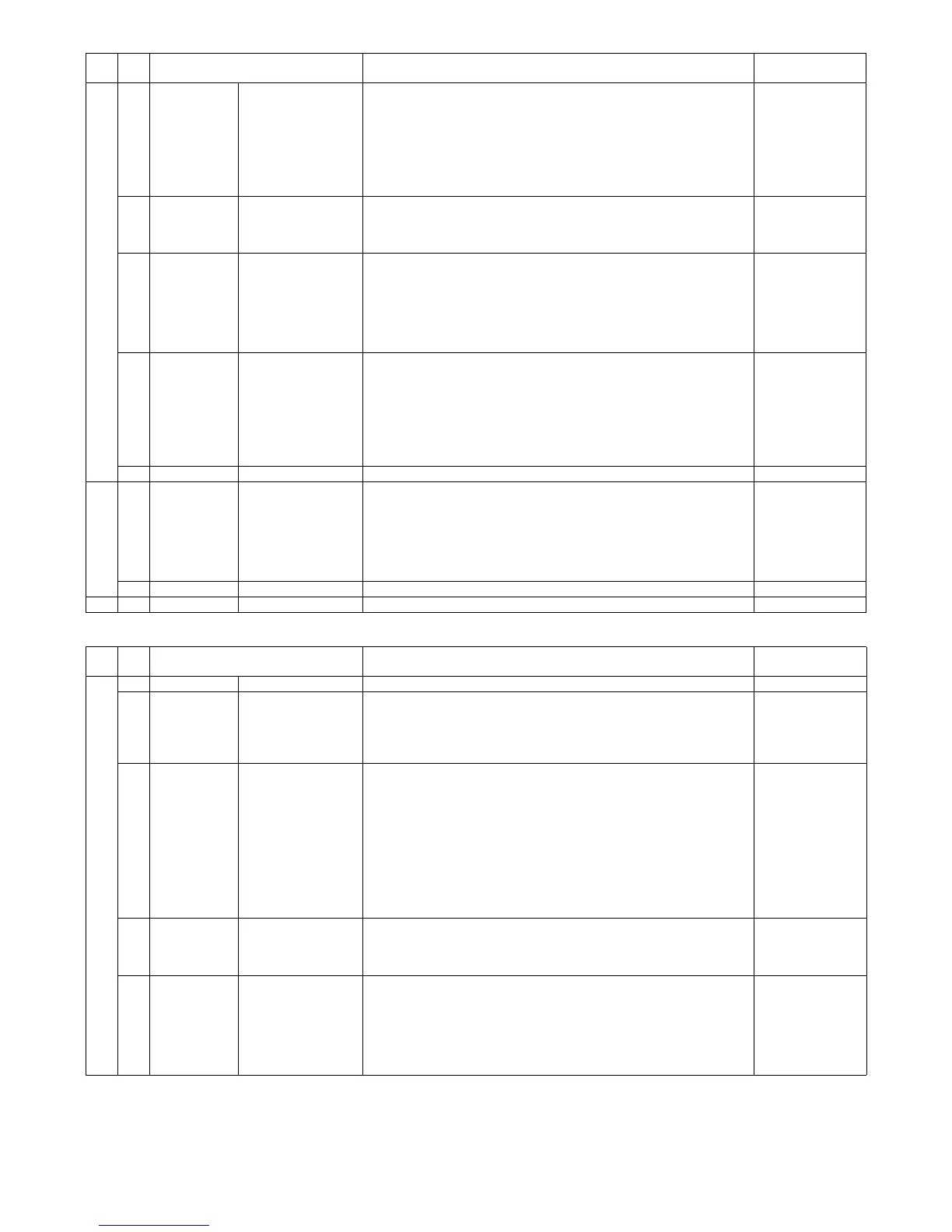
MX-FX11 FAX SOFTWARE SWITCH 2 – 9
Functions
33 1, 2 Transmission Phase-C head dummy
data send time
Setting of the time to send the dummy data until sending the head data when
sending in Phase-C.
"00": 0.3 seconds
"01": 0.4 seconds
"10": 0.5 seconds
"11": 0.2 seconds
When the dummy data send time is increased, the remote machine which
receives data can easily detect high speed signals.
3 Communication Error handling when
transmission and
receiving RTN
Setting to determine whether or not to recognize communication errors when
receiving RTN signals (only in the V.17 mode).
"0": Recognize errors during RTN reception
"1": Do not recognize error during RTN reception
Setting
4, 5 Reception SED ON level when
receiving
Setting of an indication of the receivable level when receiving FAX signals.
When noises are picked up and PPR occurs frequently, set to "-43dBm" or
greater. (For example, "-38dBm.")
"00: -48dBm
"01: -38dBm
"10: -33dBm
"11: -43dBm
6, 7 Transmission Transmission cable
amplitude equalizer
When sending FAX signals, apply different gain from the frequency to the data
signals between the modem and line. Setting to determine how high to make
the 4000Hz gain compared to 0Hz.
"00": 0dB
"01": 4dB
"10": 8dB
"11": 12dB
Indispensable in Australia
Communication/
Adjustment value
8 Not used
34 1, 2 Reception Receive cable
amplitude equalizer
When FAX signals are received, a gain different from the frequency is applied
to the data signals between the MODEM and the line. Setting of how much
greater the gain of 4000Hz is set when compared with 0Hz.
"00": 0dB
"01": 4dB
"10": 8dB
"11": 12dB
3-8 Not used
35 1-8 Not used
SW
No.
Bit
No.
Item SW selection and function System settings
SW
No.
Bit
No.
Item SW selection and function System settings
36 1 Not used
2 Communication F.A.S.T function This sets the management function performed in the FAX communication
procedure through the telephone line.
"0": No
"1": Yes
Valid only in North America.
3 Print Print setting when
there is no
communication record
table data
Setting to determine whether the record table is printed or not in the list printing
from the system when there is no record data (history) which have not printed
in printing of the communication record table.
The list printing from the system setting is as follows:
• Print output by selecting from the data list print
• Time specification print from the FAX setting or print at memory full
"0": Do not print
→ "No print data" is displayed and printing of a list is disabled.
"1": Print
→ A list is printed though there is no new history.
This setting is used to check that there is no new history.
4 Print Report output (when
cancelled)
Setting to determine whether or not to output the communication results sheet
in cases where document transmission is cancelled while in progress.
"0": Do not output
"1": Output
5 Print Report output (when
refusing reception)
<FAX only>
Setting to determine whether or not to output the communication results sheet
when reception is refused in FAX reception. However, other than not printing is
set by means of the report output (when receiving) setting.
"0": Do not output
"1": Output
Internet FAX is set by means of SW63-2.
Irrespective of "Always print" and "Error," the results sheet is not printed.



 To Next Page