16
2.2.1 Main keyboard
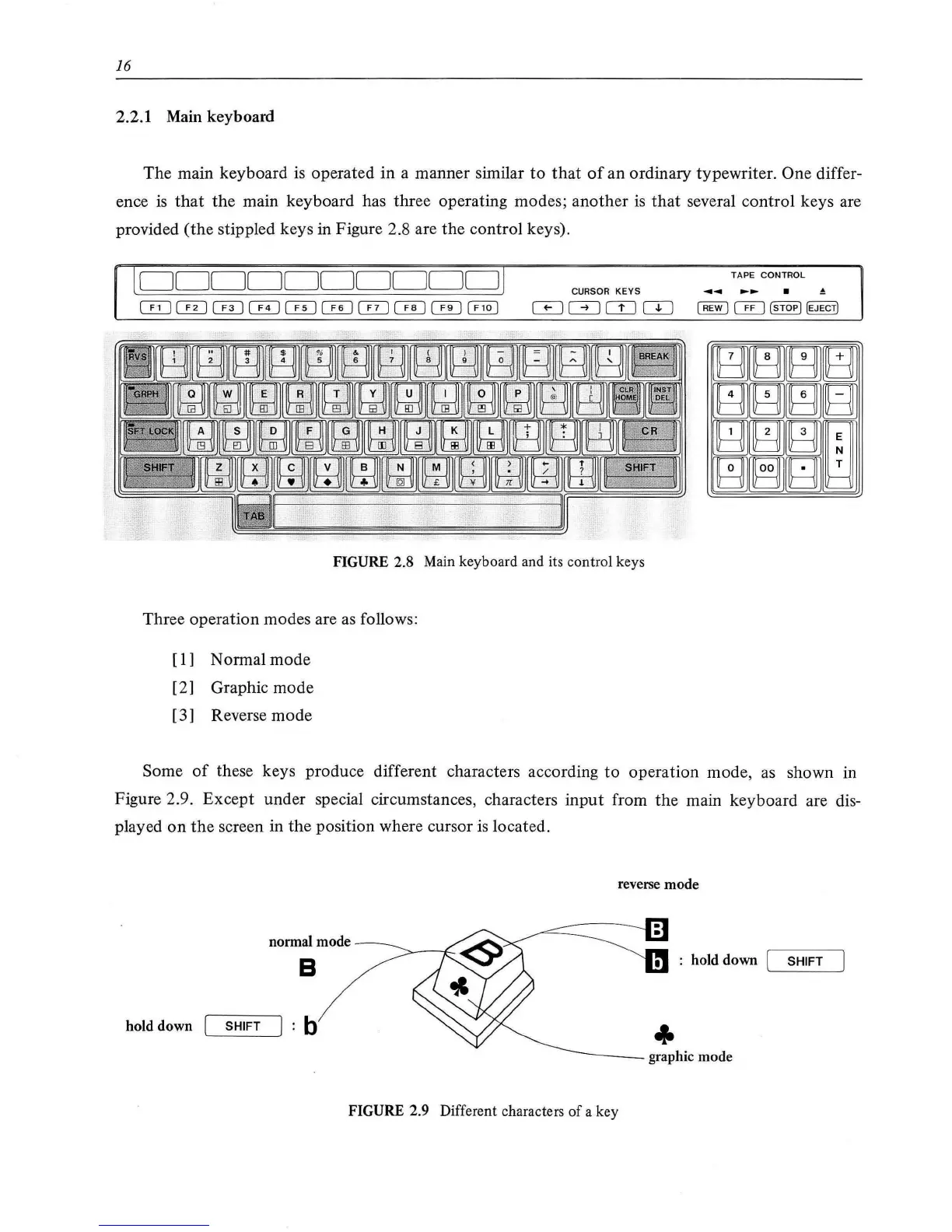
The main keyboard is operated
in
a manner similar
to
that
of
an ordinary typewriter. One differ-
ence
is
that
the
main keyboard has three operating modes;
another
is
that
several control keys are
provided
(the
stippled keys in Figure 2.8 are the control keys).
[
DDDDDDDDDD
/
TAPE CONTROL
CURSOR
KEYS
ITJ
GJCD
CTI
FIGURE 2.8
Main
keyboard and its control keys
Three operation modes are
as
follows:
[ 1 ] Normal
mode
[ 2] Graphic mode
[3] Reverse
mode
Some
of
these keys produce different characters according
to
operation mode,
as
shown in
Figure 2.9. Except under special circumstances, characters
input
from
the
main keyboard are dis-
played
on
the
screen in
the
position where cursor
is
located.
reverse mode
normal mode
8
hold down I SHIFT
hold down I SHIFT b
~---graphic
mode
FIGURE 2.9 Different characters of a key



 To Next Page