PN-465U CONNECTION, ADJUSTMENT, OPERATION, AND FUNCTION
2 – 35
6) Click [READ & SAVE] button.
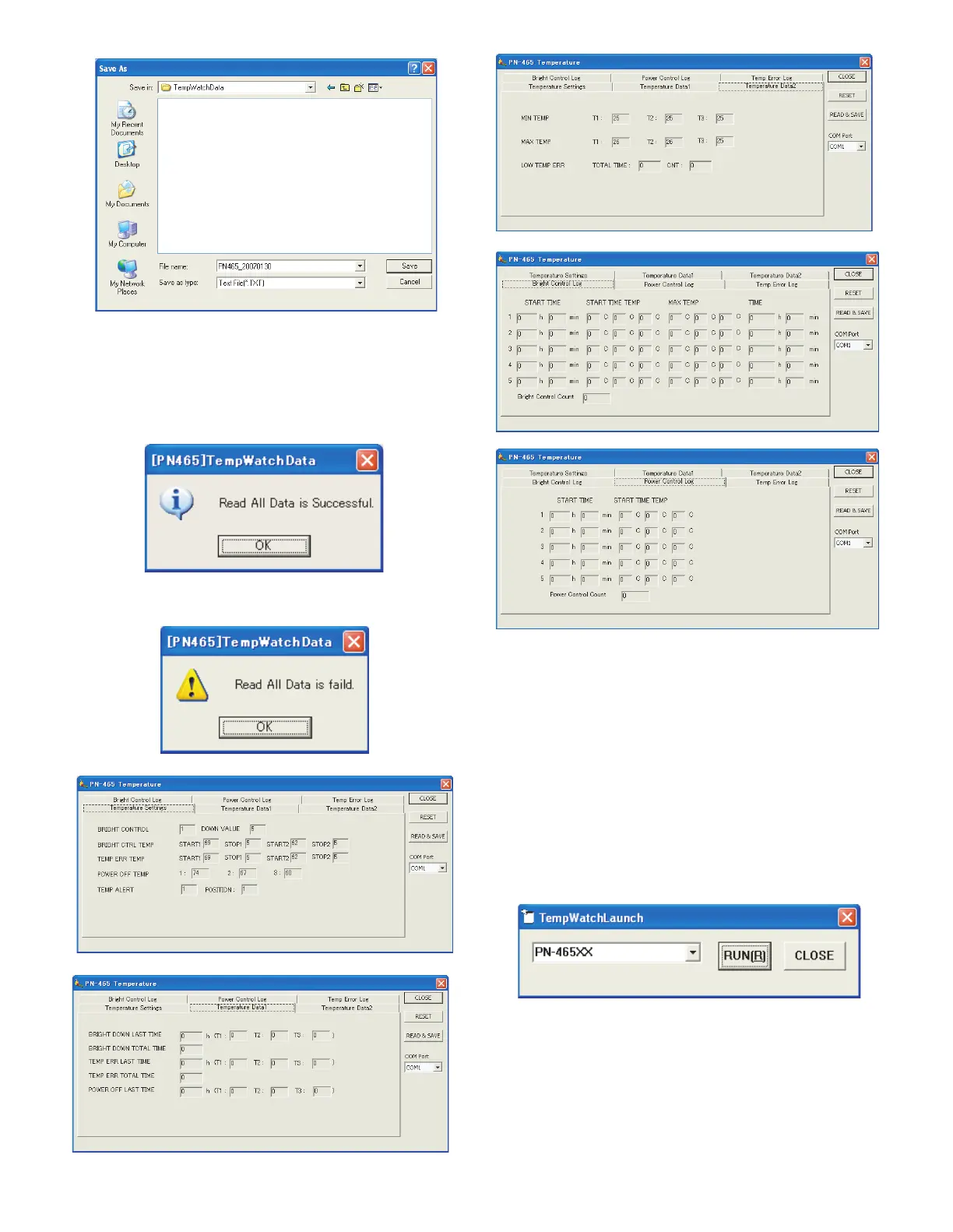
7) Set the save folder and the file name. (When the cancel button is
pressed in “Save As” dialog box, no information is saved to the file
and reading is performed.)
8) When reading is normally completed, the following message is dis-
played. Check to confirm that there is no “ERR” displayed in any tab
items. If there is any “ERR” item, perform reading again.
9) If the following message is displayed, reading has been failed. Per-
form procedures 6) ~ 8) to execute reading again.
(1)-2. Temperature watch setting data reset
In the following cases, reset the temperature watch setting data as fol-
lows:
• When the previous temperature watch setting data are remained
when replacing the PWB.
• When USAGE TIME is reset for replacement of the panel.
(The temperature watch setting data include USAGE TIME of the
machine as basic data.)
1) Connect the information display and the PC with the RS-232C
cable, and turn on the power of the information display.
2) Execute the temperature monitor setting tool, “TempWatchLaunch.e-
xe”, installed in the “Temperature monitor setting tool introduction”.
3) Check to confirm that “PN-465U” is selected in the Combo box.


 To Next Page