Connecting Peripheral Equipment
Other terminals
PC/AV audio output terminals
• AudiofromtheequipmentconnectedtotheAVaudioinput
terminals or PC audio input terminal is output. Connect to
the audio input terminals of the connected equipment using
a commercially available audio cable (RCA).
• Theaudiooutputvariesdependingontheinputmode
selection. (See Operation guide.)
• Thevolumelevelcanbeadjustedusingthevolume
adjustment. (See Operation guide.)
• SelectingFIXEDof“AUDIOOUTPUT”fromtheOPTION
menuxesthevolumeofsoundoutputfromtheaudio
output terminals. (See Operation guide.)
• AudiosignalsoutputfromthePC/AVaudiooutputterminals
cannot be adjusted using the AUDIO menu.
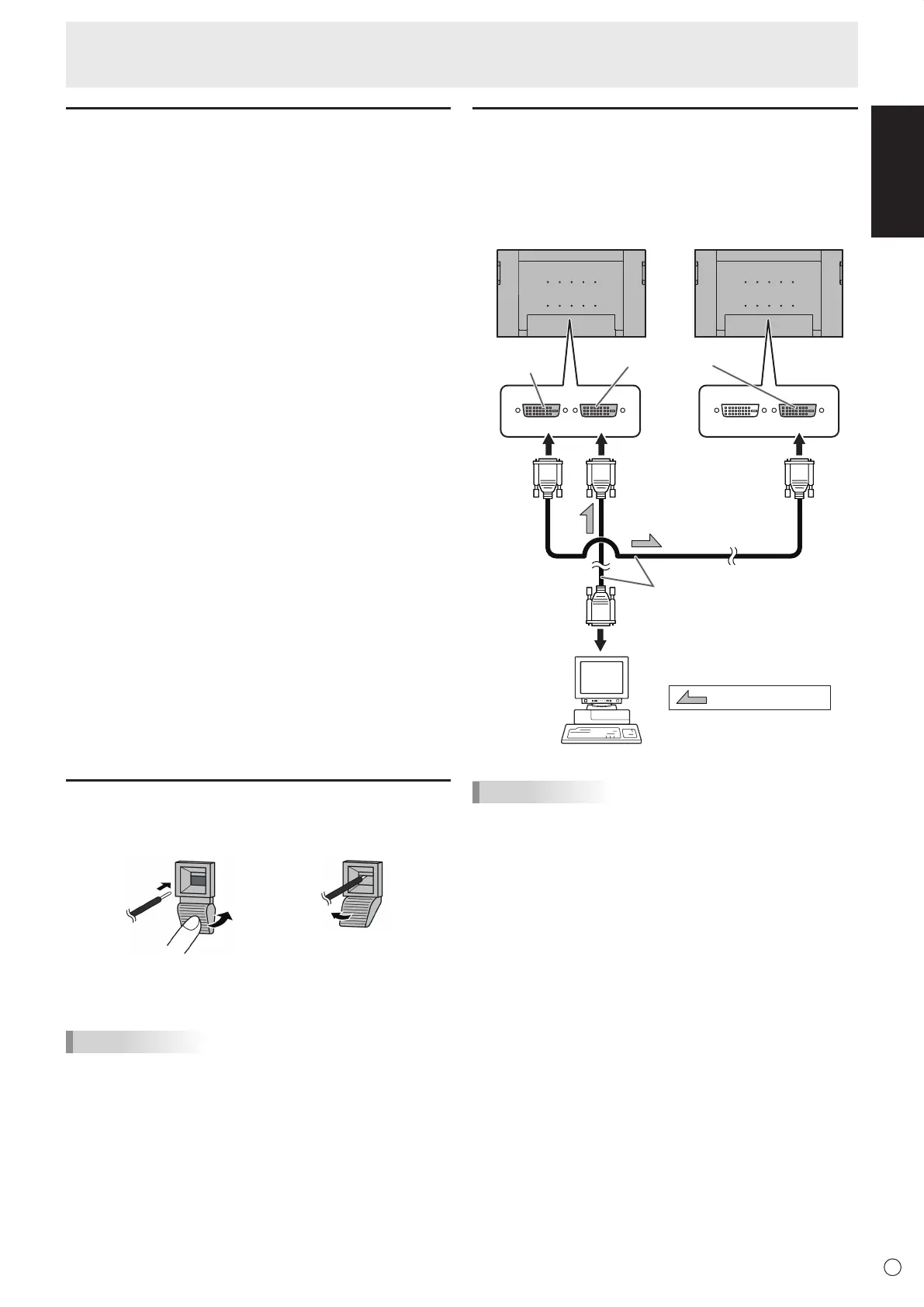
PC/AV output terminals
Video signals from PC1 and AV1 can be output to external
device. Use this terminal when you connect multiple monitors
in a daisy chain via DVI cable (commercially available). (See
the description on the right.)
Outputting images encoded with HDCP requires an HDCP-
compatible external device.
Images cannot be output in the following situations:
- In PC2/AV2 input mode
-WhenPIPSOURCEinthePIP/PbyPMenuissettoPC2
HDMI or AV2 HDMI
RS-232C input/output terminals
You can control the monitor from a PC by connecting a
commercially available RS-232 straight cable between this
terminal and the PC. (See Operation guide.)
LAN terminal
You can control the monitor from a PC on a network by
connecting a commercially available LAN cable between this
terminal and a network. (See Operation guide.)
Connecting external speakers
Besuretouseexternalspeakerswithanimpedanceof6Ω
andaratedinputofatleast7W.
1.Whilepushingthetab,insertthetipofthecable.
2. Release the tab.
TIPS
• Besuretoconnectthe+and-terminalsandtheleftand
right speakers properly.
• Avoidshortcircuitingthe+and-terminals.
Connecting multiple monitors
You can connect multiple monitors (up to 5 monitors) in a
daisy chain by using the PC1/AV1 input terminals and PC/AV
output terminals of this monitor.
Connection example
shows the signal flow
PC/AV output
terminal
PC1/AV1 input terminals
Digital signal (DVI) cables
(commercially available)
To PC digital RGB output terminal
First monitor Second monitor
TIPS
• Thelengthofthesignalcablesorsurroundingenvironment
may affect the image quality.
• Thescreenmaynotdisplayproperlywhenusingterminals
other than PC1/AV1 for the input mode. In this case, turn
off the power to all the monitors connected in a daisy chain
and then turn the power on again.
• WhenconnectingmonitorsinadaisychainsetAUTO
INPUT CHANGE to OFF.



 To Next Page