E – 5
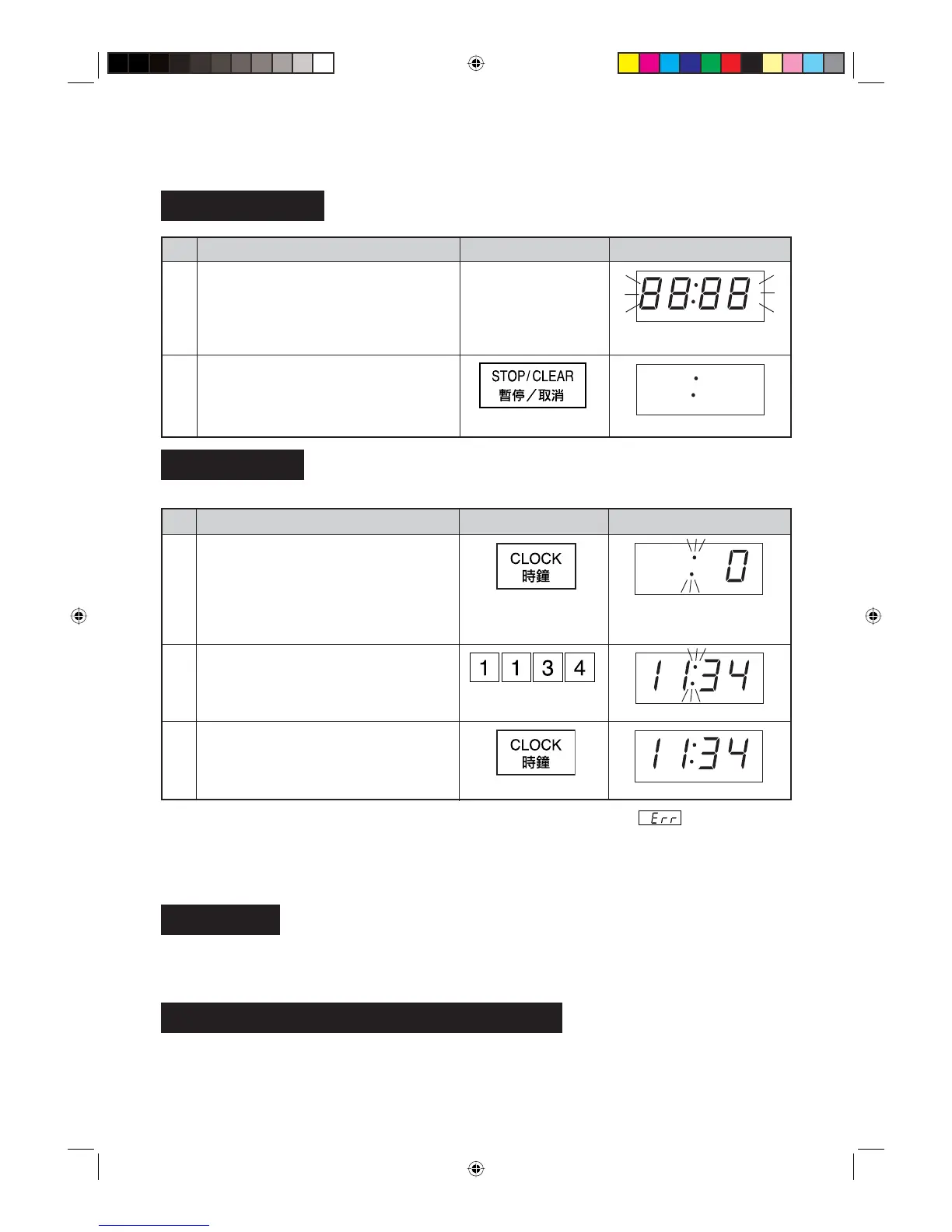
Press the STOP/CLEAR pad so that the
oven beeps.
Only the dots will remain.
Getting Started
Step Procedure Pad Order Display
1
Plug the oven into a power point.
Ensure the door is closed.
Flashing four eights.
Clock Setting
Step Procedure Pad Order Display
Press the CLOCK pad.
* To enter the present time of day e.g. 11:34 (AM or PM).
Enter the correct time of day by pressing
the numbers in sequence.
2
3
Press the CLOCK pad again.
The dots will fl ash on and
off.
This is a 12 hour clock. If you attempt to enter an incorrect clock time (Ex. 13:45),
will appear in the
display.
Press the STOP/CLEAR pad and re-enter the time of day (Ex. 1:45).
If you wish to know the time of day during the cooking or timer mode, press the CLOCK pad. As long as your
fi nger is pressing the CLOCK pad, the time of day will be displayed.
Stop/Clear
Press the STOP/CLEAR pad once to:
1. Stop the oven temporarily during cooking.
2. Clear if you make a mistake during programming.
To Cancel a Programme During Cooking
Press the STOP/CLEAR pad twice.
1
BEFORE OPERATING
2
R-360N(R) [01EN]_01-21.indd 5R-360N(R) [01EN]_01-21.indd 5 3/3/08 12:03:50 PM3/3/08 12:03:50 PM



 To Next Page