SF-7300
SF-73S0
i
(
I
I
I
!
I
[2] UNPACKING AND INSTALLATION
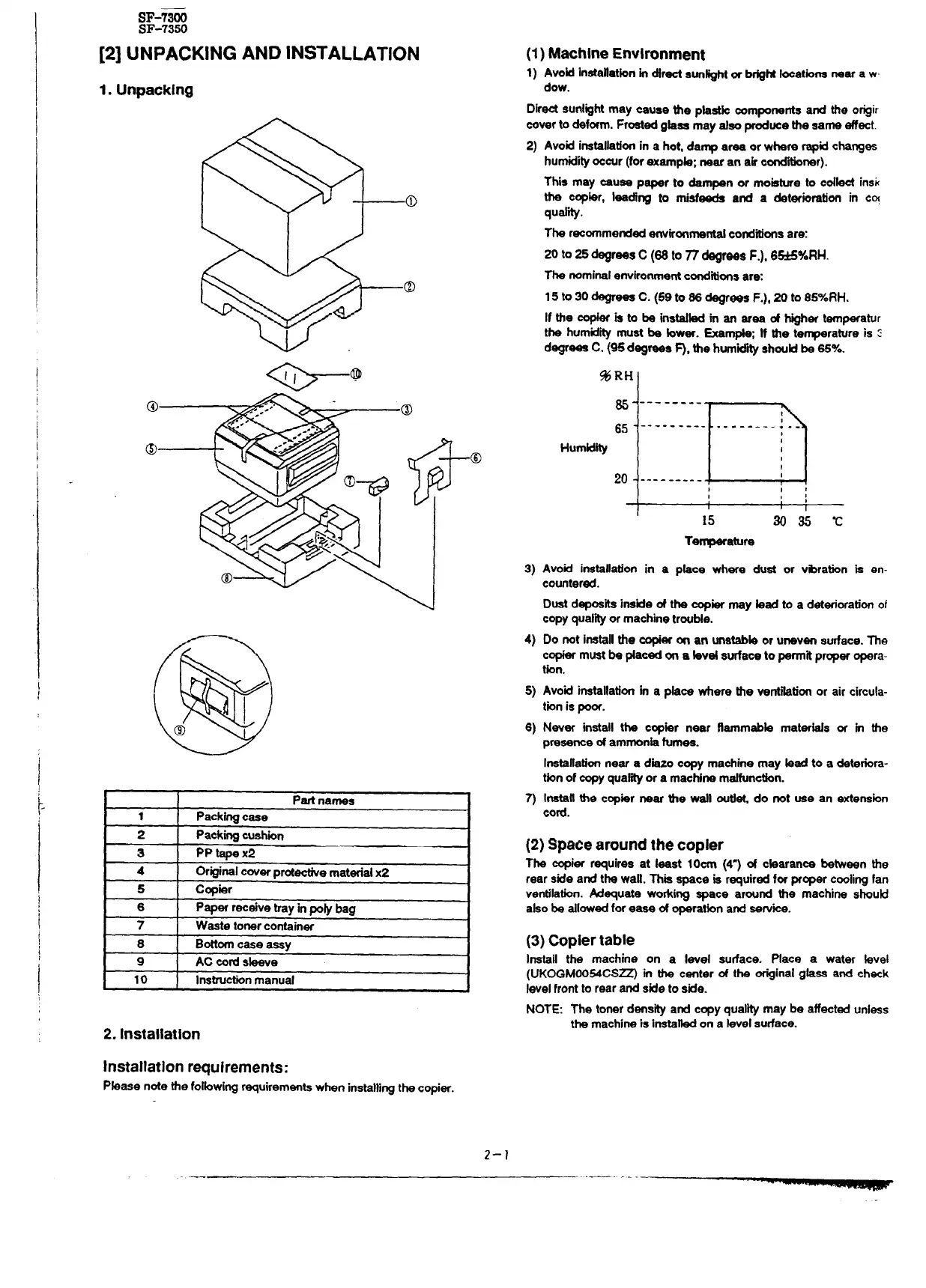
1. Unpacking
Partnames
1
Packingcase
2
Packingcushwn
3
PP tapex2
4 Originalcoverprotectivematerialx2
5 C~iar
6
Paper receive trayin pow bag
7 Waste tonercontainer
8
Bottomcase assy
9
AC cordsbeve
I
10
I
Instruct.bnmanual
I
2. Installation
Installation requirements:
Pbase note the folbwing r~uirements when installingthe copier.
(1)Machine Environment
1) Avoid
lnstaflatbnin drect sun~ht H b@ht Iocetbns near a w
dew.
Directsunlightmay cauae tie phwk Mmponents and the origir
coverto deform. Frostedgbse may SfSOproducethe same effect.
2)
3)
4)
5)
6)
3
Avoidinstallationin a hot, da- area or where rapidchanges
humidityoccur(forexampb; near an air c~ner).
This may cause p-r to dampen or mobture to cdbct insk
the cop&r, bediw to tisf~ ati a det~icmtbn in cq
qud.hy.
The recommendedenvironrneti conditionsare:
20 to 25 ~rees C (66 to ~ ~r~s F.), 6~Y0RH.
The nominalenvironmentconditfongare:
15 to 30 ~ees C. (59 to 66 degrees F.), 20 to 857eRH.
If the +W is to be instited in an ares of ~her temperature
the humiditymust be bwer. Exampte; If the temperatureis :
degrees C. (95d~reee ~, the hum”.i~ shoutdh’65Y~.
%RH
~- --------
~
~~ - ---------
.------. : --
Hu-
:
20- ---------
,
15
M35 t
Temperature
Avoid installation in a pkce where dust or vibration is en-
countered.
Dustdepoe.ti instie of the copier may bad to a deterbration of
copyqud.~ or machinetroubb.
Do not installthe copieron an unstabteor uneven surface.The
copiermustbe @aceda a bvd surfaceto permitpropw opera-
tion.
Avoid installationin a pkce where the verrtibtionor air circula-
tionis poor.
Never install the ccpier near ftamm~b materbb or m the
presenceof ammonh fumes.
Instsftatiorrnear a dhzo copy machine may bad to a deterbra-
tbn of copyqua~ or a mac~ne matfunctbrr.
Instauthe copier near the wstl outbt, do not use an efieneion
cord.
(2) Space around the copier
The qier requires at least IOcm (49 d cbarance between the
rear side and the watt.This space is requiredfor prcper c~ting fan
ventilation.Adequate woking space around the machine shouti
abo be allowedforease of operatbn and Serv.ke.
(3) Copier table
Install
the machine on a level sutiace. Place a water bvel
(UK~MO054CSZ m the center & the originalgfase and check
levelfrontto rear and side to side.
NOTE: The tonerdensityati copyqualitymaybe affectedunless
the machineis insta~ on a bvel surface.
2-?



 To Next Page