,,
-“
SF-77OO
SF–77a0
@
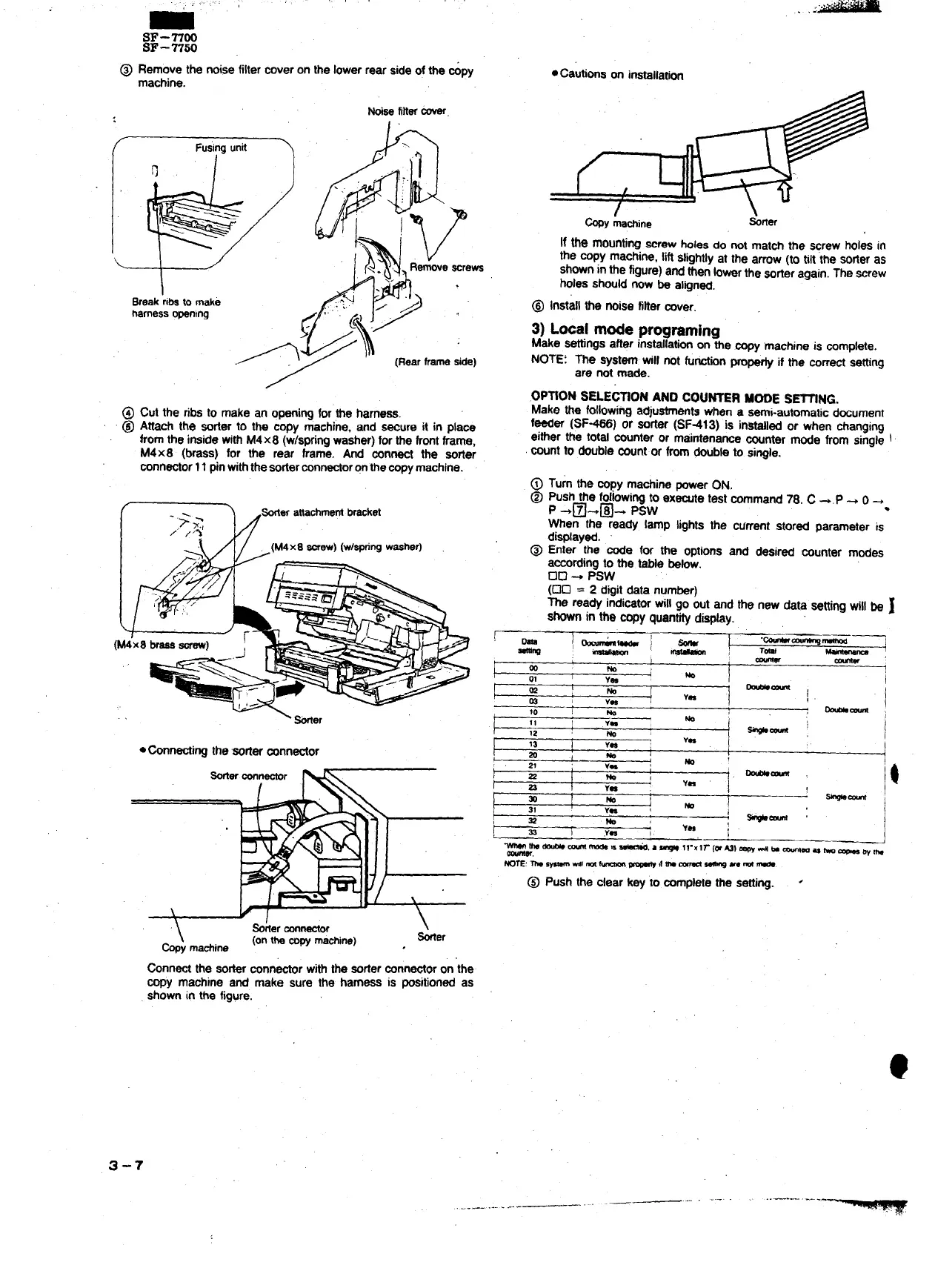
Remove the noisefiltercoveron the lowerrear sideof the &py
●Cautionson inmllatjon
machine.
/ Fusingunit
0.
\
Break~i~ tomake
harnessopening
/
wasfinercover
@ Cut the fibs to make an openingfor ,~e harness.
@ Attach the sofler to the copy machine, and ~ure it in place
fromthe insidewithM4x8 (w/springwasher)forthe frontframe,
M4x8 (brass) for the rear frame, ~d ~~t the ~~er
mnrrector11pinwiththesorterconnectororrthecopymachine.
(
‘ Wer
●-nectirtg the @fier connector
Sorterconnector
\
Sorter ~
*Y ma&ine
(ontb copym~ine) , *er
If the mounting=rew bles do not match me screw holes in
the copy machine, liftslightlyat the arrow(to tilt~heSOfieras
showninthe figure)andthenbwar the Wrter again.The screw
holesshouldnow be aligned.
@ Installthe noise fihercover.
3) Lwa[ mde progmming
Make settingsafter ins~lation on the copy ‘machineis complete.
NOTE: The system will not fu- pro- if the correctsetting
are not made.
.OP~ON SELE~ON AND COUNTER MOOE S~NG.
Make the folbwing adjustmentswhen a semi-automaticdocument
feeder (SF*) or sorter (SF413) is insfdlad or when changing
either the total counteror maintenancecounter mode from single i
countto double countor fromdoubleto single.
@ Turn the copy machineoowerON,
@ Pushthe fo~owingto ex~e test command78. C +,P + 0-.
P +~+@4 Psw
When the ready lamp lights the current stored parameter is
displayed.
@ Enter the code for the options and desired counter modes
accordingto the table bebw.
00+ Psw
(00 =
2digitdata number)
me ready indicatorwillgo out and the new data settingwillbe ~
~n in the copy quantifydispby.
!
~
.~~~
~
I
T*
I
~
-’
1
00
01
~~:
1
VW
w
I
m
,
-ti
Vn
I
!
I
I
10
~ ~-
11
Ya
M :
12
w- :
I
,.
1
!~
\
I
I
-[_;; ii
I
*
4
-. * m 11-~lr(wmla 4 * MM a h - @~
-w,
mm:m *Ml m ~
~ ,fm - ~ Memm.
@ Push the clear key to mmplete the setting.
●
Grrrrect the sorterconnectorwiththe sorterconnectoron the
copy machine and make sure the harness ia positionedas
shownin the figure.
3-7
.——-. - ~~•
..—.—.....
...—---.--——- .-



 To Next Page