. .- .
.-4—LG.. -.:-- —A-A*”i...A ....._.:&:,..;..... .... ...:------------- .,
..~.:::.:.
‘“, .... :...-.,:-:’,..
.’
‘= .
3. The basic copy process
Operationalthao~
Charge exposureand devel~ment “
A charge is aPPli~ over the OPC drum surface from the main
arena unit.ne ima9e exposedby the COPYlamp is projeded over
the drum.ne charge on the drum sutiaca is dissipatedin all area
except,forthe characterareas of the original,to forma latentimage
on the dmm surface. Toner is attractedto the chargeon the drum
suflacs and a visibleimage is now formedon the dwm.
Step 1. Charge Transfer soronaunit)
A uniformnegativechargeisappliedoverthe OPC dmm sudaca
by transfercorona unit.
Step 2, ~eaning
The residual toner left on the drum surface after transfer is
removadby the cleaner unit.
Step 3. Optical discharge
Residualchargeonthe drumsurfaceisremovedbythedischarge
lamp.
SF-77OO
SF-7750
After STep 1 (charge), Step 2 (cleaning)and Step 3 (discharge),
thed~m tirfaoepotentidm~~a~e andiareadyforoperation.
Step 4. Charge (Main coronaunit)
A uniformn-e ~rge is appliedover the drum sutiace by
the main -a unti
step5.-re
An
electrostaticlatentimage is formedover the drumsurface.
Step 6. Mve@ing
The eladrostaklatent image is oonvefledintoa visibleimage
by the toner..
Step 7. Transfer~rensfer coronaunit)”
The visible image.on the drumsutia~ is transferredonto the
mpy paper.
Step 6. Cleaning
Tonerremainingonthedmm,iamll~sd bytie~eaner blade.
Step 9. Optti discharge
Reeidud charge on the dwm surface is removed.
4. Copy steps
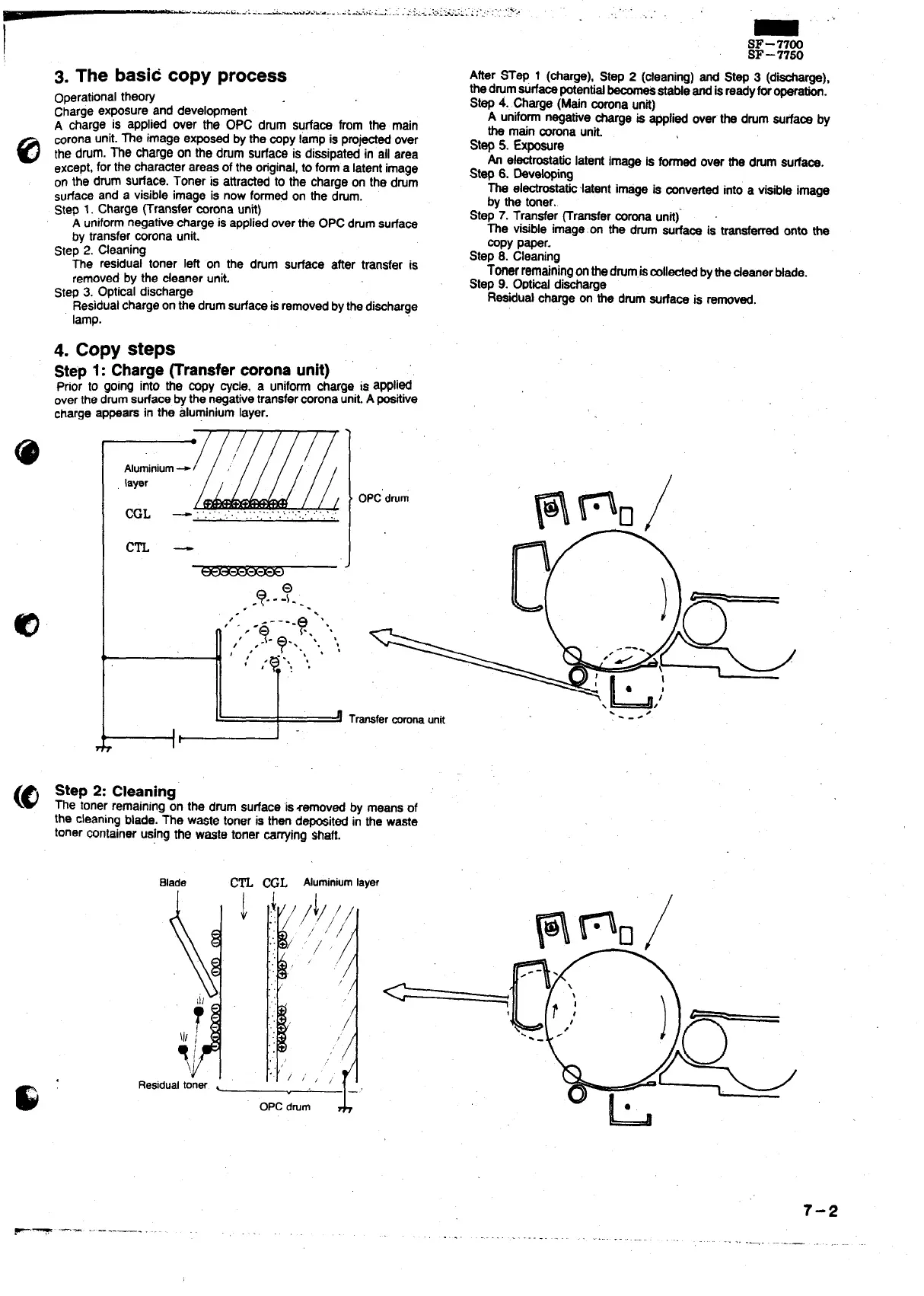
Step 1: Charge~ransfer coronaunit) .
Ptior to going into the COPYcyc~, a uniform charge is aPPli@
overthedrumsurfacebythe negativetransfercoronaunit.A positive
charge appears in the aluminiumlayer.
“
1
Aluminium-i ‘
layer
CCL — :‘.:..’:.:.’,’.‘.’::.’,’.”.”:
cm -
, -?-- ?..
.
,’.
,~
-Q---”?.,‘“,
e
/,
,<
-?..., ., ,
1
:
:$.’! ‘
!
r
I
OPCdmm
\
>
Transfermronaunk
Step 2: Cleaning
The tonerremainingon the dmm sudace ‘iszamovad by means of
the cleaningblade. The w~te toner is then deposit@ in the waste
toner containerusingthe waste toner ~rrying shaft.
Blade
Cm WL Aluminiumlayer
.-.
7-2
F- --’-- ------—-— ~~-



 To Next Page