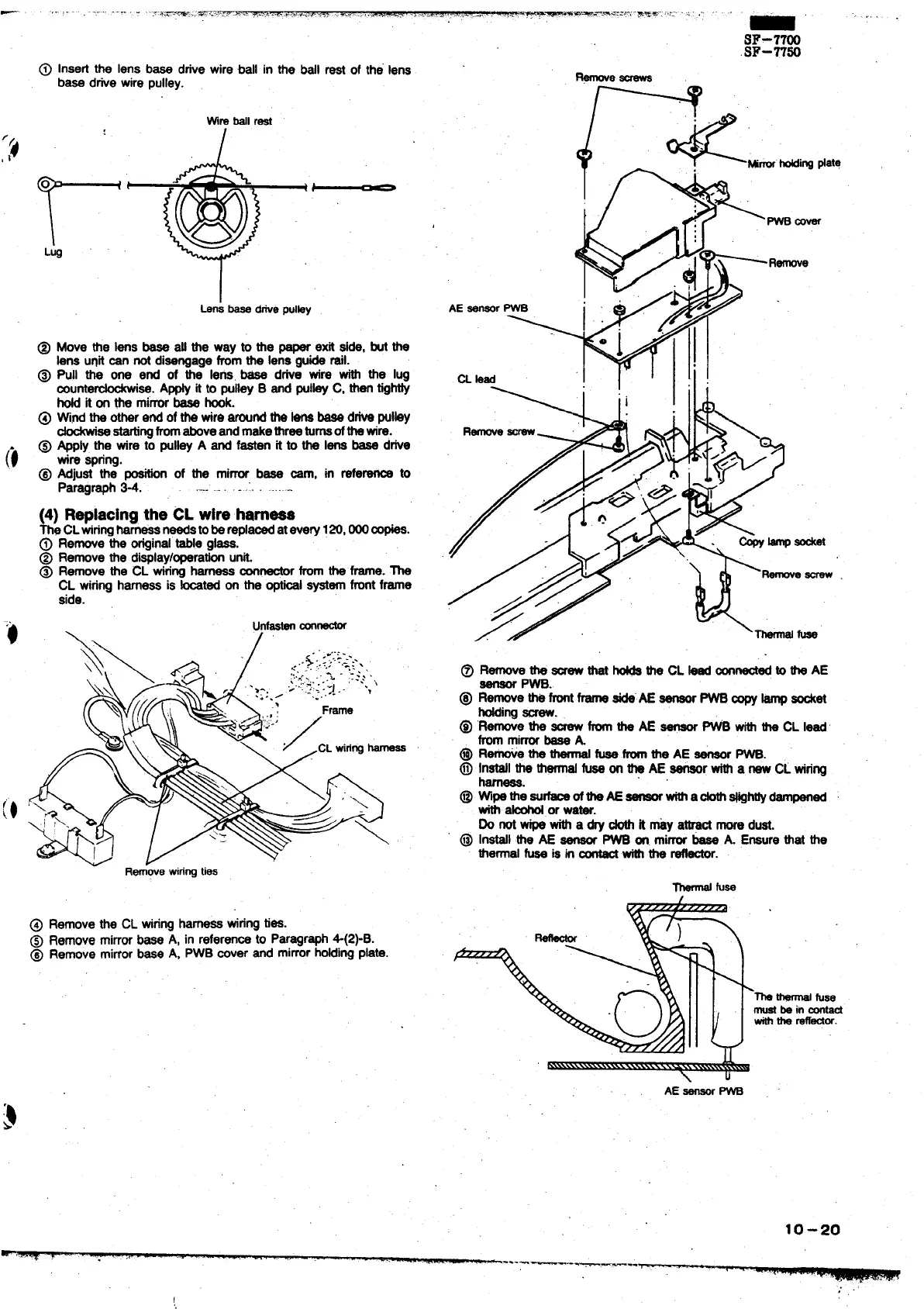
@ Insert the lens base drive wire ball in the Ml rest of tb” lens
base drive wire pulley.
WireMl resr
,/
T
o
*
‘“
@ Move the lens base M the way to the paper exit side, but the
lens unit a not disengagefrom the lens guide rail.
@ Pull the one end of the lens. ~ drive wire with the lug
munte~ise. ~ it to pulley B end pul& C, then tig~
M ton me mim _ M.
@ w.nd the othereti ofthe Are wnd the ~ * d~ pulky
~ea atartingfromeboveand mmethreetumsofthe ~re.
@ Apply the wire to pulm A and fasten it to the w base drive
tire Spring.
@ Adjust the position of the mirror base am, in rafe- to
Paragraph3+. . . . .’. .
(4)R~lacing the CL wire harness
~eCLtiting ham&s needstobe repla-atevery la, ~~s.
@ Remove the origin~ table glass.
@ Remove the dieplayjoperationunit.
@ Remove the CL wiringharness --r from the frame. ~
CL wiringharness is kted on the opt~ systemtint frame
side.
@ Remove the CL wiringhameas wiringties.
@ Remove mirrorbase A, in referena to Paragraph4(2)-B.
@ Remove mirrorbase A, PWB @ver end mirrorhoMingplate.
@ Remove the ~ that ~ the CL W oonneotedto the AE
@ Ramovep~kt frameX’AE eaneorPWB q ~ tiet
sensor
Wing mew.
@ ‘Removethe
eorewfrom the AE sensor PWB with the CL lead
tim mirrorbase A
@ R-e the ~
fuse fromthe AE m PwB.
@ =~ thwd ties on ~ AE aenaor~ a new CL wiring
@ Wipathesurfaosof the AE
aensorwitha- ~h~dmoened :
with~ or water.
Oo not wipe with a dry H R tiy a- more duat.
@ InWl the AE ~
PWB m. mi- bees A. Ensurethat the
thermal fuse is in
~ withthe ~.
AEsensorW
10-20
-.--—-..



 To Next Page