12
XEA-401 Department Key Programming
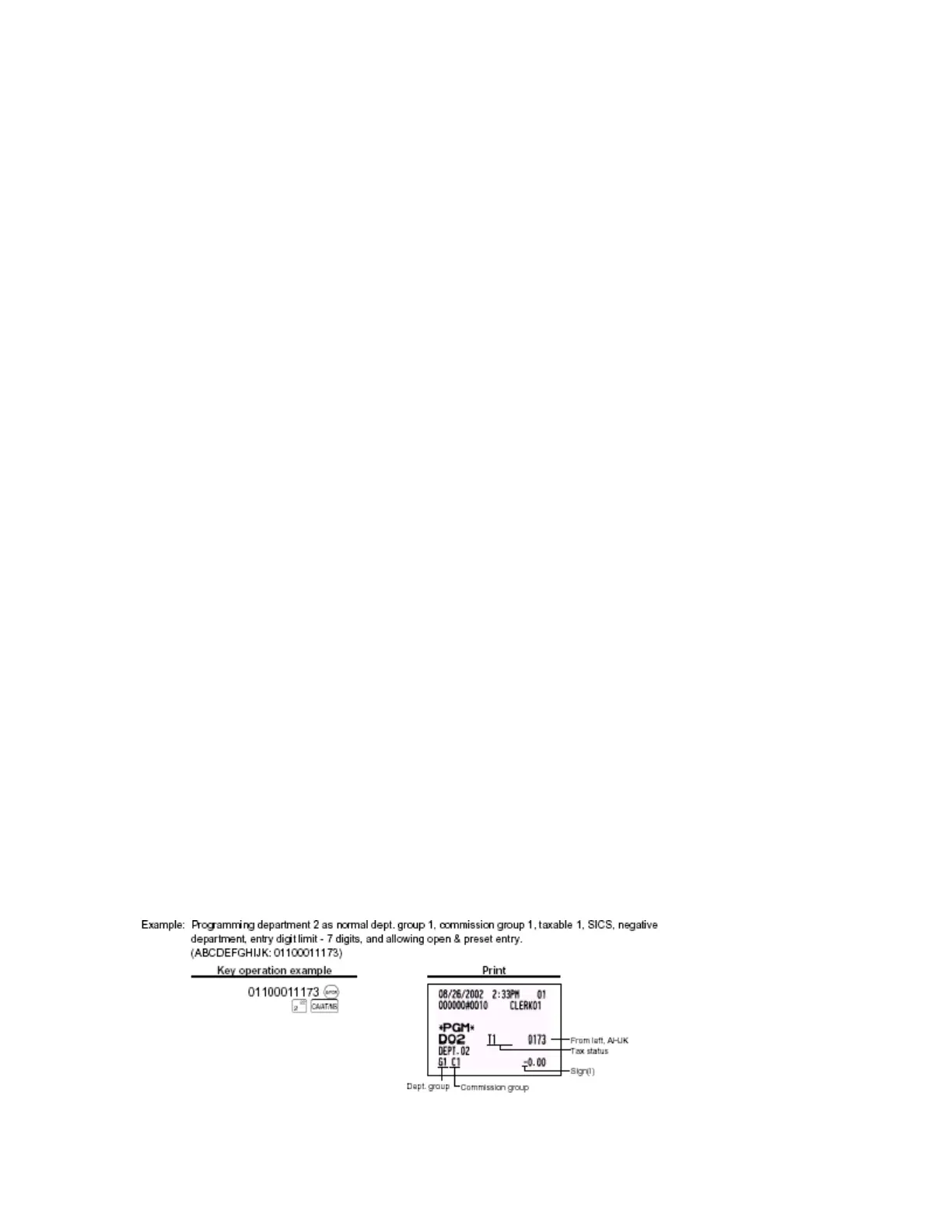
There are 11 parameters for each department key
Program department keys.
• Switch register to PGM mode
• Set 11 parameters (see below)
• Press the @/For key
• Press the department key desired (the is the one that you are programming)
•
Press the CA/AT/NS key
Each parameter and definition is listed below:
Parameter A – Type: Bottle Return = 1
Normal = 0
Parameter B – Group Number: 0-9 (0: non group)
Parameter C – Commission group # 0-2 (0:Non commission)
Parameter D – Tax 4 Status: Taxable = 1
Non-Taxable = 0
Parameter E – Tax 3 Status: Taxable = 1
Non-Taxable = 0
Parameter F – Tax 2 Status: Taxable = 1
Non-Taxable = 0
Parameter G – Tax 1 Status: Taxable = 1
Non-Taxable = 0
Parameter H – SICS/Normal: Single Item Cash Sales = 1
Normal = 0
Parameter I – Sign: Negative department = 1
Positive department = 0
Parameter J – Entry Digit limit: 0 – 7
Parameter K – Type of unit price Open & Preset = 3
Entry Preset only = 2
Open only = 1
Inhibit department key = 0
Parameters B and C should be 0 unless otherwise stated. These 2 parameters have to do with groups and how a report
will print. If they are not separating department keys then always set to “0”.












 To Next Page