EasyManua.ls Logo

Sharp XL-DH259N - User Manual

Sharp XL-DH259N
16 pages
Print Icon
To Next Page IconTo Next Page
Loading...
04/1/28 XL-DH259N_Front EN
MI
C
R
O
C
O
M
P
O
N
E
N
T
S
Y
S
T
E
M
X
L-
DH
2
59
C
D
US
B
iPod is a trademark of Apple Inc., registered in the
U.S. and other countries.
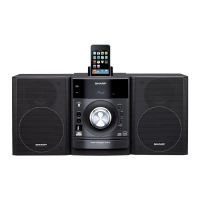
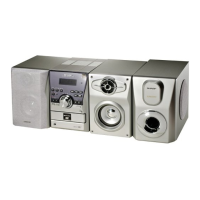
XL-DH259N Micro Component System consisting of XL-DH259N (main unit) and CP-DH259N (speaker system).
Please confirm that only the following accessories are included.
Remote control x 1
(RRMCGA204AWSA)
AM loop antenna x 1
(QANTLA004AWZZ)
FM antenna x 1
(92LFANT1535A)
Accessories
MODEL
XL-DH259N
MICRO COMPONENT SYSTEM
OPERATION MANUAL
Printed in Malaysia
09L R AS 1
TINSZA605AWZZ
ENGLISH

Questions and Answers

  • K
    Kevin ClementsJul 26, 2025
    Why is my Sharp XL-DH259N Stereo System remote control not working?
    • J
      jeromeleeJul 26, 2025
      If the remote control for your Sharp Stereo System isn't working, check the following: * Ensure the AC power cord of the unit is plugged in. * Verify the battery polarity is correct. * Replace the batteries if they are dead. * Adjust the distance or angle to the unit. * Move the device away from strong light.
  • J
    James ScottJul 30, 2025
    Why is there no sound coming from my Sharp XL-DH259N Stereo System?
    • D
      Daniel TurnerJul 30, 2025
      If you are not getting any sound from your Sharp Stereo System, make sure the volume isn't set to “0”. Also, check if headphones are connected and disconnect them. Finally, verify that the speaker wires are properly reconnected.
  • C
    Chelsea LeonardAug 3, 2025
    What to do if my Sharp XL-DH259N Stereo System playback sounds are skipped?
    • J
      Jeanette RogersAug 4, 2025
      If the playback on your Sharp Stereo System skips or stops, try these steps: * Move the unit away from excessive vibrations. * Clean the disc. * Allow the unit to dry out if condensation has formed inside.
  • T
    Todd ScottAug 7, 2025
    What to do if my Sharp Stereo System device cannot be detected?
    • A
      Angela BaileyAug 8, 2025
      If your Sharp Stereo System isn't detecting a device or playback won't start, consider these points: * Ensure MP3/WMA files are present. * Reconnect the device. * Check device compatibility. * Use different file formats if it contains AAC files only. * Use a different WMA file if it is copyright protected. * Use a genuine MP3 file if it is a false MP3 file.
  • T
    Thomas TateAug 11, 2025
    Why is my Sharp Stereo System radio making unusual noises?
    • C
      cody86Aug 12, 2025
      If your Sharp Stereo System radio is making unusual noises, try moving the unit away from the TV or computer. Also, reposition the FM antenna or AM loop antenna.
  • V
    Vincent HebertAug 16, 2025
    What to do if my iPod will not charge on my Sharp XL-DH259N Stereo System?
    • M
      Martha MarshallAug 16, 2025
      If your iPod isn't charging on your Sharp Stereo System, make sure you are using the correct iPod adapter and ensure proper contact with the connector. Also, turn on the main unit and use a compatible iPod.
  • B
    Brittany FlemingAug 20, 2025
    What to do if my Sharp XL-DH259N is not responding to button presses?
    • A
      aroseAug 20, 2025
      Set the Sharp Stereo System to the power stand-by mode and then turn it back on. If the unit still malfunctions, reset it. (Refer page 14)

Summary

Consumer Limited Warranty

Warranty Details for US Customers

Outlines warranty terms, exclusions, and how to obtain service for US customers.

System Connections and Precautions

Connecting Speakers and Antennas

Guides on connecting speakers, AM/FM antennas, and power supply.

General Unit Operations

Power and Demonstration Modes

Steps to turn the unit on, off, and manage demonstration mode.

iPod Playback and Connection

iPod Connection and Playback

Steps to connect, dock, and start playback of an iPod.

iPod Removal and Menu Navigation

How to safely remove an iPod and navigate its menus.

iPod Video and Disc Playback

CD and MP3;WMA Disc Playback Basics

How to play CDs and MP3/WMA discs, including disc functions.

USB Mass Storage and MP3 Player Playback

USB Playback Modes (Folder On;Off)

Playing music from USB devices with or without folder mode.

Advanced USB Operations and Radio Tuning

Tuning Radio Stations

How to tune into AM and FM radio stations manually or automatically.

Timer and Sleep Operation (Remote Control)

Timer Playback Setup

Configuring once or daily timers for automatic playback.

Advanced Timer and Sleep Functions

Sleep Operation Details

Setting sleep timers for automatic shutdown of audio sources.

Troubleshooting Common Issues

General Unit Troubleshooting

Solutions for common problems with the unit and its controls.

Troubleshooting USB, iPod, and Condensation

Sharp XL-DH259N Specifications

General IconGeneral
CD PlayerYes
FM RadioYes
BluetoothNo
USB PortYes
Supported FormatsMP3, WMA
Headphone JackYes
AM TunerNo
Speaker Type2-way speakers
Playable MediaCD, CD-R, CD-RW, USB
TypeMicro Component System
Power Output50W

Related product manuals