05/5/23 XL-MP9H(H)E1.fm
E-7
ENGLISH
TINSZA058SJZZ
XL-MP9H
Preparation for Use
System connections (continued)
! Speaker connection
Connect the wire with the white line to the minus (-) terminal and the
plain wire to the plus (+) terminal.
Caution:
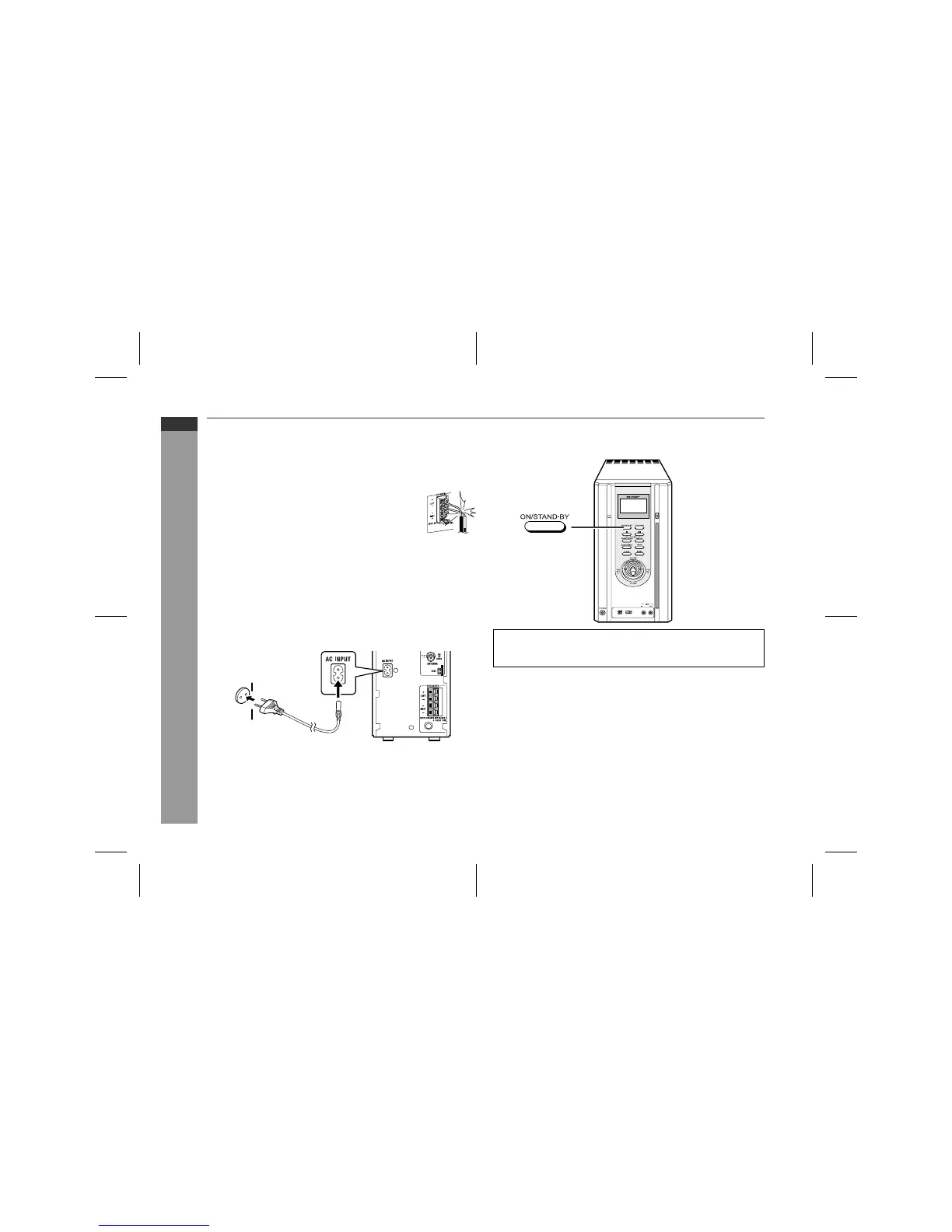
! AC power connection
After checking all the connections have been made correctly, con-
nect the AC power lead to the AC power input socket, then plug the
AC power lead of this unit into the wall socket.
Notes:
"
Unplug the AC power lead from the wall socket if the unit will not
be in use for a prolonged period of time.
"
Never use a power lead other than the one supplied. Otherwise,
a malfunction or an accident may occur.
!
To turn the power on
Press the ON/STAND-BY button to turn the power on.
"
Do not let the bare speaker wires touch each
other.
Incorrect
"
Use speakers with an impedance of 4 ohms or
more, as lower impedance speakers can damage
the unit.
"
Do not mistake the right and the left channels.
The right speaker is the one on the right side
when you face the unit.
"
Do not allow any objects to fall into or to be placed
in the bass reflex ducts.
Wall socket
(AC 230 V, 50 Hz)
After use:
Press the ON/STAND-BY button to enter the power stand-by
mode.


 To Next Page