XL-T200H
– 8 –
TAPE MECHANISM SECTION
Perform steps 1 and 7 of the disassembly method to remove
the tape mechanism. (See page 6,7.)
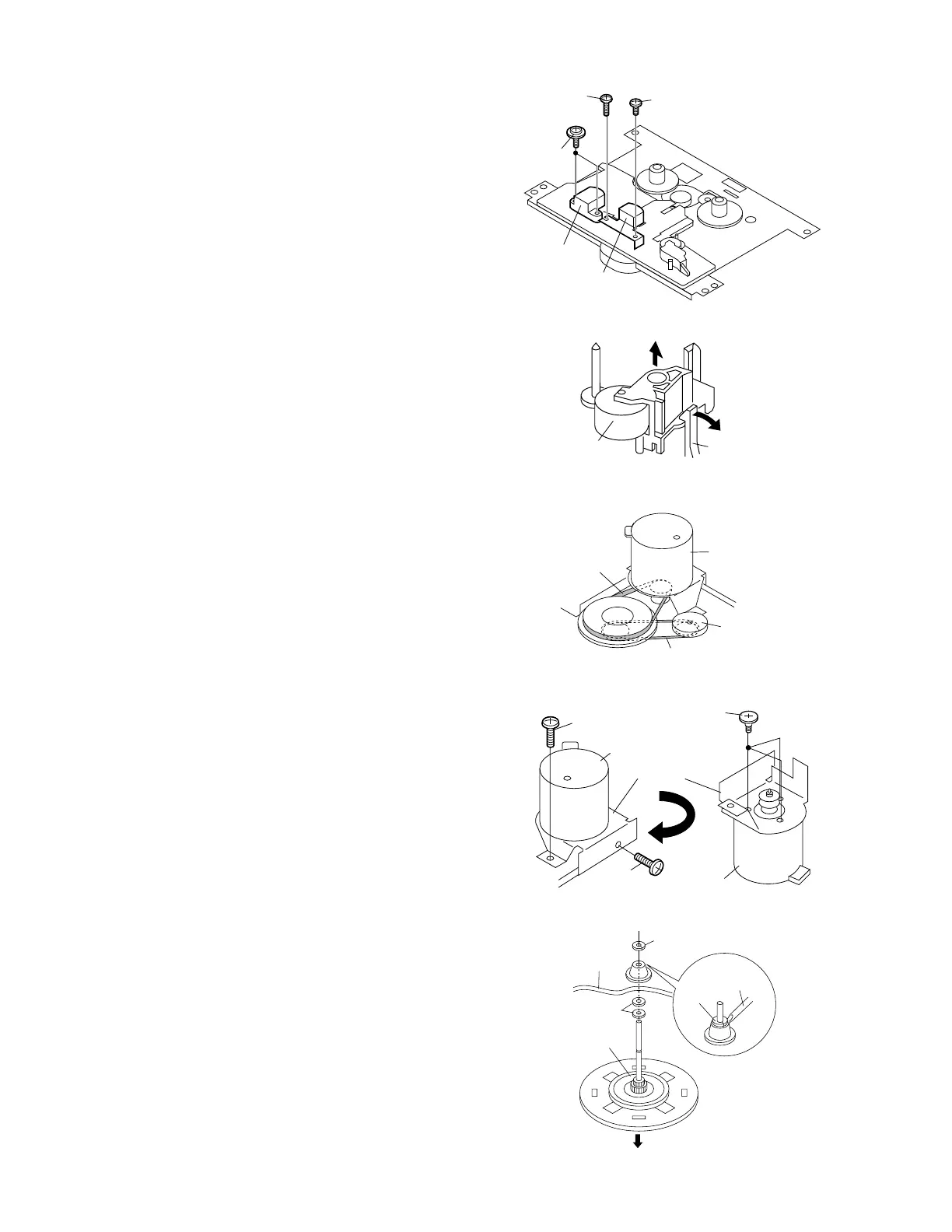
How to remove the record / playback and erase
heads (See Fig. 8-1.)
1. Remove the screws (A1) x 2 pcs., to remove the erase
head.
2. Remove the screws (A2) x 2 pcs., to remove the record/
playback head.
Note:
After replacing the heads and performing the azimuth
adjustment, be sure to apply screwlock.
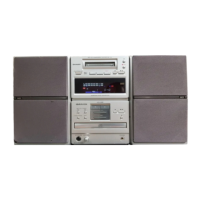
How to remove the pinch roller (See Fig. 8-2.)
1. Carefully bend the pinch roller pawl in the direction of the
arrow
<A>, and remove the pinch roller (B1) x 1 pc.,
upwards.
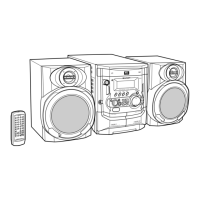
How to remove the belts (See Fig. 8-3.)
1. Remove the main belt (C1) x 1 pc., from the motor pulley.
2. Remove the FF/REW belt (C2) x 1 pc., from the REW/FF
roller.
3. Put on the belts in the reverse order of removal.
Note:
When putting on the belt, ascertain that the belt is not twisted,
and clean it.
How to remove the motor
(See Figs. 8-4.)
1. Remove the mainbelt.
2. Remove the screws (D1) x 2 pcs., to remove the motor
bracket.
3. Remove the screws (D2) x 3 pcs., to remove the motor.
Note:
When mounting the motor, pay attention to the motor mounting
angle
<A>
Pinch Roller
(B1)x1
Pinch Roller
Pawl
REMOVING AND REINSTALLING THE MAIN PARTS
Main Belt
(C1)x1
FF/REW Belt
(C2)x1
REW/FF
Clutch
Motor
Erase Head
Record/
Playback Head
(A1)x2
ø2x8mm
(A2)x1
ø2x3mm
(A2)x1
ø2x7mm
(D1)x1
ø2x4mm
(D2)x3
Special
Screw
Motor
Bracket
Motor
Motor
(D1)x1
ø2x4mm
Figure 8-1
Figure 8-2
Figure 8-3
Figure 8-4
How to remove the flywheel (See Fig. 8-5.)
1. Remove the belt.
2. Remove the stop washer (E1) x 1 pc., with a small precision
screwdriver to extract the flywheel from the capstan metal.
Note:
When the stop washer is deformed or damaged, replace it
with a new one.
How to reinstall the parts
Install each part in the reverse order of the removal with care.
Stop
Washer
Driver
(E1)x1
Stop Washer
Mechanism
Chassis
Washerx2
Flywheel
Figure 8-5


 To Next Page