1-0
1-1
1-2
1-3
1-4
1-5
1-6
1-7
1-8
1-9
1-10
1-11
1-12
1-13
1-14
1-15
1-16
1-17
1-18
mode 1
Direct call execution
screen
1-0
1-1 (Option)
1-2 (Option)
1-3 (Option)
1-4 (Option)
1-5 (Option)
1-6 (Option)
1-7 (Option)
1-8
1-9
1-10
1-11
1-12
1-13
1-14
1-15
1-16
1-17
1-18
1~18
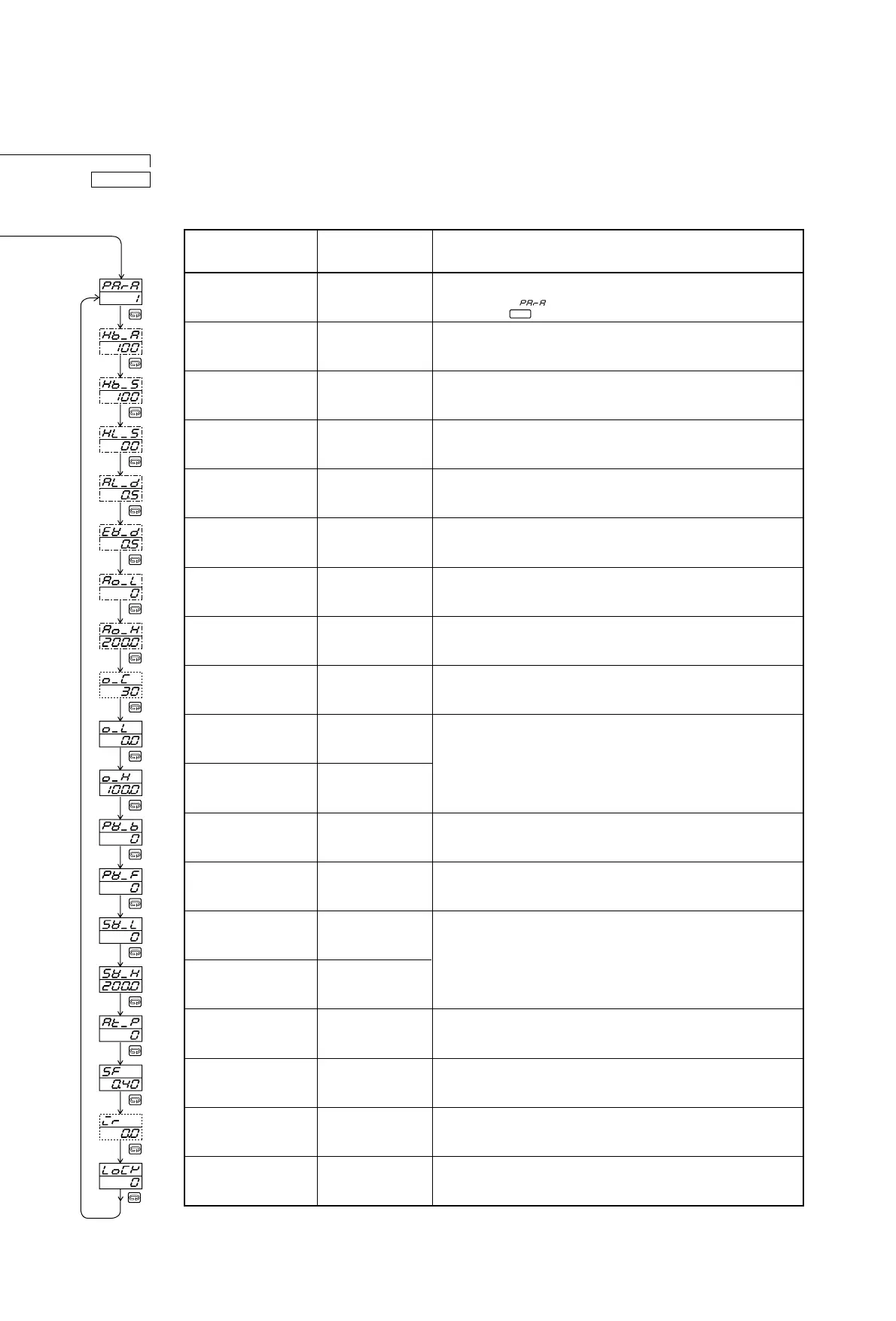
(1)
Heater current monitor
screen
Heater break alarm value
setting screen
oFF, 0.1~50.0A
(oFF)
Heater loop alarm value
setting screen
oFF, 0.1~50.0A
(oFF)
Alarm action hysteresis
setting screen
1~999 Unit
(5 Unit)
Event action hysteresis
setting screen
1~999 Unit
(5 Unit)
Analog output higher
limit side scale setting
Within measuring
range (Lower limit
value of measuring
range)
Analog output higher
limit side scale setting
Within measuring
range (Higher limit
value of measuring
range)
Proportional cycle time
setting
1~120 sec.
(30 sec.)
Lower output limiter
setting (control output)
0.0~99.9%
(0.0%)
o_L<o_H
Higher output limiter
setting (control output)
0.1~100.0%
(100%)
o_L<o_H
Process value bias
setting
-1999~1999 Unit
(0 Unit)
Process value filter
setting
0~100 sec.
(0 sec.)
Lower limit side set value
limiter setting
Within measuring
range (Lower limit
value of measuring
range) SV_L<SV_H
Higher limit side set
value limiter setting
AT execution point
setting
Set value point setting
(not displayed
when P:OFF, I:OFF.)
Initial reset setting
Keylock setting
Within measuring
range (Higher limit
value of measuring
range) SV_L<SV_H
0~5000 Unit
(0 Unit)
oFF, 0.01~1.00
(0.40)
-50.0~50.0%
(0.0%)
oFF, 1~3
(oFF)
Function description
For the quick selection of a desired parameter, set the parameter mode
No., the desired parameter No. out of 1 through 18 on the SV display of
the "Mode 1-0" ( ) which is the first screen of the "Mode 1" group,
then, press the key.
This screen is for reading current only. You cannot set the value.
Detects the heater current by the function of the CT when the control
output is on and outputs an alarm if the current is lower than the set
current value judged as being an abnormal condition.
Detects the heater current by the function of the CT when the control
output is off and outputs an alarm if the current is higher than the set
current value as judged by an abnormal loop condition in the output
circuit.
Sets the action hysteresis of the alarm relay ON action position and OFF
action position.
Sets the action hysteresis of the event relay ON action position and OFF
action position.
Sets the lower limit side scale value for output value 0%.
Sets the higher limit side scale value for output value 100%.
Average proportional cycle time is 30 seconds when the control output is
set at contact (Y) and approximately 3 seconds when the control output is
set at SSR drive voltage (P).
By setting the limit values of the control output in advance, the max. and
min. values of the control output remain within the limit values.
*
If a temperature gap is observed due to the temperature within the furnace
to be controlled and the position of the detector, setting the gap (process
value bias) allows display and execution of control with the "process
value (PV) + process value bias (PV_b)" as the measured input value.
When the process value input contains noise, the display of the process
value and the result of the control operation may be affected. In order to
minimize such influence, a time constant is set.
* The larger the time constant is, the greater the effect of removing noise
Setting the limit values of the set value range in advance will result in the
values being limited within the set limit range.
When executing AT action, if you want to avoid hunting due to a limit
cycling at a set set value, set a hypothetical SV so as to execute AT action
at a point apart from the actual set set value.
This function is used to adjust overshooting or undershooting at a set
value by using the control result as a guideline in PID control mode. The
control of overshooting is the most effective when SF is at 1.00.
This function locks the key operation. It can be used to prevent erroneous
key operation after completing the setting of various data.
If a mode No. for which no optional function is assigned is selected, the mode of the following No. is selected.
Name of screens
and mode No.
Numbers in ( ) shows
values set before shipping
Setting range
The lower limit may be used to secure the minimum temperature and the
higher limit. The upper limit can be used for the prevention of overshooting.
ENT



 To Next Page